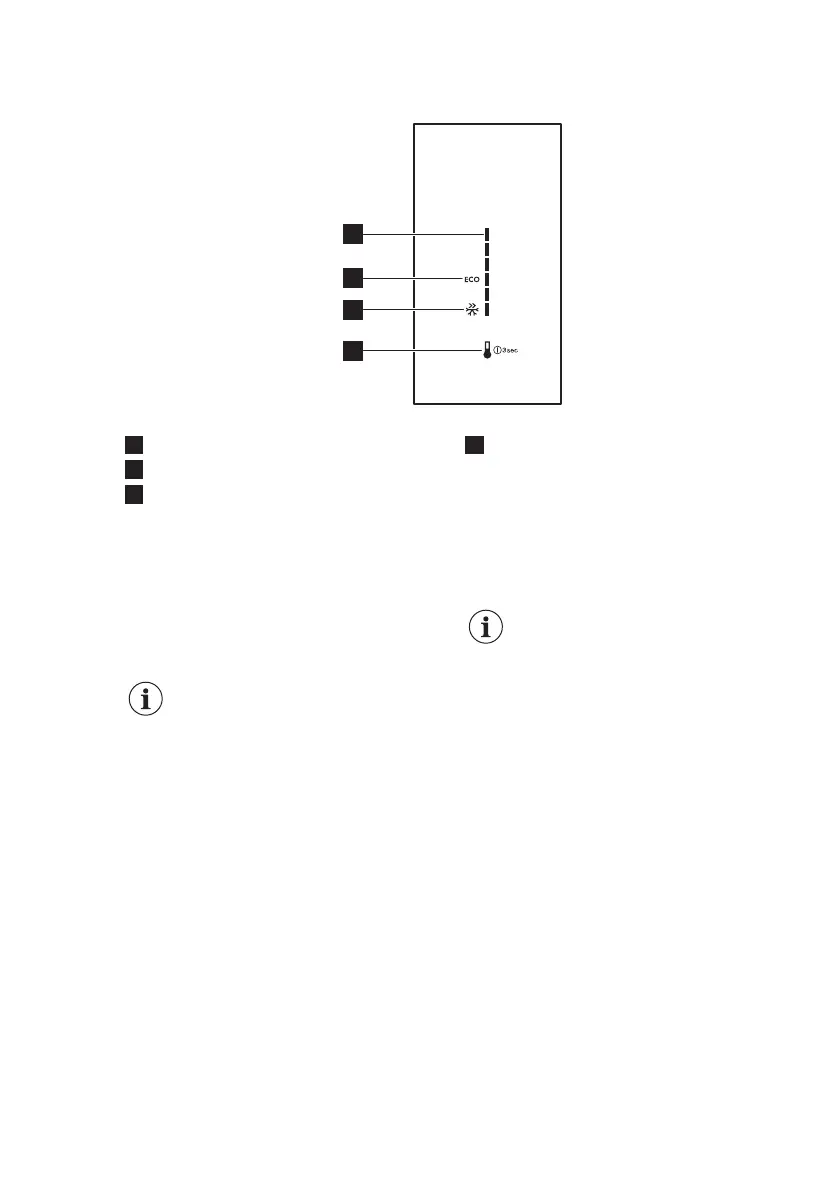
3. CONTROL PANEL
1
Temperature scale
2
EcoMode icon
3
FastFreeze icon
4
Temperature key
3.1 Switching on
1. Plug the appliance into electrical
mains socket.
2. To turn on the appliance, touch the
temperature key until all LED
indicators light up.
After approximately 3
seconds LED indicators fade
and the temperature is set to
the default setting
(EcoMode). LED indicator
next to EcoMode icon
illuminates.
3.2 Switching off
1. To switch off the appliance press the
temperature key for 3 seconds.
All LED indicators turn off.
2. To disconnect the appliance from the
electrical supply, remove the mains
plug from the power socket.
3.3 Temperature regulation
To regulate the temperature, press the
temperature key. Every time the key is
pressed, the set temperature moves by 1
position and corresponding LED indicator
lights up. Press the temperature key
repeatedly until the required temperature
is selected. The setting will be fixed.
Selection is progressive,
varying from +2°C to +8°C.
Coldest setting: +2°C.
Warmest setting: +8°C
Most suitable setting:
EcoMode (+3 to +4°C).
Choose the setting keeping in mind that
the temperature inside the appliance
depends on:
• room temperature
• frequency of opening the door
• quantity of food stored
• appliance location.
3.4 Sleep mode of the display
After 30 seconds of no interaction with
the appliance, the display goes into the
sleep mode. Only LED indicator
corresponding to currently set
temperature illuminates in low light. All
other LED indicators are off. To
deactivate this mode press the
temperature key.
www.electrolux.com6



 To Next Page