6 electrolux
Before Using for the first time
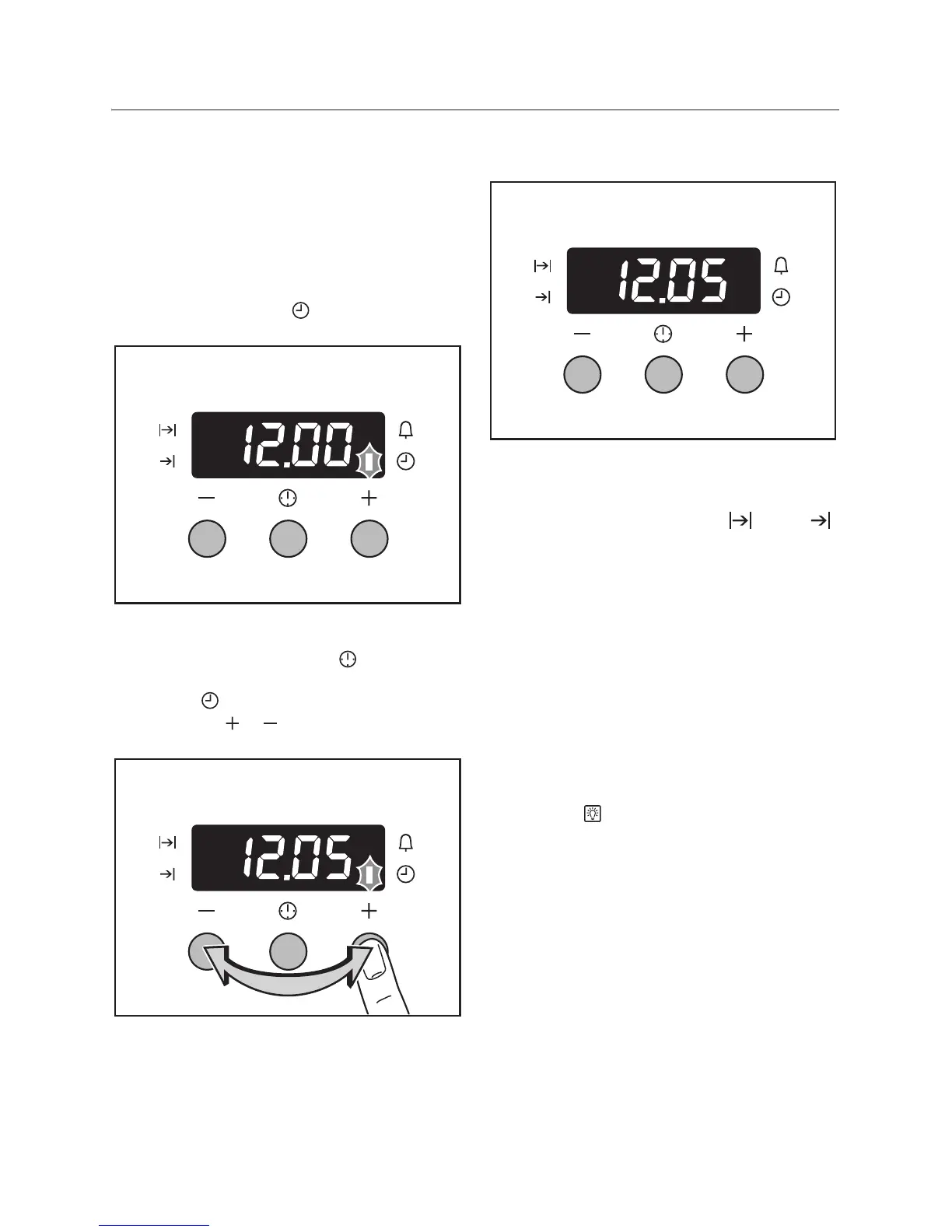
Setting and changing the time
3 The oven only operates when the time
has been set.
When the appliance has been connect-
ed to the electrical supply or when there
has been a power cut, the function indi-
cator Time of day flashes automati-
cally.
1. To change a time that has already been
set, press the Selection button re-
peatedly until the function indicator Time
of day flashes.
2. Using the or button, set the current
time.
After approx. 5 seconds, the flashing stops
and the clock displays the time set.
The appliance is now ready to use.
3 The time can only be changed if no au-
tomatic function (Duration or End )
has been set.
Initial Cleaning
Before using the oven for the first time you
should clean it thoroughly.
1 Caution: Do not use any caustic, abra-
sive cleaners! The surface could be
damaged.
3 To clean metal fronts use commercially
available cleaning agents.
1. Turn the oven function switch to oven
lighting .
2. Remove all accessories and the shelf
support rails and wash them with warm
water and washing up liquid.
3. Then wash out the oven with warm wa-
ter and washing-up liquid, and dry.
4. Wipe the front of the appliance with a
damp cloth.



 To Next Page