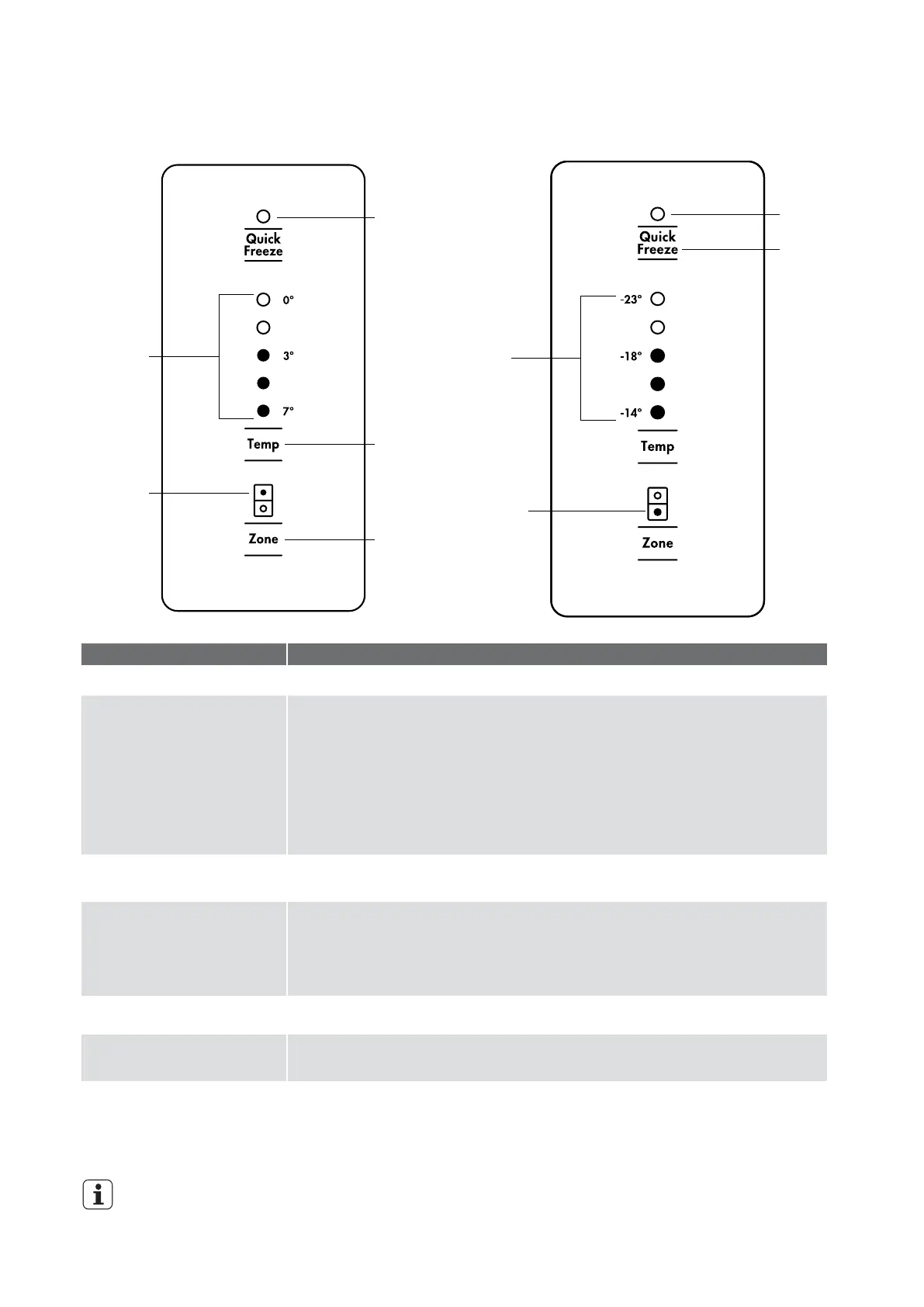
Refrigerator
temperature
scale icons
Quick freeze
on/off icon
Temperature
adjust
Refrigerator
indication
icon
Compartment
select button
Freezer
temperature
scale icons
Quick
freeze button
Quick freeze
on/off icon
Freezer
indication
icon
ABOUT THE USER INTERFACE
OPERATION / PRIMARY FUNCTION
• Indicates the status of the Quick Freeze function.
DESCRIPTION
Quick Freeze on/ off icon
Quick Freeze button
Use the Quick Freeze function when you add a large amount of food to the freezer
compartment.
• Press the ‘Quick Freeze’ button. The Quick Freeze icon will flash indicating that the
quick freeze is active and the compressor will run continuously for 90 minutes.
• After 90 minutes the freezer will automatically return to normal mode.
• The Quick Freeze function can be cancelled anytime by pressing the
button again.
Refrigerator / Freezer
temperature scale icons
Temperature adjust button
• Indicates the temperature setting of the refrigerator compartment.
• Indicates the temperature setting of the freezer compartment.
• Touch any button to awaken control.
• Touch the ‘Temp’ button to decrease the selected compartment temperature. There
are 8 temperature settings indicated by the illumination sequence on the display.
Once the coldest temperature is reached the display will return to the warmest
setting with the next press.
Refrigerator/Freezer
indication icon
Compartment select button
• Indicates the selected zone.
• Press to select the desired compartment.
• The refrigerator / freezer indication icon will show which zone is selected.
IMPORTANT
The factory default settings for the refrigerator is “3°C” and “-18°C” for the freezer. If you want to change the
temperature, remember to make only small adjustments and wait 24 hours to see
if it’s correct.
Sabbath Mode
• Press and hold button 'Temp' for 5 seconds.
• When enabled/disabled an alarm long beep 1 time and Top 2 LED on temp setting
will appear on display when active.
• Disables all lights and other electrical activity from occurring when the refrigerator
door is opened.




 To Next Page