obtain from your local authorities.
Avoid damaging the cooling unit,
especially at the rear near the heat
exchanger. The materials used on
this appliance marked by the sym-
bol
are recyclable.
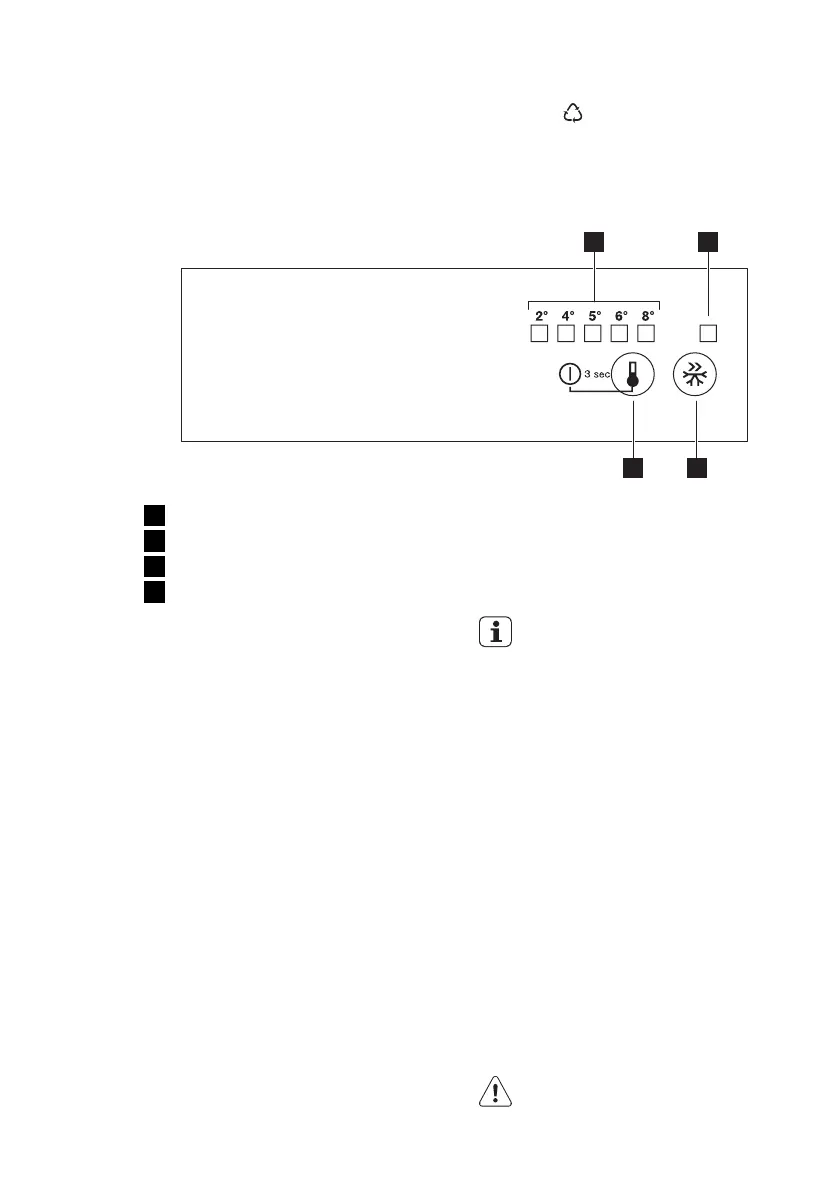
2. CONTROL PANEL
1 2
4 3
1
Temperature indicator LED
2
Fast Freeze indicator
3
Fast Freeze button
4
Temperature regulator
ON/OFF button
2.1 Switching on
Insert the plug into the wall socket.
Touch the temperature regulator button if
all LED are off.
2.2 Switching off
Keep touching the temperature regulator
button for 3 Sec.
All indicators light off.
2.3 Temperature regulation
To operate the appliance, proceed as fol-
lows:
• touch the temperature regulator button
until the LED corresponding to the re-
quired temperature lights up. Selection
is progressive, varying from 2 to 8°C.
At first button touch actual setting LED
keeps blinking.
Any time the button is touch the set
temperature is moved to 1 position
right. Corresponding LED will blink for a
while.
Touch the setting button until the re-
quired temperature is selected. The set
will be fixed
coldest setting: +2°C
warmest setting: +8°C
A medium setting is generally the
most suitable.
However, the exact setting should be
chosen keeping in mind that the tempera-
ture inside the appliance depends on:
• room temperature
• how often the door is opened
• quantity of food stored
• appliance location.
2.4 Fast Freeze function
You can activate the Fast Freeze function
by pressing the Fast Freeze button.
The LED corresponding to the symbol
Fast Freeze indicator lights up.
You can deactivate the Fast Freeze func-
tion by pressing the Fast Freeze button
again.
The Fast Freeze indicator will light off.
ENGLISH 5



 To Next Page