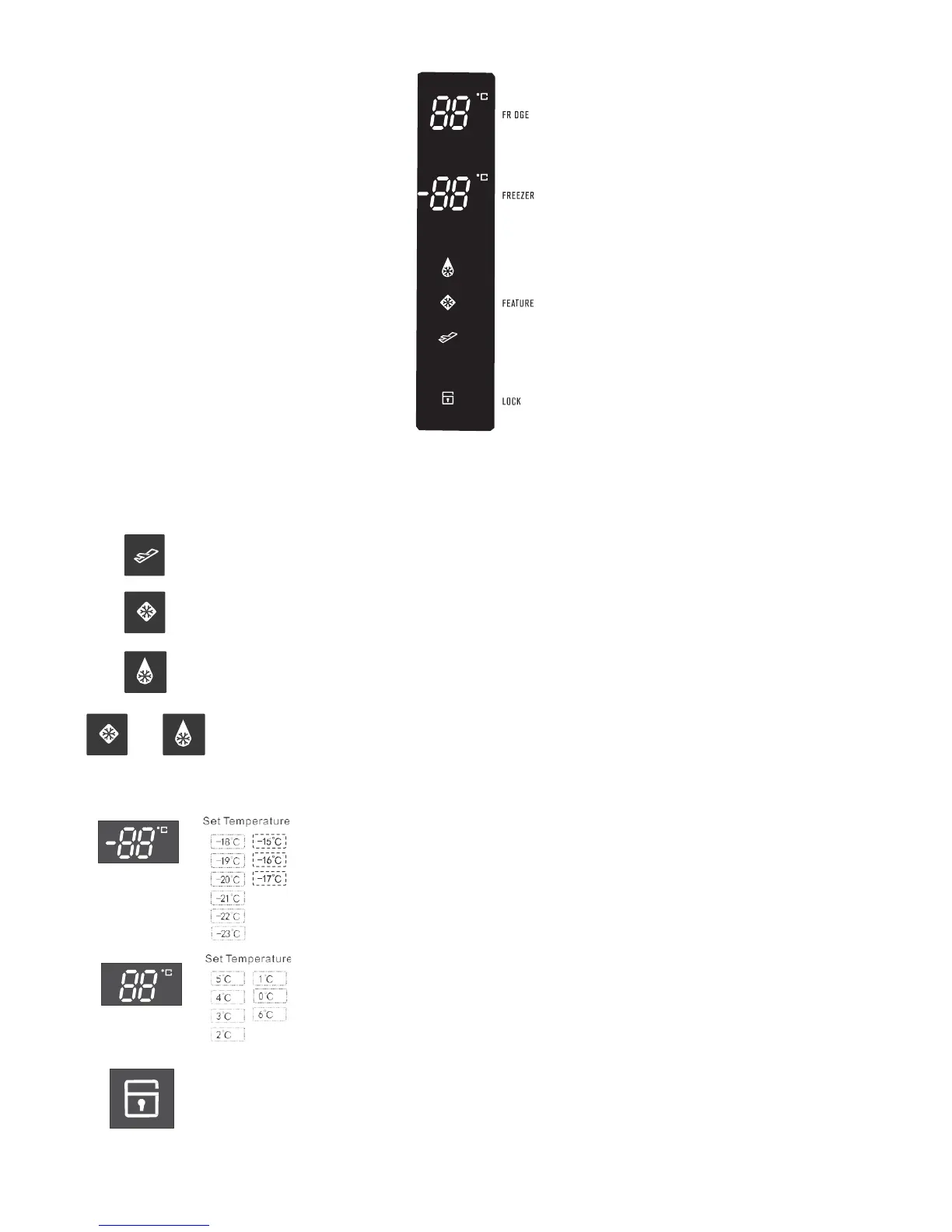
Using the control panel
Refrigerator temperature
display
Refrigerator temperature
control
Freezer temperature
display
Fridge
Boost
Freezer Icon
Boost
Icon
Holiday
mode
Icon
Display
lock
Icon
Freezer temperature
control
Feature Button
Lock/Unlock Button
Function setting of the LED display
Note: the display will turn off after 20 seconds of inactivity, while the display will wake up if the button is touched again.
Holiday
Mode
Freezer
Boost
Fridge
Boost
Feature Selection - each press of the ‘‘Feature’’ button will cycle through the operating modes.
o
Holiday Mode - the refrigerator will run at 6°c while the freezer will operate at -15°c.
o
Freezer Boost mode - when Freezer Boost mode is selected, the compressor will operate
continuously for 180 minutes after which the freezer will return to the last set operating mode.
o
Fridge Boost mode - -- when Fridge Boost mode is selected, the refrigerator temperature
display turns to 0°c. The refrigerator compartment will be fast cooled down to 0°c. When the
refrigerator temperature has been down to 0°c or as soon as the running duration of this
Fridge Boost mode is up to 150 minutes, the system will automatically exit the Fridge Boost
mode and meanwhile the display returns to the last temperature set.
Freezer
Boost
Fridge
Boost
o
Freezer Boost and Fridge Boost mode - In this mode, both the Freezer Boost and Fridge
Boost are activated with the freezer running to the minimum temperature and meanwhile
the refrigerator operating to 0°c. Each boost mode will work under the conditions same
as dcescribed on each individual selected boost mode.
Freezer compartment settings - the default temperature of the freezer is -18°c.
To change the temperature press the ‘‘Freezer’’ button to cycle through the set
temperatures.
Fridge compartment settings - the default temperature of the refrigerator is 5°c.
To change the temperature press the ’’Fridge‘‘ button to cycle through the set
temperaures.
Press the ‘‘Lock’’ button this will enable the lock mode , the lock icon will be visible. While the
refrigerator is in this mode the other buttons on the control panel will not function, when the
buttons are touched a chime will sound and the lock icon will flash. To exit lock mode press and
hold the lock button for 3 seconds until the icon is no longer displayed.
((Door Alarm))
Open door alarm - when the refrigerator or freezer door is left open for more than 1 minute the
alarm will sound to alert that the door is open closing the door will disable the alarm. The
alarm will continue every 30 second until the door is closed..
Using the control panel 7



 To Next Page