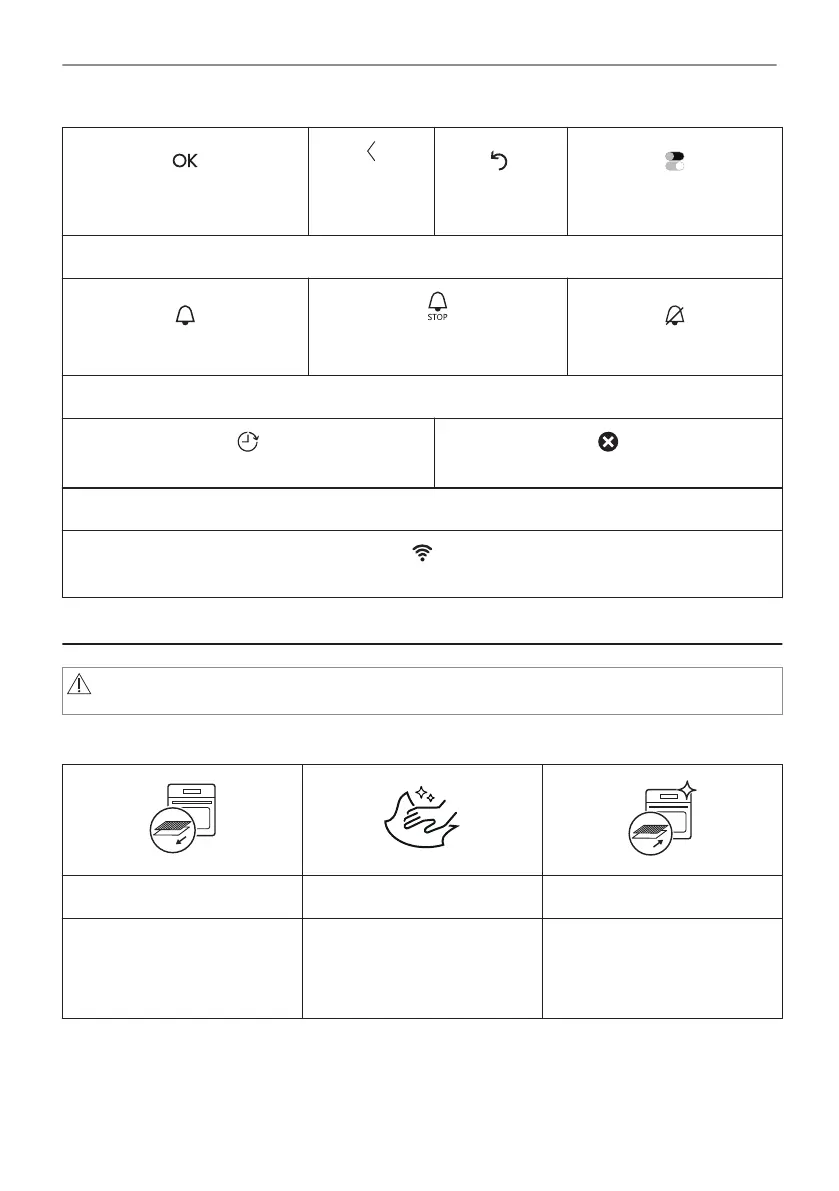
To confirm the selection / set‐
ting.
To go one
level back in
the menu.
To undo the
last action.
To turn the options on and
off.
Sound alarm function indicators - when the set time of cooking ends, the signal sounds.
The function is on.
The function is on.
Cooking stops automatically.
Sound alarm is off.
Timer indicators
To set the function: Delayed start.
To cancel the setting.
Wi-Fi indicator - the oven can be connected to Wi-Fi.
Wi-Fi connection is turned on.
5. BEFORE FIRST USE
WARNING!
Refer to Safety chapters.
5.1 Initial Cleaning
Step 1 Step 2 Step 3
Remove all accessories and
removable shelf supports from
the oven.
Clean the oven and the ac‐
cessories with a soft cloth,
warm water and a mild deter‐
gent.
Place the accessories and the
removable shelf supports in
the oven.
5.2 First connection
The display shows welcome message after the first connection.
You have to set: Language, Display brightness, Key tones, Buzzer volume, Time of day.
13/40
BEFORE FIRST USE



 To Next Page