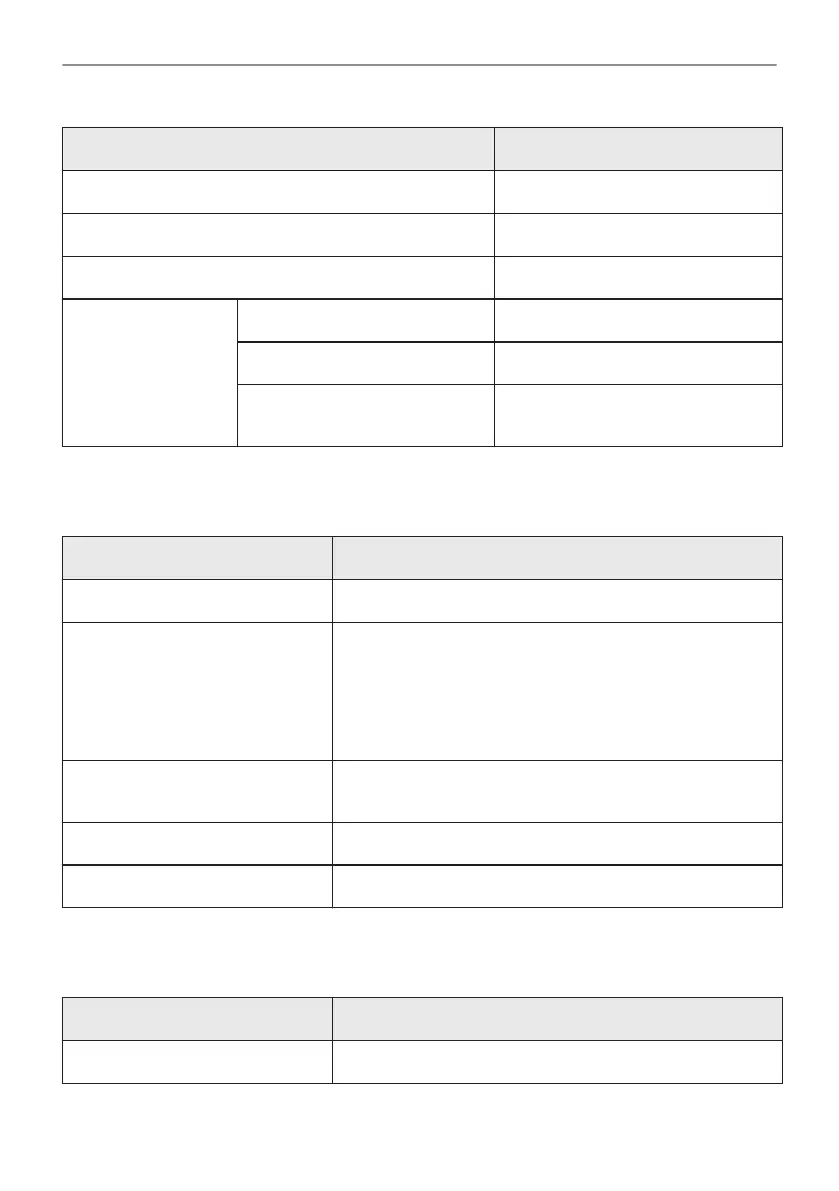
Menu item Application
Assisted Cooking Lists automatic programmes.
Favourites Lists the favourite settings.
Options To set the oven configuration.
Settings Connections To set the network configuration.
Setup To set the oven configuration.
Service Shows the software version and con‐
figuration.
14.2 Submenu for: Options
Submenu Application
Light Turns the lamp on and off.
Child Lock Prevents accidental activation of the oven. When the option
is on, the text "Child Lock" appears on the display when you
turn on the oven. To enable the oven use, choose the code
letters in the alphabetical order. Access to the timer, the re‐
mote operation and the lamp is feasible with the Child Lock
on.
Fast Heat Up Shortens heat up time. It is available only for some of the
oven functions.
Time indication Turns the clock on and off.
Digital clock style Changes the format of the displayed time indication.
14.3 Submenu for: Connections
Submenu Description
Wi-Fi To enable and disable: Wi-Fi.
34/40
MENU STRUCTURE



 To Next Page