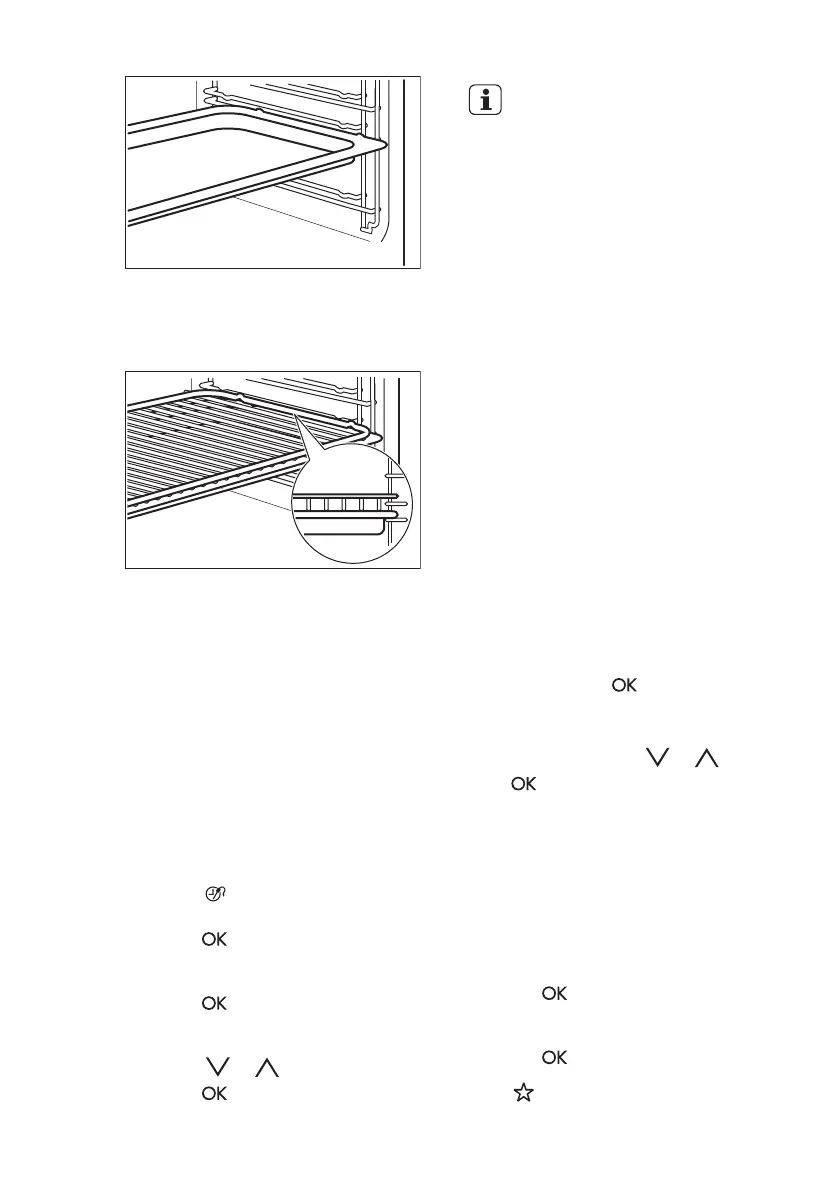
Wire shelf and the deep pan together:
Push the deep pan between the guide
bars of the shelf support and the wire
shelf on the guide bars above.
All accessories have small
indentations at the top of the
right and left side to increase
safety. The indentations are
also anti-tip devices.
The high rim around the
shelf is a device which
prevents cookware from
slipping.
10. ADDITIONAL FUNCTIONS
10.1 Favourites
You can save your favourite settings,
such as duration, temperature or heating
function. They are available in the menu:
Favourites. You can save 20
programmes.
Saving a programme
1. Activate the appliance.
2. Set a heating function or an
automatic programme.
3. Touch again and again until the
display shows: SAVE.
4. Press
to confirm.
The display shows the first free memory
position.
5. Press to confirm.
6. Enter the name of the programme.
The first letter flashes.
7. Touch or to change the letter.
8. Press .
The next letter flashes.
9. Do step 7 again as necessary.
10. Press and hold to save.
You can overwrite a memory position.
When the display shows the first free
memory position, touch or and
press
to overwrite an existing
programme.
You can change the name of a
programme in the menu: Edit
Programme Name.
Activating the programme
1. Activate the appliance.
2. Select the menu: Favourites.
3. Press to confirm.
4. Select your favourite programme
name.
5. Press
to confirm.
Press to go directly to menu:
Favourites.
www.electrolux.com16




 To Next Page