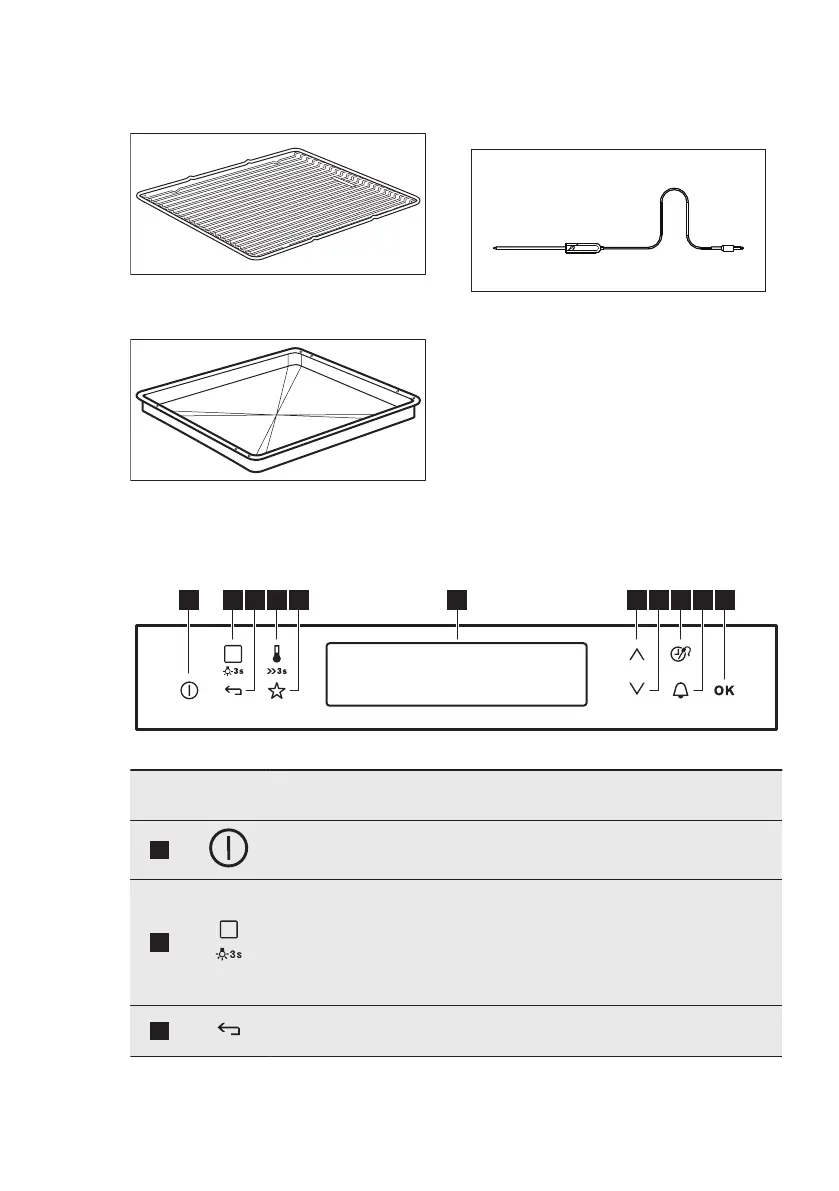
3.2 Accessories
Wire shelf
For cookware, cake tins, roasts.
Grill- / Roasting pan
To bake and roast or as a pan to collect
fat.
Core temperature sensor
To measure how far the food is cooked.
4. CONTROL PANEL
4.1 Electronic programmer
Use the sensor fields to operate the appliance.
Sensor
field
Function Comment
1
ON / OFF To activate and deactivate the appliance.
2
Heating Func‐
tions or Assisted
Cooking
Touch the sensor field once to choose a heat‐
ing function or the menu: Assisted Cooking.
Touch the sensor field again to switch between
the menus: Heating Functions, Assisted Cook‐
ing. To activate or deactivate the light, touch
the field for 3 seconds.
3
Back key To go back one level in the menu. To show the
main menu, touch the field for 3 seconds.
ENGLISH 7




 To Next Page