Sym‐
bol
Submenu Description
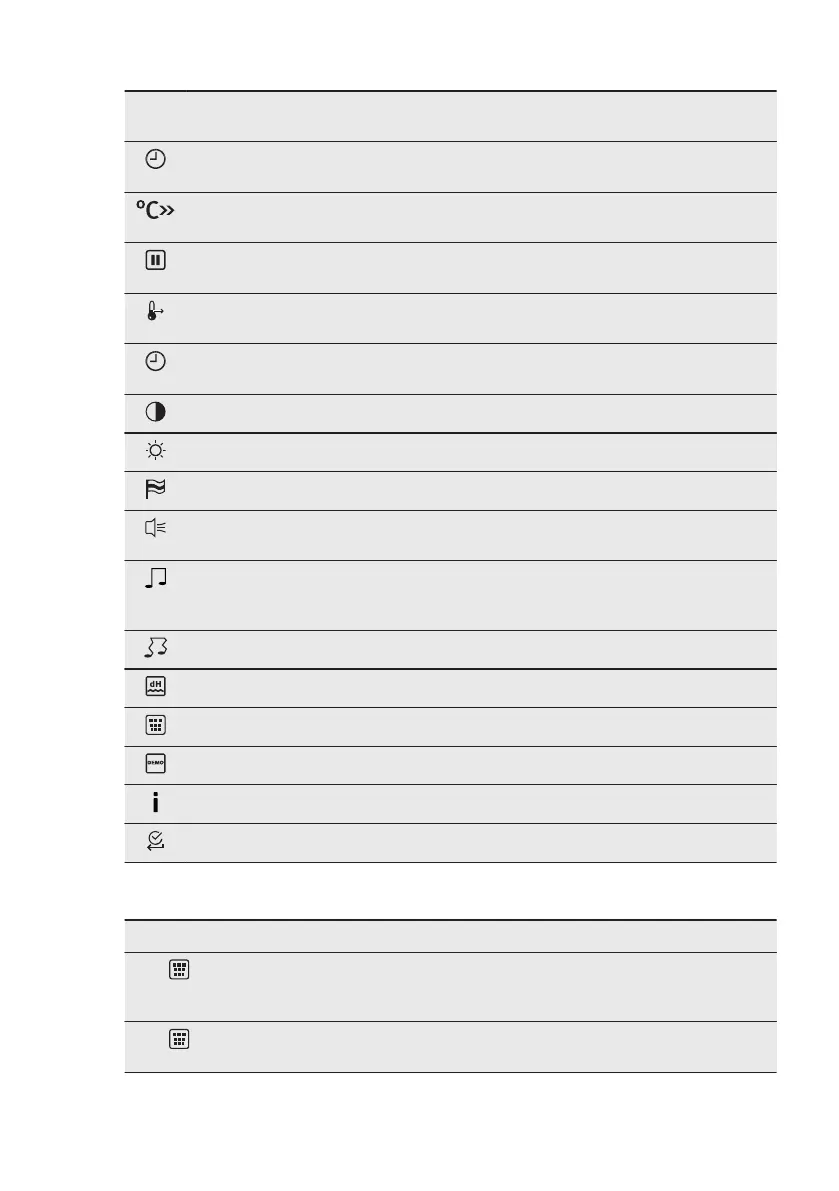
Time Indication When ON, the display shows the current time
when you deactivate the appliance.
Fast Heat Up When ON, the function decreases the heat-up
time.
Set + Go To set a function and activate it later with a
press of any symbol on the control panel.
Heat + Hold Keeps the prepared food warm for 30 minutes
after a cooking cycle finished.
Time Extension Activates and deactivates the time extension
function.
Display Contrast Adjusts the display contrast by degrees.
Display Brightness Adjusts the display brightness by degrees.
Set Language Sets the language for the display.
Buzzer Volume Adjusts the volume of press-tones and signals
by degrees.
Key Tones Activates and deactivates the tone of the touch
fields. It is not possible to deactivate the tone
of the ON / OFF touch field.
Alarm/Error Tones Activates and deactivates the alarm tones.
Water hardness To sets the water hardness level (1 - 4).
Cleaning Reminder Reminds you when to clean the appliance.
DEMO mode Activation / deactivation code: 2468
Service Shows the software version and configuration.
Factory Settings Resets all settings to factory settings.
6.3 Submenu for: Cleaning
Symbol Menu item Description
Tank Emptying Procedure for removing the residual wa‐
ter from the water drawer after use of the
steam functions.
Steam Cleaning Plus Procedure for cleaning stubborn dirt with
the support of an oven cleaner.
www.electrolux.com12




 To Next Page