The appliance calculates an approximate
end time. The end time is different for the
different quantities of the food, the set
oven temperatures (minimum 120 °C)
and the operating modes. The appliance
calculates the end time in approximately
30 minutes.
6. To change the core temperature,
press .
When the meat is at the set core
temperature, an acoustic signal sounds.
The appliance turns off automatically.
7. Press any symbol to stop the signal.
8. Remove the core temperature sensor
plug from the socket and remove the
meat from the oven.
9. Press to turn off the appliance.
WARNING!
The core temperature
sensor is hot. There is a risk
of burns. Be careful when
you remove the tip and the
plug of the core temperature
sensor.
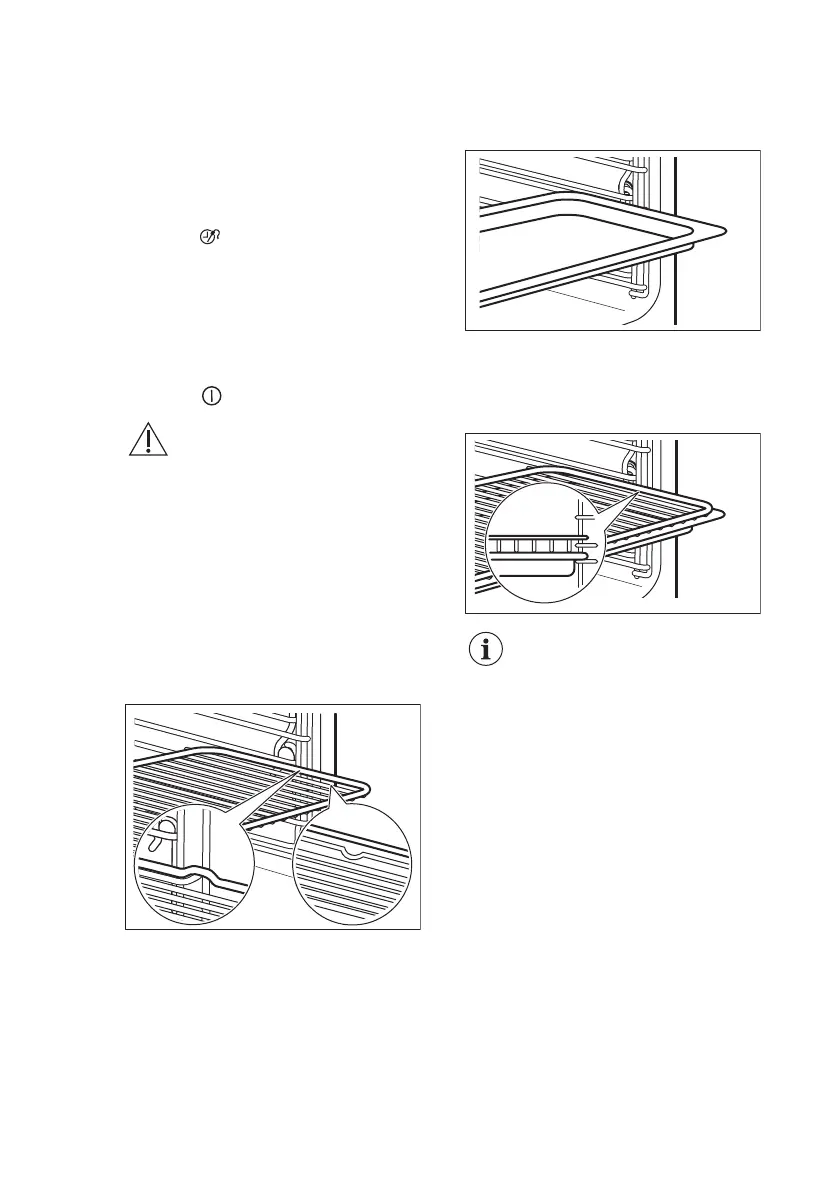
9.2 Inserting the accessories
Wire shelf:
Push the shelf between the guide bars of
the shelf support and make sure that the
feet point down.
Baking tray :
Push the baking tray between the guide
bars of the shelf support.
Wire shelf and baking tray together:
Push the baking tray between the guide
bars of the shelf support and the wire
shelf on the guide bars above.
Small indentation at the top
increase safety. The
indentations are also anti-tip
devices. The high rim
around the shelf prevents
cookware from slipping of
the shelf.
10. ADDITIONAL FUNCTIONS
10.1 Favourites
You can save your favourite settings,
such as duration, temperature or heating
function. They are available in the menu:
Favourites. You can save 20
programmes.
Saving a programme
1. Activate the appliance.
2. Set a heating function or an
automatic programme.
www.electrolux.com22




 To Next Page