Component Teardown
4-5
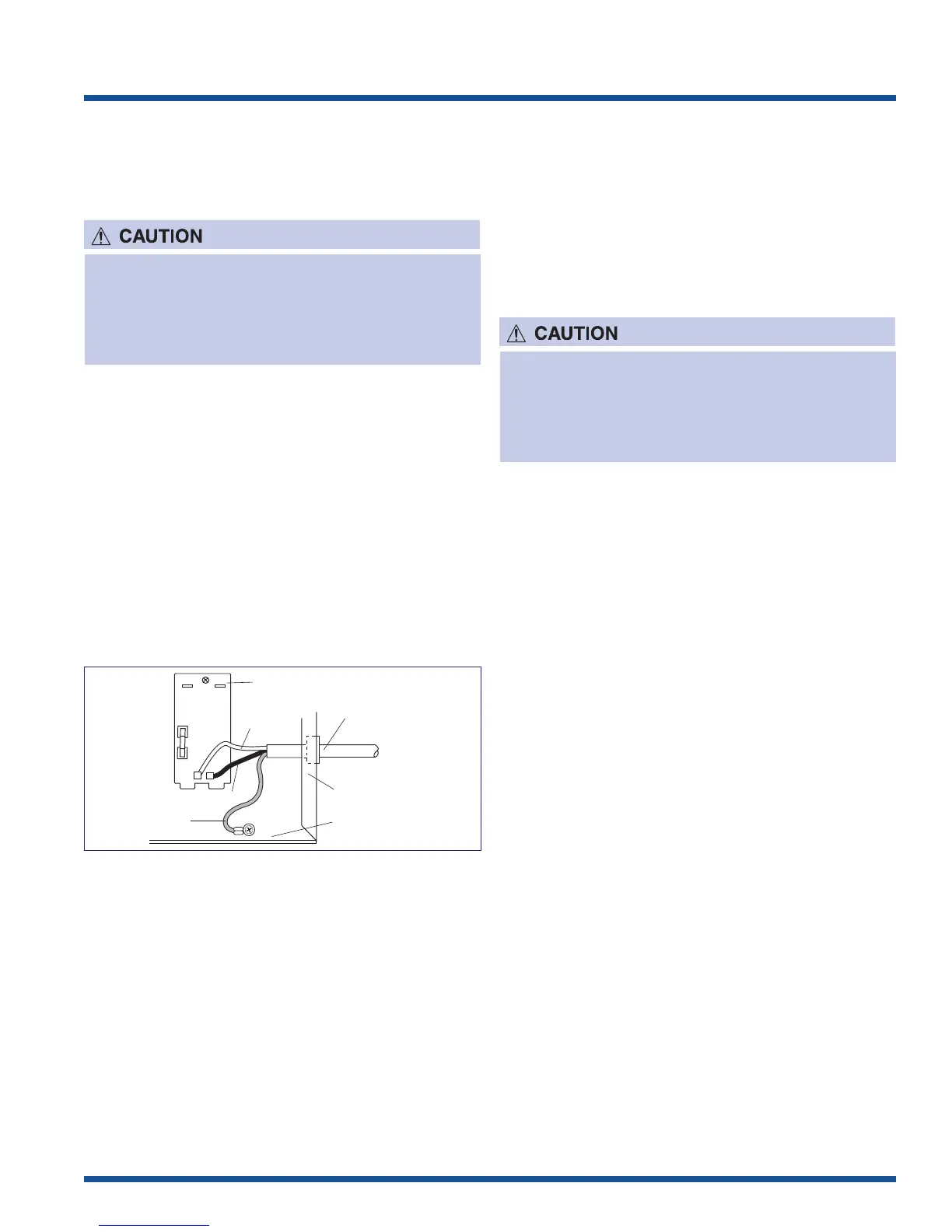
Power Supply Cord Replacement
REMOVAL
1. Disconnect the power supply cord.
2. Discharge high voltage capacitor.
3. Disconnect the white and black wires of the power
supply cord from the noise filter.
4. Remove the one (1) screw holding the ground wire of
the power supply cord to the base cabinet.
5. Remove the power supply cord from the rear cabinet.
Re-install
1. Insert the power supply cord into the rear cabinet.
2. Connect the white and black wires of the power
supply cord into the terminal of noise filter, referring
to the Wiring Diagram.
3. Re-install the ground wire of the power supply cord to
the base cabinet with the one (1) screw.
To discharge the high voltage capacitor, wait for 60
seconds and then short-circuit the connection of
the high-voltage capacitor (that is the connecting
lead of the high-voltage rectifier) against the
chassis with the use of an insulated screwdriver.
Noise filter
Power
supply cord
Rear Cabinet
Base Cabinet
Black wire
White wire
Green wire
N
RED
GRY
H
Figure 4-3. Power Cord Connections
Door Sensing Switch, Primary/Third
Interlock Switch and Monitor Switch
Replacement
REMOVAL
1. Disconnect the oven power supply cord and remove
outer case.
2. Open the door and block it open.
3. Discharge high voltage capacitor.
4. Disconnect the wire leads from the switch.
5. Remove the one (1) screw holding the latch hook
(right or left) to the oven cavity front plate, and
release the latch hook (right or left).
6. Keep pushing the stopper tub holding the switch to
the latch hook (right or left) and revolve the switch on
the pole.
7. Remove the switch from the latch hook (right or left).
8. Now, the switch is free.
REINSTALL
1. Re-install each switch in its place. The door sensing
switch is in the lower position of the latch hook right.
The primary interlock switch is in the lower position of
the latch hook left. The monitor switch is in the upper
position of the latch hook left.
2. Hold the latch hook (right or left) to the oven cavity
front plate and secure with the one (1) screw.
3. Reconnect the wire leads to the switch.
4. Make sure that monitor switch is operating properly
and check continuity of the monitor circuit. Refer to
“Test Procedure” and “Adjustment procedure.
To discharge the high voltage capacitor, wait for 60
seconds and then short-circuit the connection of
the high-voltage capacitor (that is the connecting
lead of the high-voltage rectifier) against the
chassis with the use of an insulated screwdriver.







 To Next Page