Settin Surface Controls
SETT)NGTHE COOKTOP
[] [] [] [] [] [] [] [] [] [] [] [] [] [] [] [] [] [] [] [] [] []
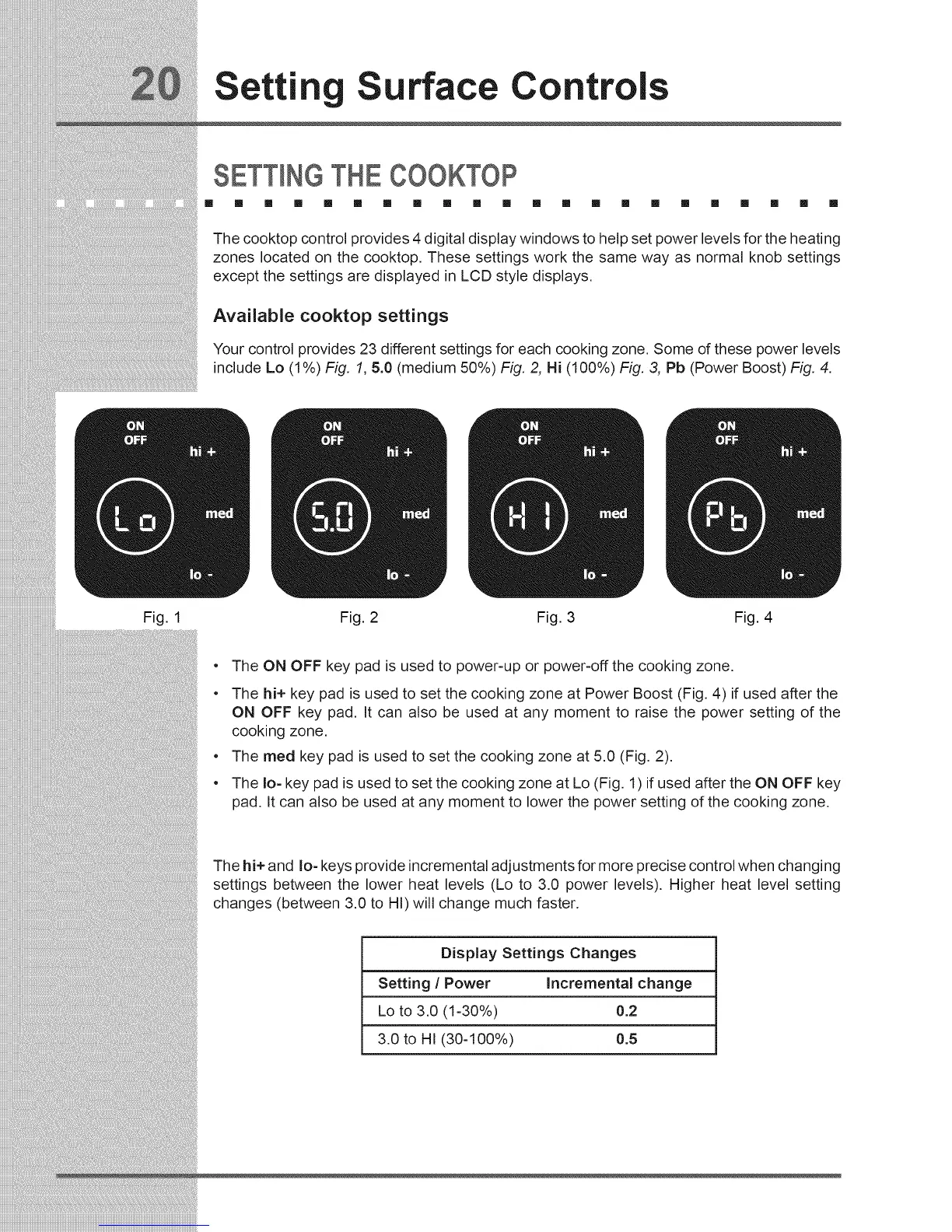
The cooktop control provides 4 digital display windows to help set power levels for the heating
zones located on the cooktop. These settings work the same way as normal knob settings
except the settings are displayed in LCD style displays.
Available cooktop settings
Your control provides 23 different settings for each cooking zone. Some of these power levels
include Lo (1%) Fig. 1, 5.0 (medium 50%) Fig. 2, Hi (100%) Fig. 3, Pb (Power Boost) Fig. 4.
Fig. 1 Fig. 2 Fig. 3 Fig. 4
e
e
e
e
The ON OFF key pad is used to power-up or power-off the cooking zone.
The hi+ key pad is used to set the cooking zone at Power Boost (Fig. 4) if used after the
ON OFF key pad. It can also be used at any moment to raise the power setting of the
cooking zone,
The meal key pad is used to set the cooking zone at 5.0 (Fig. 2).
The Io- key pad is used to set the cooking zone at Lo (Fig. 1) if used after the ON OFF key
pad. It can also be used at any moment to lower the power setting of the cooking zone.
The hi+ and Io- keys provide incremental adjustments for more precise control when changing
settings between the lower heat levels (Lo to 3.0 power levels), Higher heat level setting
changes (between 3.0 to HI) will change much faster.
Display Settings Changes
Setting / Power Incrementa( change
Lo to 3.0 (1-30%) 0.2
3.0 to HI (30-100%) 0.5





 To Next Page