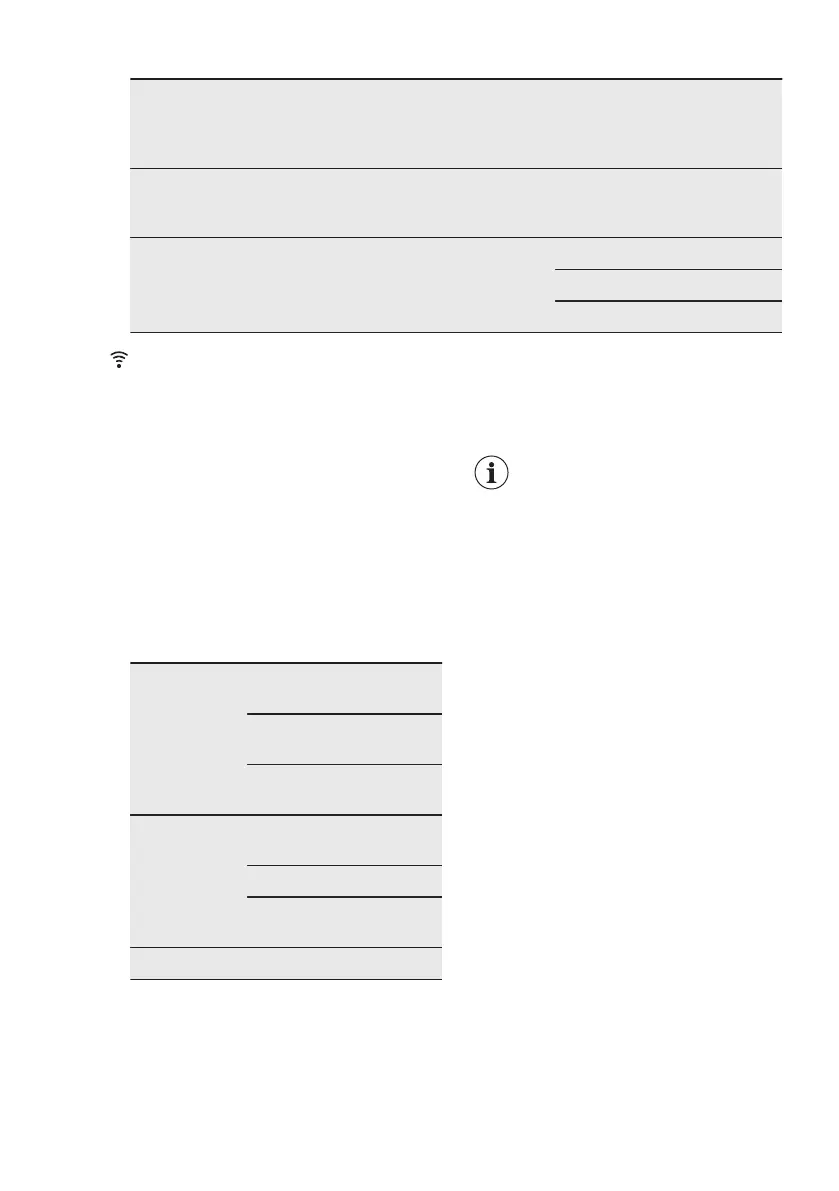
Dryness Level Type of fabric Load
(kg)
Spin
spee
d
(rpm)
Suggested
duration
(mins)
Silk
(silk garments and very delicate
items)
0.5 1000 60 - 80
Iron Dry
Suitable for
ironing
Cottons and Linen
(sheets, tablecloths, shirts, etc)
6 1600 160 - 180
4 1600 100 - 120
2 1600 50 - 60
10. WI-FI - CONNECTIVITY SETUP
This chapter describes how to connect
the smart appliance to the Wi-Fi network
and to link it to mobile devices.
By this functionality you can receive
notifications, control and monitor your
appliance from your mobile devices.
To connect the appliance to enjoy the full
range of features and services you need:
• Wireless network at home with
internet connection enabled.
• Mobile device connected to wireless
network.
Frequency/
Protocol
Wi-Fi: 2.4 GHz / 802.11
bgn
Wi-Fi: 5 GHz / 802.11
an (for indoor use only)
Bluetooth Low Energy
5.0: 2.4 GHz / DSSS
Max Power Wi-Fi 2.4 GHz: <20
dBm
Wi-Fi 5 GHz: <23 dBm
Bluetooth Low Energy
5.0: < 20 dBm
Encryption WPA, WPA2
10.1 Installing and configuring
"My Electrolux"
"My Electrolux" allows you to
control your laundry through
a mobile device.
It contains a large number of
programmes, useful features
and product information
tailored perfectly to the
appliance.
Through the app you can
select the programmes
already available from the
appliance control panel, plus
unlock additional
programmes available only
from a mobile device
Additional programmes can
change over the time along
with new versions of the
app.
It's personalized laundry
care - all from your mobile
device.
When connecting the appliance to the
application, stand near it with your smart
device.
Make sure that your smart device is
connected to the wireless network.
1. Go to the App Store on your smart
device.
2. Download and install the App "My
Electrolux".
3. Make sure you started a Wi-fi
connection in the appliance. If not,
ENGLISH 27



 To Next Page