16
www.electrolux.com
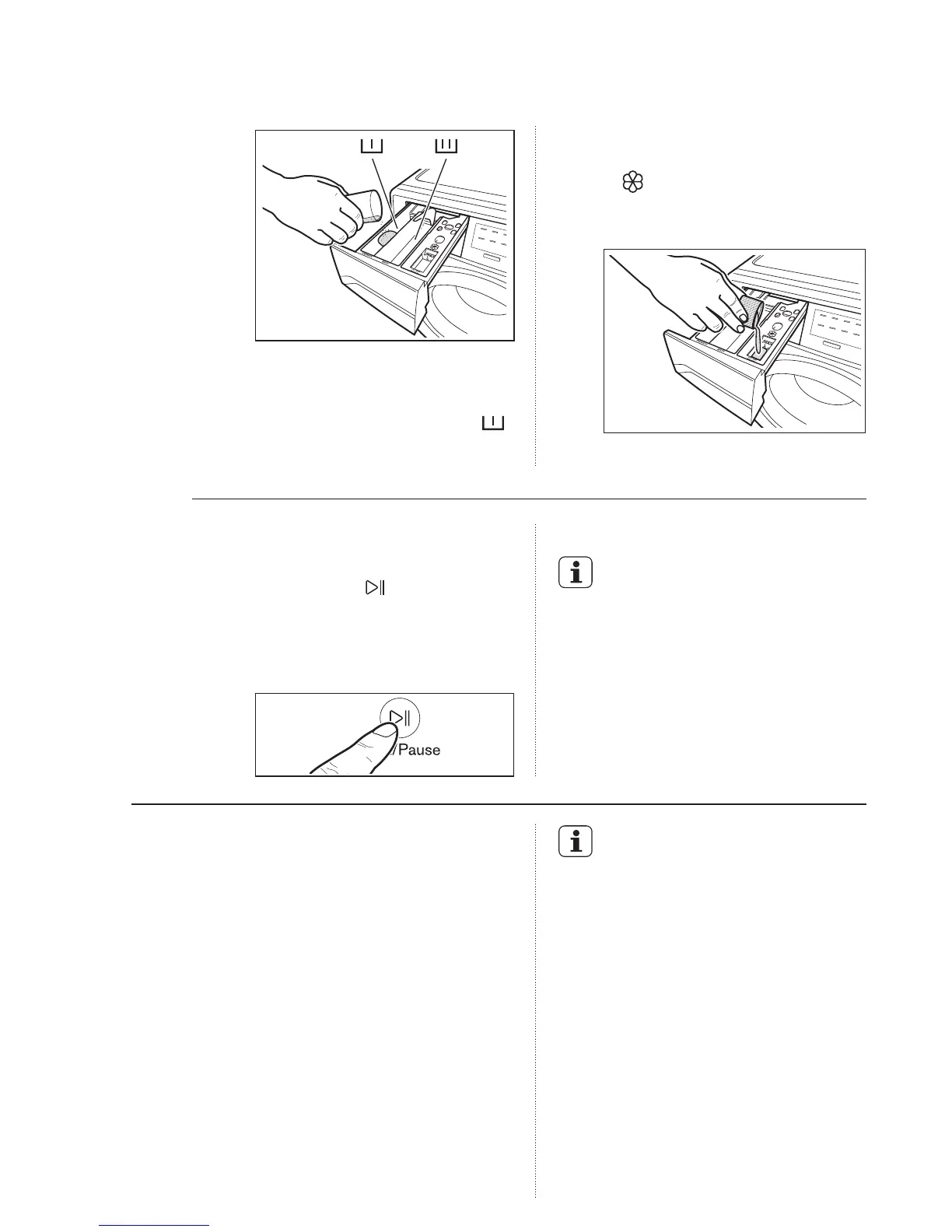
If you wish to carry out the
“Prewash” phase, pour it into
the compartment marked .
If required, pour fabric softener
into the compartment marked
(the amount used must not
exceed the “MAX” mark in the
drawer).
-
Close the drawer gently.
-
-
The appliance will automatically
adjust the selected program
duration according to the type
and size of the load.
-
The display will show adjusted
program duration.
-
Step 4 - Starting a program
To start a program, press the
Start/Pause ( ) touchpad, the
corresponding pilot light will stop
flashing and a default program
duration will be displayed on the
screen.
After approx. 15 minutes from
the start of a program:
To pause press Start/Pause. The
indicator will start flashing.
-
Press the Start/Pause again. The
program will continue.
-
Changing a running program is possible
only by switching off the appliance.
Press the “On/Off” button to cancel the
program and to turn off the appliance.
-
5.2 Interruption Of A Program
5.3 Changing A Program
It is possible to change only some
option after the program has
started.
Press the touchpad Start/Pause.
The indicator will start flashing.
1.
Change the options.2.
Press Start/Pause again. The
program will continue.
3.
Press the “On/Off” button again to start
the appliance. Now, you can set a new
washing program.
The appliance will not drain the
water.
-
5.4 Changing The Options



 To Next Page