ENGLISH 25
8.7 Cleaning The Pump
The appliance does not drain the
water.
The drum is not turning.
The appliance makes an unusual
noise due to blocked drain
pump.
The display shows .
Regularly examine the drain pump
and make sure that it is clean.
Clean the pump if:
1. Disconnect the mains plug
from the mains socket.
2. Do not remove the filter while
the appliance is operating.
Do not clean the drain pump
if the water in the appliance
is hot. The water must be
cold before you clean the
drain pump.
WARNING!
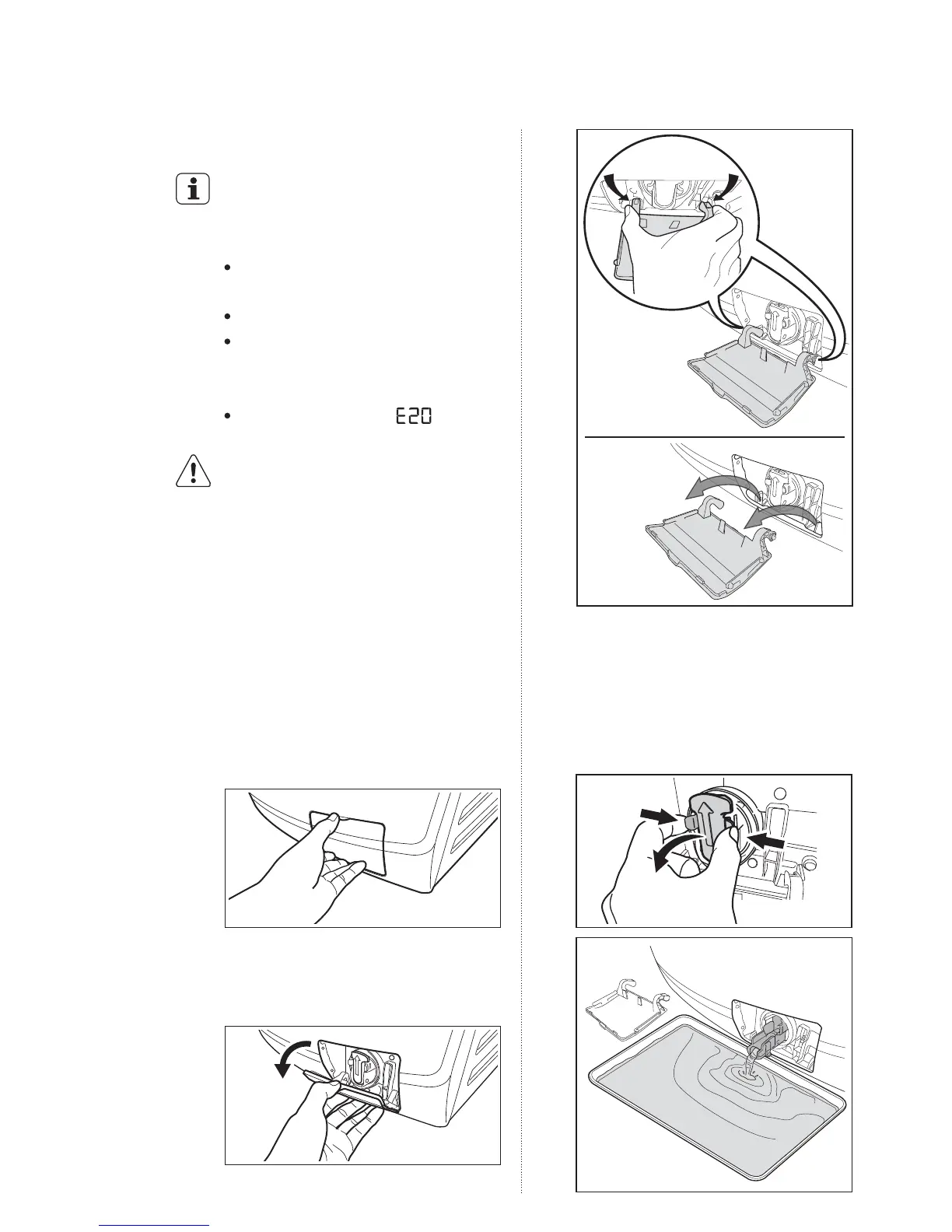
To clean the drain pump:
1.
Open the drain pump door.
2.
Pull the flap down, then squeeze
the legs on both sides of the cover
together and pull out (as picture).
3.
Place a suitable water container
below the recess of the drain pump
to collect the water that flows out.
Press the two levers and pull
forward the drainage duct to let the
water flow out.
squeeze
the legs
on both
sides
pull out
1
2



 To Next Page