26
Operating User Interface Features
Saving Favorites
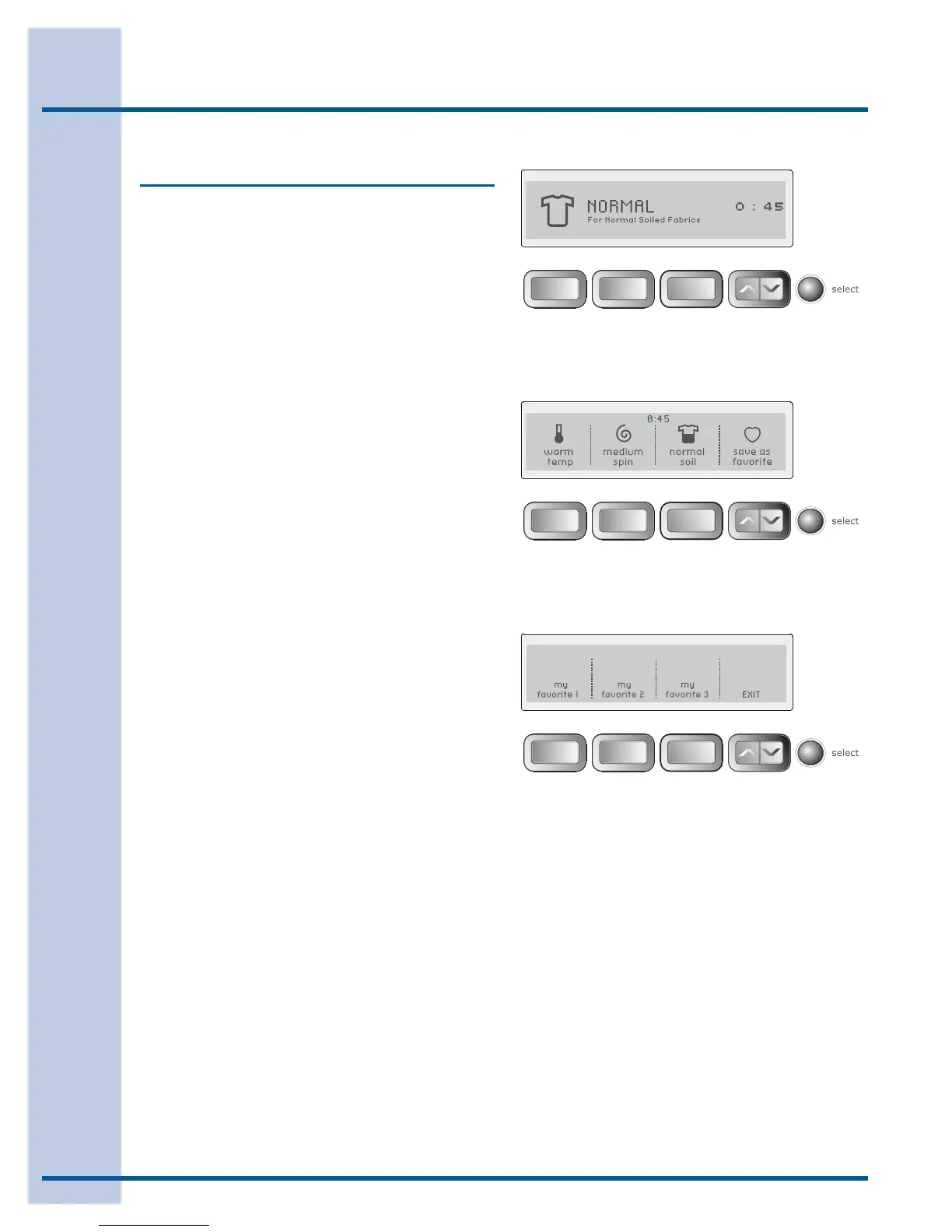
Use the save as favorite feature to name and save
a custom cycle to memory with all options and
settings preferred. Up to 3 favorites may be saved
for each custom user. Follow these steps:
Select a cycle, washing temperature, spin speed, •
soil level and other options desired.
Use the scroll up or scroll down button until you •
reach save as favorite.
Press the • select button to enter the favorite
cycle choice screen.
Choose 1 of the 3 buttons for naming the cycle.•
See the next page for naming your favorite cycle.•
For example, to customize the normal cycle for
your shirt loads with a warm water wash, medium
fi nal spin speed and normal soil level:
Turn the cycle selector knob to • normal.
Press the • temp button to select warm temp.
Press the • spin speed button to select medium
spin speed.
Press the • soil level button to select normal soil.
Press the scroll up or scroll down button until •
you reach save as favorite.
Press the • select button to enter the favorite
cycle choice screen.
Press the button under • my favorite 1.
See the next page for naming your favorite cycle.•






 To Next Page