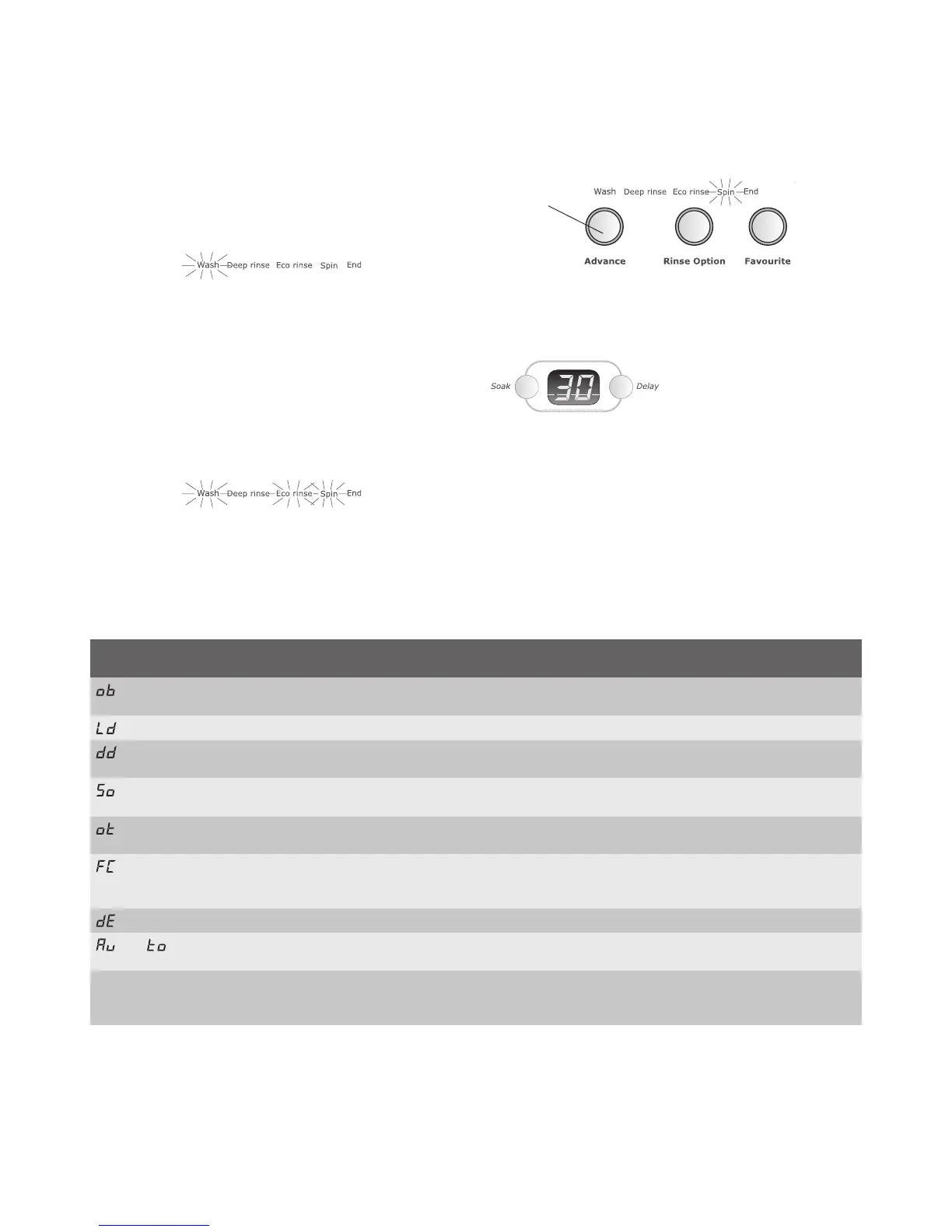
Advance button
Press the Advance button to advance the wash program to
the next stage as shown in the progress indicator.
EGå7ASHå%COåRINSEå3PIN
Digital display
The digital display will show the time in minutes (or hours
and minutes) to complete a wash program.
This time does not include time the washing machine will
take to fill with water.
The digital display also shows information codes, in some
CASESåACCOMPANIEDåBYå@"EEPINGå3EEåTABLEåBELOW
Operating your washing machine
Progress of your wash program
The wash progress indicator gives you information about
the progress and status of your wash program.
During a wash, the program stage will be highlighted in the
wash progress indicator as it takes place. For example,
when you start your wash by pressing Start/Pause, the first
STAGEå@7ASHåWILLåBEåHIGHLIGHTED
7HENåTHEåPROGRAMåMOVESåONTOåTHEåRINSEåSTAGEå@7ASHåWILLå
no longer be highlighted, and either Deep rinse or Eco rinse
will be highlighted, whichever is selected.
7HENåYOUåPRESSå3TART0AUSEåDURINGåAåWASHåAåmASHINGå
progress indicator tells you where the wash is in the
program and remaining stages will be highlighted but not
flashing.
In the following illustration, the machine is paused in the
@7ASHåSTAGEåLIGHTåmASHINGå@%COåRINSEåANDå@3PINåAREå
highlighted to show these stages will follow the wash stage
when it is completed.
NOTE: A flashing progress indicator light indicates your
machine is paused. When ‘End’ is highlighted your wash
has finished.
10 operating your washing machine electrolux water aid washing machine
Advance
button
Digital display codes
Displayed code Beeping Information the display is giving you and
what to do to continue
15 very fast ‘beeps’ every 4 minutes. Indicates the machine has gone out of balance during spin.
Open lid, redistribute load and close lid.
5 very fast ‘beeps’ every 4 minutes. Lid is in the open position. Close the lid.
3 slow ‘beeps’ every 4 minutes. (No ‘beeps’ if end
of program beep is switched off, see page 12).
The machine has reached the end of the Drip Dry program.
Open lid, remove clothes and close lid.
Your machine is Soaking.
7HEREåSOAKåISåINCLUDEDåINåTHEåWASHåPROGRAM
The machine has paused to allow motor controller to cool.
7AITåANDåAFTERåAåSHORTåDELAYåTHEåWASHåWILLåCONTINUE
You are in the Favourite wash programming mode.
Press Favourite to save displayed settings as a favourite wash or
press Start/Pause to exit and not save settings.
The machine is set for Delay start.
then
The machine is in auto sensing water level test mode
7AITåANDåAFTERåAåSHORTåDELAYåTHEåWASHåWILLåCONTINUE
Other codes Accompanied by many ‘beeps’. The machine is informing you of a fault with the washing machine
which you need to address. Refer to pages 17-19 for further
information and what you should do before calling Service.




 To Next Page