Starting your washing machine
1. Turn on the taps
2. Close the lid
åå0RESSåTHEå0OWERåBUTTON
The machine will ‘beep’ twice, show a welcome message
for a short time and then it is ready for you to select the
wash program settings.
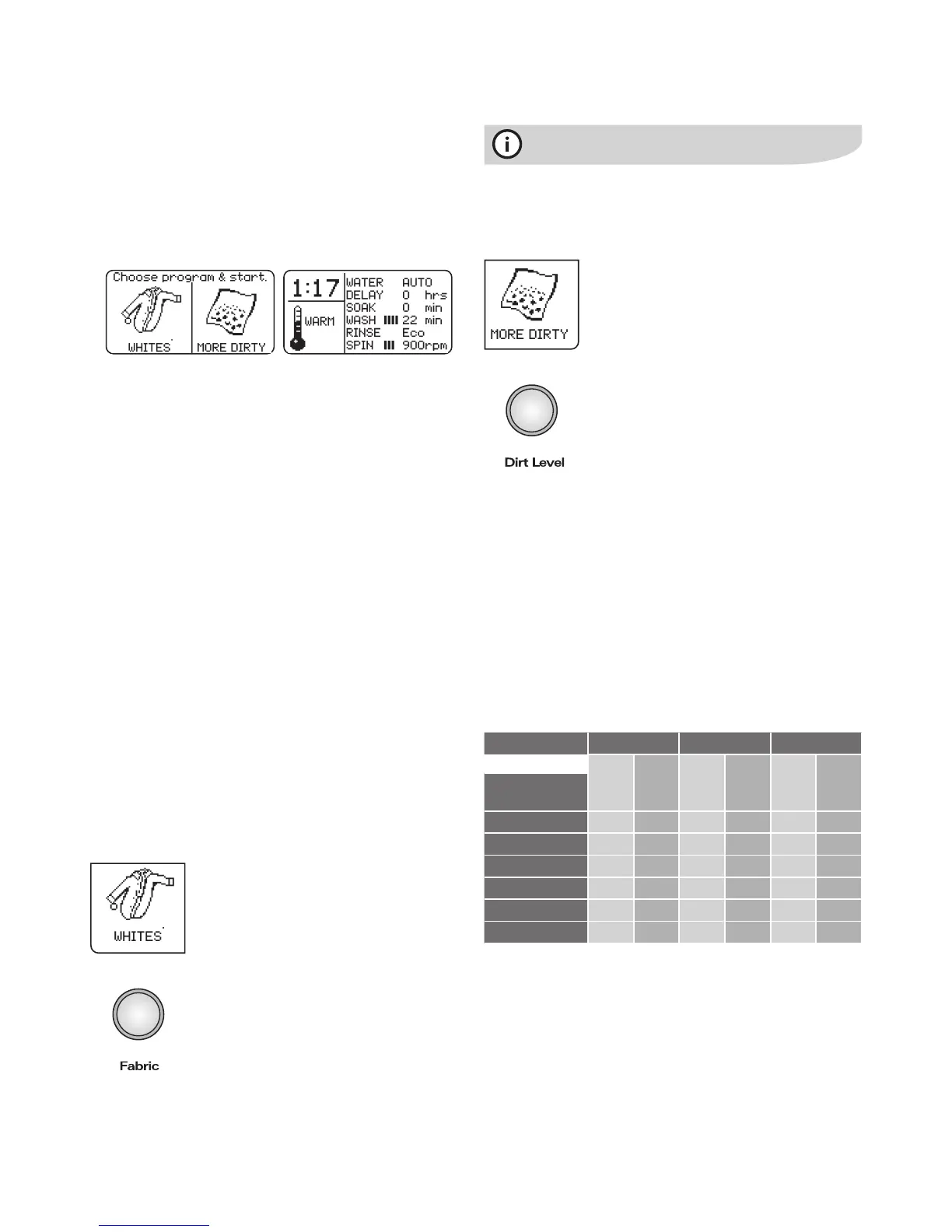
The screens should look something like these:
NOTE: On powering up the machine, some settings will reset
to a default condition. DELAY and SOAK reset to zero (0)
while the WATER level resets to AUTO.
If the displayed settings are what you want to use, press the
Start/Pause button to start the wash.
Alternatively you can,
såCHANGEåTHEåSETTINGSåTHENåSTARTåYOURåWASH
såREPROGRAMåANDåSAVEåAå&AVOURITEåWASH
såRECALLåANDåSTARTåAå&AVOURITEåWASHåPROGRAM
såENTERåTHEå5SERå(ELPåMENU
To find out more about these options read the instructions
on the following pages.
Choosing your own wash program settings
såå3ETTINGSåCANåBEåCHANGEDåWHENåAåWASHåISåINåPROGRESSå
ORåWHENåTHEåMACHINEåISåINåPAUSEåMODEå7HENåRUNNINGå
there will be a short delay of 2 seconds before a change
to settings takes effect. This is to allow you time to
complete your desired changes.
såå)FåYOUåMAKEåAåCHANGEåTOåSETTINGSåDURINGåAåWASHåTHEå
progress of the wash may not continue exactly from
where it was in the program before the change.
såå7HENåYOUåTRYåTOåMAKEåAåCHANGEåTOåSETTINGSåANDåTHEå
selection you make is unavailable at the time, you will
hear a long ‘error beep’.
Fabric button
The Fabric button is used to select the
appropriate wash program for your load.
Press the Fabric button repeatedly until
you see the program you want in the left
hand display screen.
The table on page 8 gives you guidance for
your wash program and for the other selections
available to you using the Fabric button.
The other selections you can make using
the Fabric button are RINSE&SPIN only
and DRAIN&SPIN only.
7HENåYOUåCHOOSEåTHEå7//,,%.3åORå(!.$7!3(å
program, DEEP RINSE is automatically selected for you.
You cannot use Eco RINSE with these wash programs.
Dirt Level button
4HEREåAREååDIRTåLEVELSåTOåCHOOSEåFROM
såååå-/2%å$)249åFORåHEAVILYåSOILEDåCLOTHESå
eg. very dirty work clothes and overalls.
såååå$)249åFORåEVERYDAYåSOILEDåITEMSåEGå
family clothes, sheets etc.
såååå,%33å$)249åFORåLIGHTLYåSOILEDåCLOTHESå
just to freshen them up.
Press the Dirt Level button repeatedly until
the level you want is shown in the left hand
display screen.
The Dirt Level option chosen will have an
influence on the wash time of the selected
wash program.
For the same wash program, MORE DIRTY will have a
longer wash time than DIRTY, and DIRTY a longer wash
time than LESS DIRTY.
Water Aid recirculation system active programs
Your machine is programmed with the recirculation system
active in most wash and deep rinse stages of the various
wash programs.
The following table shows when the recirculation is active
during wash and deep rinse, for the different settings of
7ASHå0ROGRAMåSELECTEDåUSINGå&ABRICåBUTTONåANDå$IRTå,EVEL
Is the recirculation system active?
Dirt Level
Less Dirty Dirty More Dirty
7ASHDeep
Rinse
7ASHDeep
Rinse
7ASHDeep
Rinse
Wash Program
(Fabric button)
Heavy Duty
No No No No No No
7HITES
Yes Yes Yes Yes
No
Yes
Colours No
Yes
No
Yes
No No
Delicates
Yes Yes Yes Yes
No
Yes
7OOLLENS
Yes Yes Yes Yes
No
Yes
Handwash
Yes Yes Yes Yes
No
Yes
NOTE: Eco Rinse
With most programs you have an option of selecting an Eco
Rinse, in which case the Deep Rinse column of the table above
is not relevant. Recirculation is not active during Eco Rinse.
Operating your washing machine
electrolux water aid washing machine operating your washing machine 7




 To Next Page