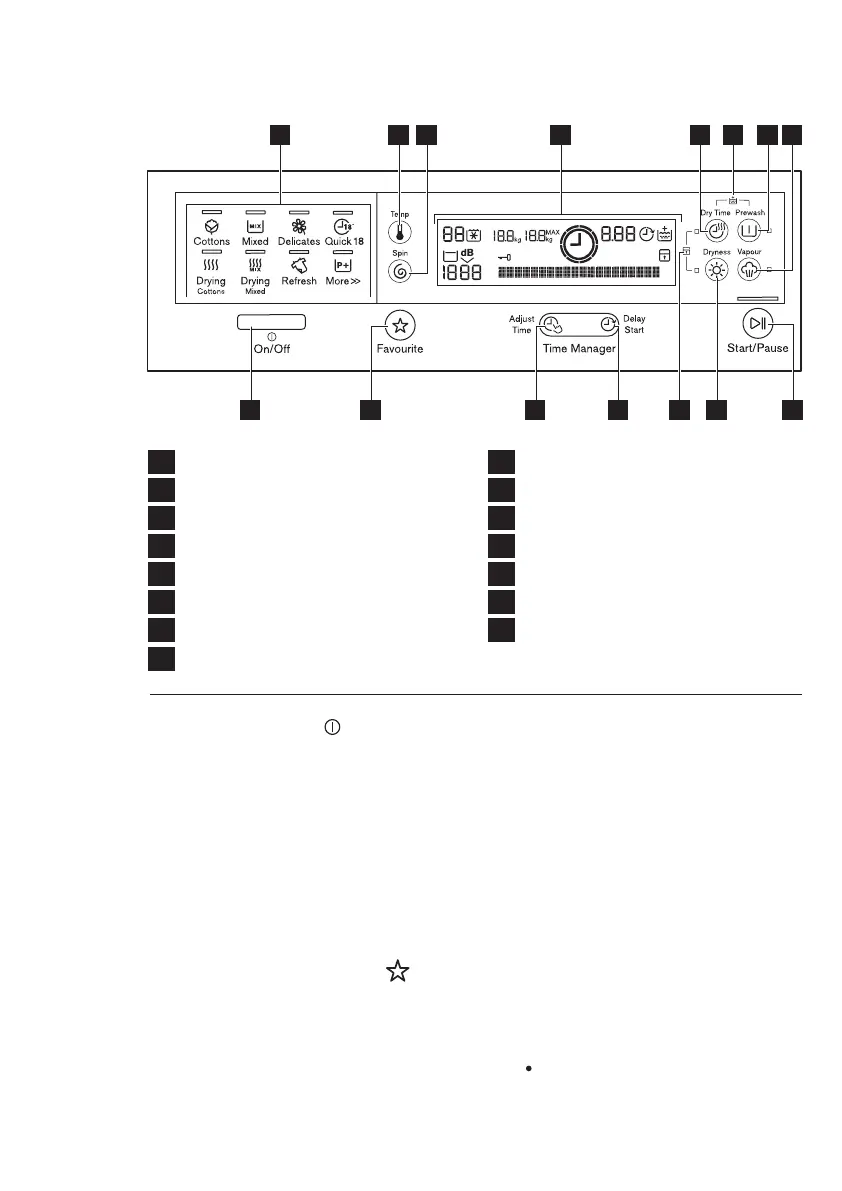
CONTROL PANEL3.
1
On/Off Button
2
Program Touchpads
3
Favourite Touchpad
4
Temperature Touchpad
5
Spin Selection Touchpad
6
Adjust Time Touchpad
7
Delay Start Touchpad
8
Display
9
10
Dryness Touchpad
11
Dry Time Touchpad
12
Prewash Touchpad
13
Vapour Touchpad
14
Start/Pause Touchpad
Rinse Plus Option (see page 11)
15
Child Lock Option (see page 21)
8
www.electrolux.com
1 9 13156 73
2 4 108 14 11 125
3.1 On/Off Button
On/Off button is used to turn on
and turn off your washer-dryer
machine.
3.2 Program Touchpads
Press the program icon to select
the wash or dry program. The
relevant light will light up.
(See page 12)
3.3 Favourite Touchpad
Program settings that are
frequently used can be saved (e.g.
Cotton, 60°C, 1200 rpm, with
Prewash and Rinse Plus).
To recall the favourite wash
program, press ‘Favourite’ button.
You will get acknowledgement on
the screen the Favourite program
is loaded.
You can recall a favourite wash
program ONLY when the
washer-dryer is:
Otherwise touching Favourite will
have no effect.
in the program selection mode.
To program/re-program Favourite
with your own selections and save
them, proceed as follows:
1. Put machine in Stand-by mode.
2. Select your desired wash
settings.
3. To save the new program touch
and hold ‘Favourite’ button for 3
seconds.



 To Next Page