8 www.electrolux.com
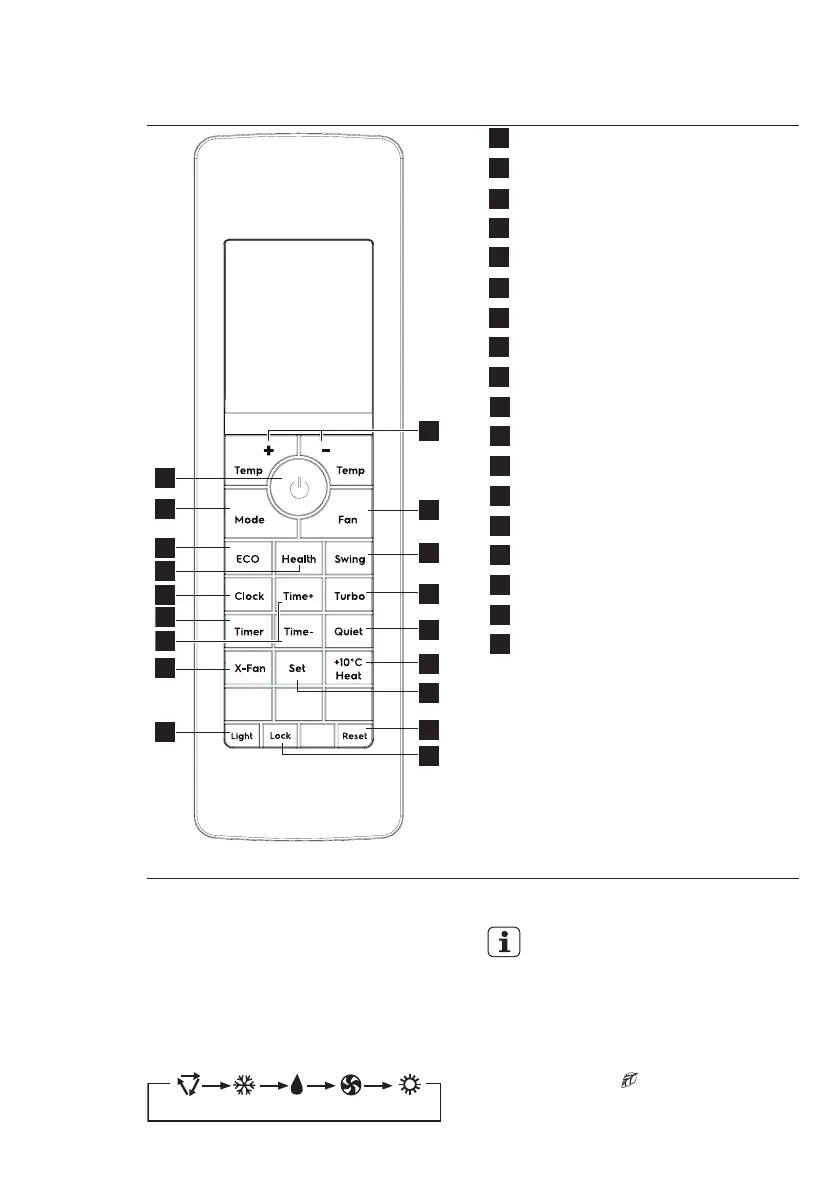
5. REMOTE CONTROLLER DESCRIPTION
1 Temp +/- Button
2 Fan Button
3 Swing Button
4 Turbo Button
5 Quiet Button
6 +10ºC Heat Button
7 Set Button
8 Reset Button
9 Lock Button
10 Light Button
11 X-Fan Button
12 Time +/- Button
13 Timer Button
14 Clock Button
15 Health Button
16 Eco Button
17 Mode Button
18 On/O Button
ON/OFF BUTTON
Press the button to switch on or o
the unit.
MODE BUTTON
Press the button to set the operation
mode: AUTO, COOL, DRY, FAN and
HEAT. Default setting: AUTO.
$872 &22/ '5<)$1 +($7
• In AUTO mode, user can
still set desired temperature.
ECO BUTTON
In COOL, HEAT or DRY mode, press
this button to enable or disable Eco
operation. If the ECO function is enabled,
the ECO symbol “ ” will be shown.
Default setting: OFF.
This is ideal for the users to use while
sleeping.



 To Next Page