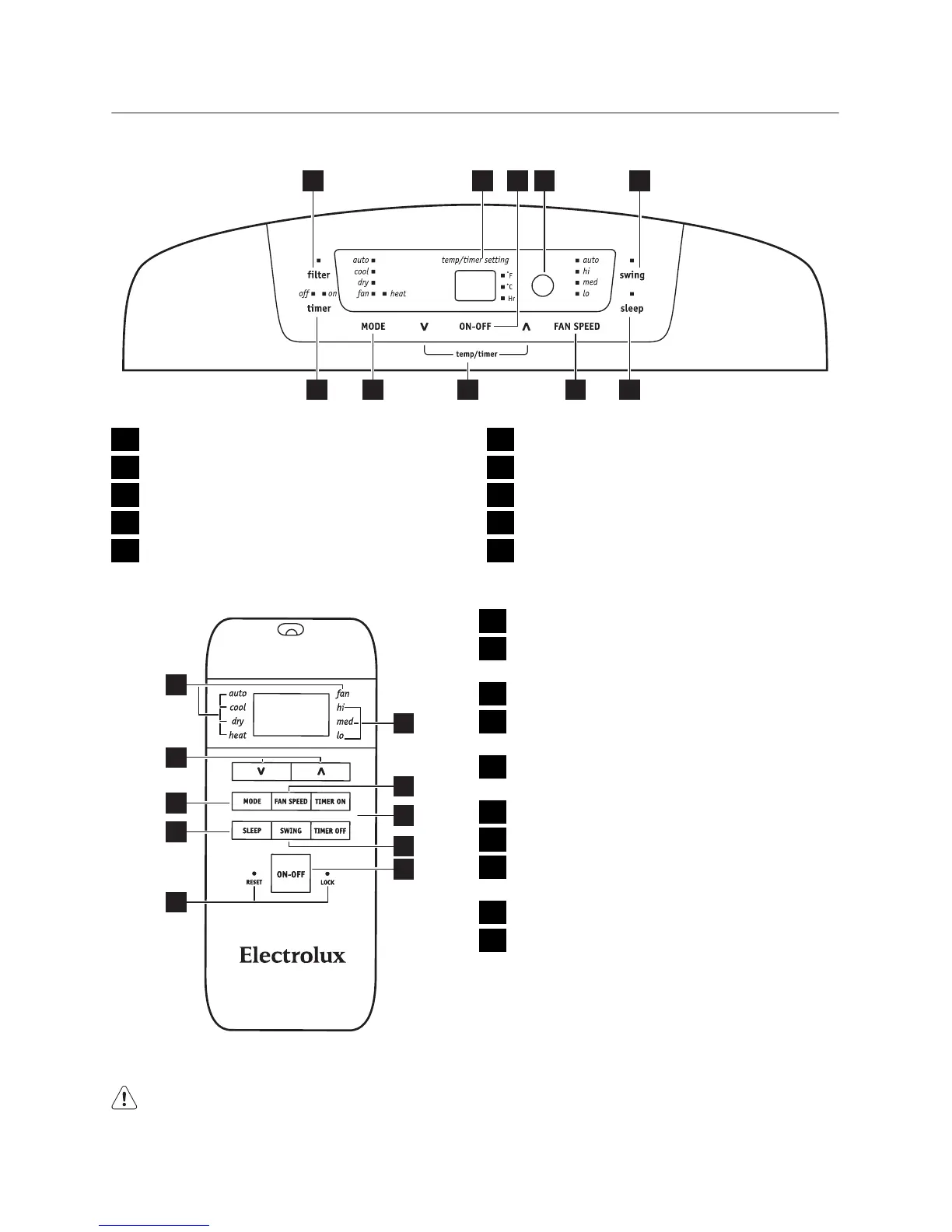
CONTROL PANEL
CONTROL PANEL
1 2 3 4 5
678910
1
CHECK FILTER RESET BUTTON
2
DISPLAYS TEMPERATURE/TIME
3
TURNS UNIT ON OR OFF
4
REMOTE SIGNAL RECEIVER
5
SWING BUTTON (SWING)
6
ACTIVATES TIMER (TIMER)
7
SET MODE (MODE)
8
ADJUSTS TEMPERATURE OR TIME
9
SETS FAN SPEED (FAN SPEED)
10
SLEEP MODE (SLEEP)
REMOTE CONTROL
10
9
7
3
4
6
8
1
5
2
1
MODE INDICATION
2
TEMPERATURE/TIMER CONTROL
BUTTONS
3
MODE SELECTOR (MODE)
4
SLEEP BUTTON
(SLEEP)
5
RESET+LOCK PIN BUTTONS (RESET/
LOCK)
6
FAN SPEED SELECTION
7
FAN SPEED SELECTOR (FAN SPEED)
8
TIMER BUTTONS (TIMER ON/TIMER
OFF)
9
SWING BUTTON (SWING)
10
ON/OFF BUTTON
BATTERY SIZE: AAA
Warning! Do not mix old and new
batteries. Do not mix alkaline, standard
(carbon-zinc) or rechargeable (nickel-
cadmium) batteries.
The Reset button RESET is depressed
when you want to return to the initial factory
settings. The Lock button LOCK is de-
pressed to lock the keypad so the settings
cannot be changed. The key symbol will
electrolux 9



 To Next Page