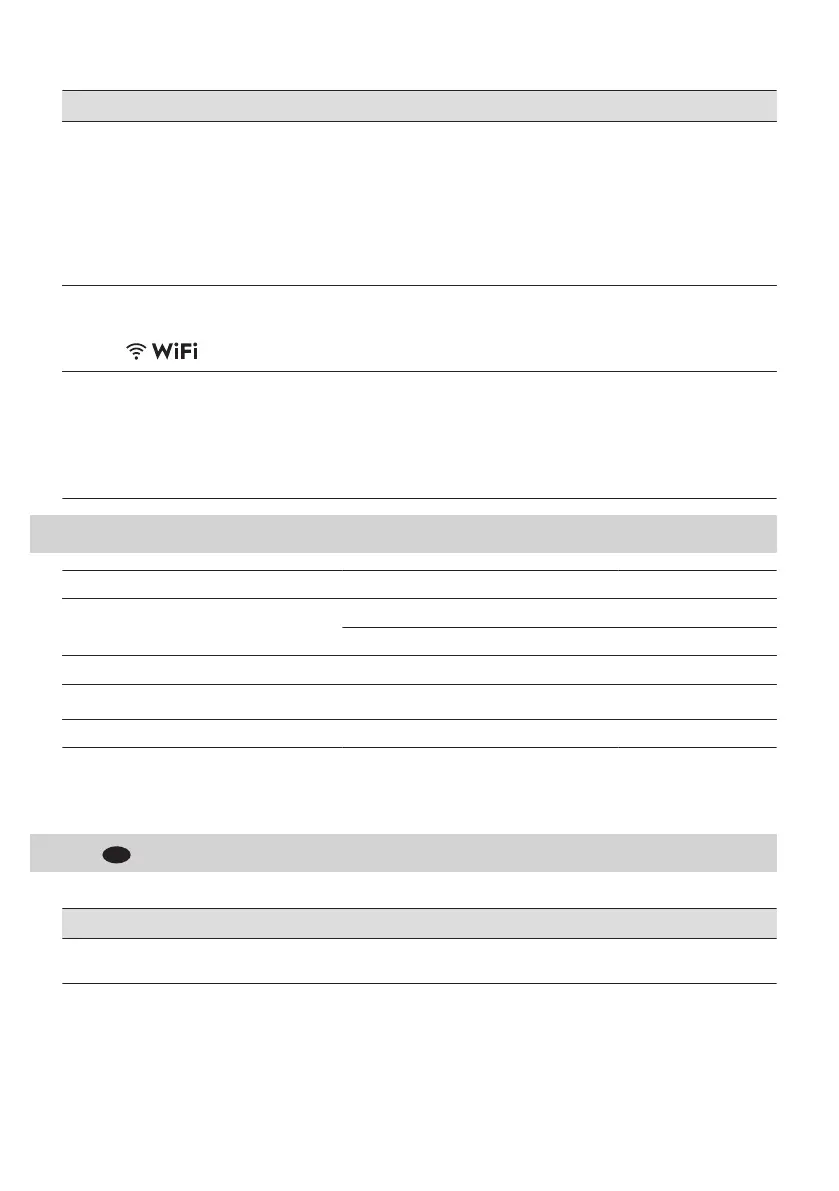
Problem Possible cause and solution
The app cannot connect to the dish‐
washer.
• There is a trouble with the wireless network signal. Check your wire‐
less network and router. Restart the router.
• Check if your mobile device is connected to the network.
• New router was installed or router configuration was changed. Con‐
figure the dishwasher and mobile device again. Refer to "Wireless
connection" chapter.
• Contact your wireless service provider if there are further problems
with the wireless network.
The app cannot connect to the dish‐
washer through any network other
than your home wireless network. The
indicator flashes.
• The connection to the cloud is lost. Wait for the connection to be re‐
stored.
The app frequently cannot connect to
the dishwasher.
• The wireless signal is disrupted by a microwave appliance placed
near the dishwasher. Turn off the microwave appliance. Avoid using
the microwave appliance and the remote start at the same time.
• The wireless network signal is weak. Move router as close to the
dishwasher as possible or consider purchasing a wireless range ex‐
tender.
14. TECHNICAL INFORMATION
Dimensions Width / height / depth (mm) 596 / 818 - 898 / 560
Electrical connection
1)
Voltage (V) 200 - 240
Frequency (Hz) 50 - 60
Water supply pressure Min. / max. MPa (bar) 0.05 (0.5) / 1 (10)
Water supply
Cold water or hot water
2)
min. 5 - max. 60 °C
Capacity Place settings 14
1)
Refer to the rating plate for other values.
2)
If the hot water comes from alternative source of energy (e.g. solar panels), use the hot water supply to de‐
crease energy consumption.
15.
GUARANTEE
Customer Service Centres
Point of Service
Industriestrasse 10
5506 Mägenwil
Le Trési 6
1028 Préverenges
Via Violino 11
6928 Manno
ENGLISH 31



 To Next Page