
 Need help?
Do you have a question about the Electrolux KT6421XE and is the answer not in the manual?
This document describes the Electrolux KT6421XE hob, a built-in appliance designed for cooking. It emphasizes safety, proper installation, and efficient use to ensure optimal performance and longevity.
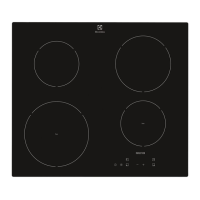
The Electrolux KT6421XE hob is a radiant heater with four cooking zones, designed to provide efficient and controlled heat for various cooking tasks. It features a glass-ceramic surface with touch controls for easy operation.
Cooking Zones: The hob includes multiple cooking zones, some of which are multi-zone, allowing for adjustment to different cookware sizes. The layout includes:
Control Panel: The control panel is operated by sensor fields, with displays and indicators providing feedback on active functions. Key sensor fields include:
The hob offers several features to enhance cooking convenience and safety:
Activating and Deactivating: The hob is activated or deactivated by touching the ON/OFF sensor field for 1 second.
Heat Setting: Heat settings from 1 to 14 can be selected using the control bar. For multi-zone cooking areas, the outer rings can be activated or deactivated to match the cookware size, providing flexibility in cooking.
Automatic Switch Off: For safety and energy saving, the hob automatically deactivates under certain conditions:
Automatic Heat Up (A): This function allows for quicker heating by initially setting the cooking zone to the highest heat setting for a short period, then automatically reducing it to the desired setting. It can only be activated when the cooking zone is cold.
Timer Functions:
STOP+GO (STOP+GO): This function pauses all active cooking zones by setting them to the lowest heat setting. It's useful for temporary interruptions during cooking, as it maintains a warm temperature without stopping the timer functions.
Lock / Child Safety Device (१): This feature locks the control panel to prevent accidental changes to settings, especially when cooking zones are active. It can also be activated as a child safety device to prevent unintentional operation of the hob.
OffSound Control: Allows users to deactivate or activate the hob's acoustic signals. When deactivated, sounds are only heard for the Minute Minder, Count Down Timer, or when an object is placed on the control panel.
OptiHeat Control (Residual Heat Indicator): A 3-step indicator (H, h, or -) shows the level of residual heat in a cooking zone after it has been turned off, warning against burns and allowing for energy-efficient use of residual heat.
Öko Timer (Eco Timer): This energy-saving function deactivates the cooking zone heater before the set count-down timer ends, utilizing residual heat to complete cooking.
Regular care and cleaning are essential for maintaining the hob's appearance and functionality.
General Cleaning:
Specific Cleaning Tasks:
Service and Support: In case of malfunctions or if a solution cannot be found in the troubleshooting section, users should contact an Authorized Service Centre. It is important to provide the model, PNC, and serial number from the rating plate, as well as the three-digit letter code from the glass ceramic surface and any error message displayed. Using original spare parts for repairs is recommended.
 General
| Product Type | Induction Hob |
|---|---|
| Number of Cooking Zones | 4 |
| Control Type | Touch Control |
| Width | 59 cm |
| Depth | 52 cm |
| Color | Black |
| Material | Glass ceramic |
| Residual Heat Indicator | Yes |
| Safety Shutdown | Yes |
| Total Power | 7400 W |


 To Next Page