EasyManua.ls Logo

Electrolux MO318GXE - Control Panel Explained; Operating the Microwave Oven; Getting Started and Basic Controls

Electrolux MO318GXE
40 pages
Print Icon
To Next Page IconTo Next Page
To Previous Page IconTo Previous Page
Loading...








AUTO
%
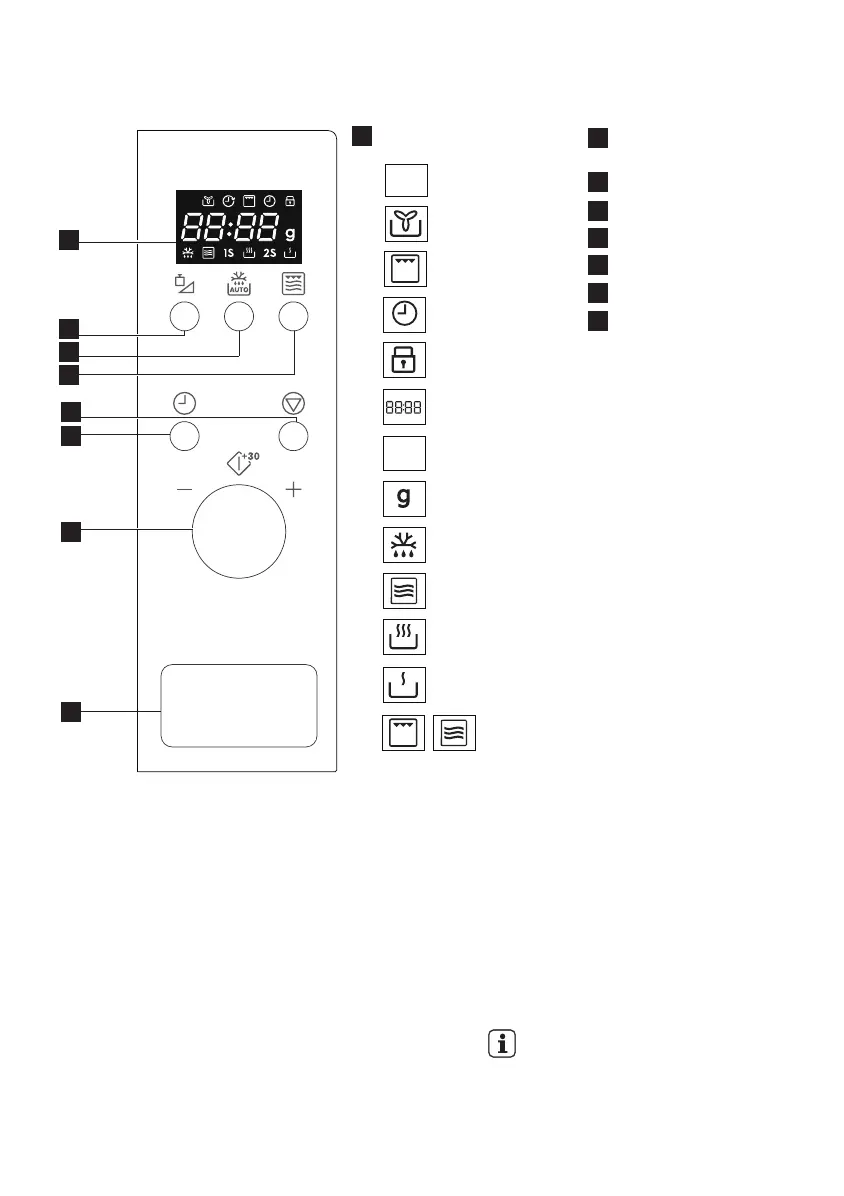
Digital display indicators:
Auto
Fan
Grill
Clock
Child safety lock
Display segments
Microwave power level
Weight
Defrost
Microwave
High
Low
Combi
1
Power level/weight
button
Auto defrost button
Micro. + grill button
Pause/cancel button
Clock button
Knob
Door open button
2
3
4
5
6
7
8
12
www.electrolux.com
3.3 Control panel
4. OPERATION
AUTO
%
2
3
4
7
1
5
6
8
4.1 Plug in
When the oven is plugged in for the first
time you have the option of setting the
clock. The oven has a 24hr clock.
Example: To set the clock.
1. In standby mode, press the CLOCK
button once to set the clock.
2. Rotate the knob to adjust the hour.
3. Press the CLOCK button to confirm.
4. Rotate the knob to adjust the minutes.
5. Press the CLOCK button to confirm the
setting.
During cooking, you can press the
CLOCK button to check the time of
day.

1_ELECTROLUX_EN230_17LGRILL_SBI_QUADRO_BASE_AJ26UICTO_Layout 1 17/04/2020 11:16 Page 12

Related product manuals