EasyManua.ls Logo

Electrolux ULTIMATEHOME 300 - User Manual

Electrolux ULTIMATEHOME 300
13 pages
Print Icon
To Next Page IconTo Next Page
Loading...
Instruction Book
ULTIMATEHOME 300
Air Purifier

Questions and Answers

Summary

Safety Information and Precautions

General Electrical Safety Warnings

Avoid fire and electric shock by using correct adapters and avoiding flammable materials near the unit.

Children and Vulnerable People Safety

Ensures safety for children and vulnerable individuals, emphasizing supervision and keeping packaging away.

Electrical Safety Precautions

Ensures proper grounding, safe unplugging, and using authorized repair services for electrical safety.

General Safety Precautions

General cautions to prevent injury or damage, such as not inserting objects into the air outlet grill.

UV-C Emitter Precautions

UV-C Emitter Safety Warnings

Warnings regarding potential harm from UV-C radiation if the appliance is damaged or misused.

Disposal and Before Starting

Product Disposal Guidelines

Instructions for environmentally friendly disposal and recycling of the air purifier.

Preparation Steps Before Use

Key steps to take before operating the unit, including reading instructions and checking parts.

Description of Your Air Purifier

Appliance Components Overview

Identification and description of the physical parts of the air purifier unit.

Control Panel Features Explained

Detailed explanation of buttons, indicators, and display elements on the control panel.

Set Up and Initial Operation

Prepare the Unit for Use

Steps to prepare the air purifier, including removing protective films and packaging.

Install the Air Filter

Instructions for correctly inserting the air filter into the unit.

Power On and Sensor Calibration

Connecting the power plug and the initial sensor calibration process.

Operation Modes

Mode Selection Guide

How to toggle and select between SMART and MANUAL operating modes.

Air Speed Control in Manual Mode

Adjusting the fan speed manually and understanding the fan speed indicator.

Feature Icons and Indicators

Alert, Filter, WiFi, and UV Icons

Explanation of key icons like alert, filter change, WiFi status, and UV emitter.

Scheduler and Child Lock Icons

Information on icons indicating scheduled events and the child lock feature.

Air Quality Indicator

Air Quality Levels Explained

Details the real-time air quality indication through light colors and PM 2.5 values.

Onboarding and Connectivity

Download and Connect to Electrolux App

Steps for downloading the app and connecting the air purifier via WiFi for onboarding.

Replacing the Filter

Filter Monitoring and Replacement Timing

Guidance on monitoring filter lifetime and when to replace it.

Filter Replacement Procedure

Step-by-step instructions for safely removing and installing a new air filter.

Filter Reset After Replacement

How to reset the filter change indicator after replacing the filter.

Care and Cleaning

Cleaning the Air Quality Sensor

Instructions for cleaning the sensor box, lens, and inlet for optimal performance.

Cleaning Unit Exterior and Air Inlet

Guidelines for cleaning plastic parts and the air inlet area to maintain the unit.

Storage Guidelines

Proper Storage of the Air Purifier

Recommendations for storing the appliance when it will not be used for an extended period.

Troubleshooting Common Issues

Alert Icon and Fan Speed Problems

Resolving issues related to the alert icon and continuous high or low fan speed.

Troubleshooting Further Issues

Noise, Power, and Air Quality Issues

Troubleshooting abnormal noise, unit not operating, poor air quality, and strange smells.

Troubleshooting Connectivity and Other Problems

Filter Icon and App Connectivity

Resolving issues with the filter indicator after replacement and app connection problems.

Unlisted Issues and Support Contact

Guidance for issues not covered and how to contact Electrolux support.

Summary

Safety Information and Precautions

General Electrical Safety Warnings

Avoid fire and electric shock by using correct adapters and avoiding flammable materials near the unit.

Children and Vulnerable People Safety

Ensures safety for children and vulnerable individuals, emphasizing supervision and keeping packaging away.

Electrical Safety Precautions

Ensures proper grounding, safe unplugging, and using authorized repair services for electrical safety.

General Safety Precautions

General cautions to prevent injury or damage, such as not inserting objects into the air outlet grill.

UV-C Emitter Precautions

UV-C Emitter Safety Warnings

Warnings regarding potential harm from UV-C radiation if the appliance is damaged or misused.

Disposal and Before Starting

Product Disposal Guidelines

Instructions for environmentally friendly disposal and recycling of the air purifier.

Preparation Steps Before Use

Key steps to take before operating the unit, including reading instructions and checking parts.

Description of Your Air Purifier

Appliance Components Overview

Identification and description of the physical parts of the air purifier unit.

Control Panel Features Explained

Detailed explanation of buttons, indicators, and display elements on the control panel.

Set Up and Initial Operation

Prepare the Unit for Use

Steps to prepare the air purifier, including removing protective films and packaging.

Install the Air Filter

Instructions for correctly inserting the air filter into the unit.

Power On and Sensor Calibration

Connecting the power plug and the initial sensor calibration process.

Operation Modes

Mode Selection Guide

How to toggle and select between SMART and MANUAL operating modes.

Air Speed Control in Manual Mode

Adjusting the fan speed manually and understanding the fan speed indicator.

Feature Icons and Indicators

Alert, Filter, WiFi, and UV Icons

Explanation of key icons like alert, filter change, WiFi status, and UV emitter.

Scheduler and Child Lock Icons

Information on icons indicating scheduled events and the child lock feature.

Air Quality Indicator

Air Quality Levels Explained

Details the real-time air quality indication through light colors and PM 2.5 values.

Onboarding and Connectivity

Download and Connect to Electrolux App

Steps for downloading the app and connecting the air purifier via WiFi for onboarding.

Replacing the Filter

Filter Monitoring and Replacement Timing

Guidance on monitoring filter lifetime and when to replace it.

Filter Replacement Procedure

Step-by-step instructions for safely removing and installing a new air filter.

Filter Reset After Replacement

How to reset the filter change indicator after replacing the filter.

Care and Cleaning

Cleaning the Air Quality Sensor

Instructions for cleaning the sensor box, lens, and inlet for optimal performance.

Cleaning Unit Exterior and Air Inlet

Guidelines for cleaning plastic parts and the air inlet area to maintain the unit.

Storage Guidelines

Proper Storage of the Air Purifier

Recommendations for storing the appliance when it will not be used for an extended period.

Troubleshooting Common Issues

Alert Icon and Fan Speed Problems

Resolving issues related to the alert icon and continuous high or low fan speed.

Troubleshooting Further Issues

Noise, Power, and Air Quality Issues

Troubleshooting abnormal noise, unit not operating, poor air quality, and strange smells.

Troubleshooting Connectivity and Other Problems

Filter Icon and App Connectivity

Resolving issues with the filter indicator after replacement and app connection problems.

Unlisted Issues and Support Contact

Guidance for issues not covered and how to contact Electrolux support.

Overview

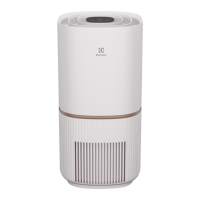
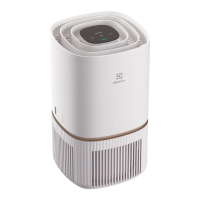
The Electrolux ULTIMATEHOME 300 Air Purifier is a home appliance designed to improve indoor air quality. It features a sleek, cylindrical design with a control panel display on the top surface and an air outlet at the top. The main body consists of a top and bottom section, with a sensor box and adapter jack located on the side of the bottom section. Inside the unit, there is a filter and, for specific models, a UV-C emitter. The device is powered by a power cord.

Function Description

The primary function of the air purifier is to filter and clean the air in a room. It operates by drawing in air, passing it through a multi-layer filter, and then releasing cleaner air back into the environment. The filter is designed to capture particulate matter and other airborne impurities. For UV models, a UV-C emitter is included to help eliminate bacteria within the product, contributing to a more hygienic air purification process. The unit is equipped with an air quality sensor that continuously analyzes the surrounding air and provides real-time feedback through an air quality indicator, which changes color based on the detected PM 2.5 levels.

Usage Features

The air purifier offers several user-friendly features controlled via its top-mounted control panel or through a dedicated Electrolux App for WiFi models.

  • Power On/Off: The unit is turned on and off using the ON/OFF button. Upon first use, it defaults to SMART mode. Subsequent starts will resume the last settings.
  • Mode Selection: Users can toggle between two operating modes: SMART and MANUAL, using the MODE button.
    • SMART Mode: In this mode, the air purifier automatically adjusts its fan speed based on the real-time air quality data from its sensors. This ensures efficient cleaning without manual intervention. There's also a "SMART QUIET" sub-mode, where the unit operates at the lowest possible fan speed with dimmed indicators for quiet operation, ideal for sleep.
    • MANUAL Mode: This mode allows users to manually select one of three fan speeds using the FAN button. While the air quality indicator still shows current air quality, the unit's fan speed will not automatically adjust. This is useful for quick bursts of cleaning, such as during household chores that might generate more particulate matter.
  • Air Quality Indicator: A visual indicator on the control panel displays the current air quality using different colors: Green (Good, 0-12 µg/m³ PM 2.5), Yellow (Average, 13-35 µg/m³ PM 2.5), Orange (Poor, 36-55 µg/m³ PM 2.5), and Red (Very Poor, >56 µg/m³ PM 2.5).
  • Filter Change Indicator: An icon illuminates when the filter needs to be replaced, ensuring optimal performance. After replacing the filter, a long press on the MODE button resets this indicator.
  • UV-C Emitter Control (UV models only): The UV feature can be activated or deactivated by long-pressing the FAN button for 3 seconds. A UV icon on the display indicates when the feature is active.
  • Child Lock: To prevent unintended operation, especially by children, a child lock feature can be activated by simultaneously pressing and holding the MODE and POWER buttons for 5 seconds. A child lock icon will light up when active. In this state, changes can only be made via the Electrolux App.
  • WiFi Connectivity (WiFi models only): These models include a WiFi module for remote control and access to advanced features via the Electrolux App. A WiFi icon indicates connection status, blinking if connectivity is lost. The wireless network can be activated or deactivated by long-pressing the ON/OFF button for 5 seconds.
  • Scheduler (WiFi models only): Through the Electrolux App, users can schedule specific operating times for the air purifier, indicated by a scheduler icon on the control panel.
  • Alert Icon: An alert icon will light up to signal potential electrical or electronic errors, prompting users to check the App or the troubleshooting section for details.

Maintenance Features

Regular maintenance is crucial for the air purifier's longevity and performance.

  • Filter Replacement: The multi-layer filter cannot be washed and must be replaced when its lifetime expires. The filter change icon on the control panel and notifications from the Electrolux App (for WiFi models) will alert users when a replacement is due. It's recommended to monitor the filter's remaining lifetime via the App and order a new filter in advance. Before changing the filter, the unit should be turned off or unplugged. The used filter should be placed in a disposable bag and discarded according to local recycling guidelines. New filters must have their plastic protective bag removed before insertion.
  • Sensor Cleaning: The air quality sensor box and sensor should be cleaned every 1-2 months to maintain accurate performance. This involves vacuuming the sensor box inlet grill and cleaning the lens, inlet, and outlet with a wet cotton swab, followed by a dry cotton swab to remove excess water.
  • Unit Cleaning: The plastic parts of the unit can be cleaned with an oil-free dry cloth. For stains, a slightly damp soft microfiber cloth can be used. Abrasive cleaners, harsh detergents, or wax should never be used.
  • Air Inlet Cleaning: The area around the air inlet at the bottom of the unit may accumulate dust more frequently and should be wiped off or cleaned with a vacuum cleaner to ensure optimal performance.
  • Storage: If the appliance will not be used for an extended period, it should be covered with plastic or returned to its carton for protection.

The Electrolux App plays a significant role in managing and maintaining the air purifier, especially for WiFi models, providing detailed information, troubleshooting guidance, and remote control capabilities. Users are encouraged to register their appliance and stay updated with new app releases for enhanced features and services.

Electrolux ULTIMATEHOME 300 Specifications

General IconGeneral
ColorWhite
CategoryAir Purifier
Air Quality SensorYes
Power Consumption30W
Room SizeMedium to Large
CADR (Dust)160 cfm
CADR (Pollen)170 cfm
Filter TypeHEPA, Activated Carbon
FeaturesAuto Mode, Air Quality Indicator
Filtration SystemHEPA

Related product manuals