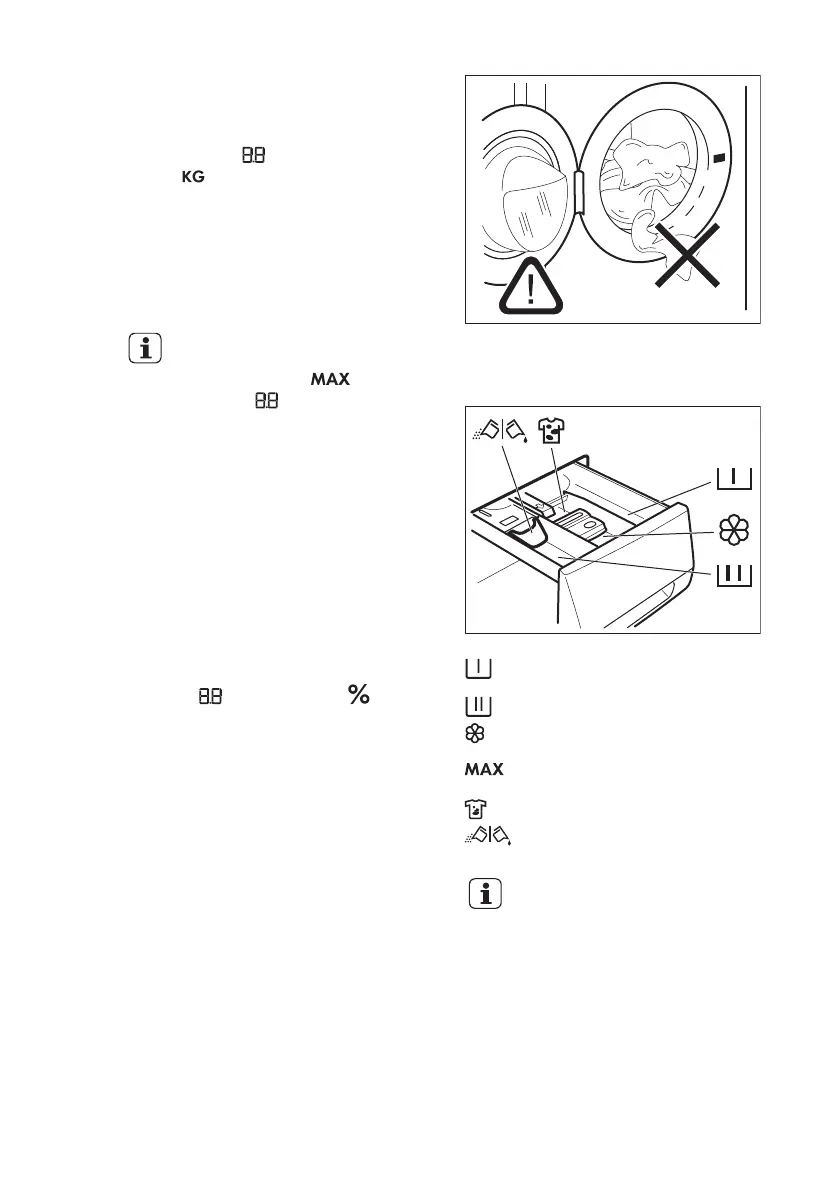
10.4 Loading the laundry
1. Open the appliance door.
The display shows the maximum load for
the programme and the weight of the
laundry .
2. Put the laundry in the drum, one item
at time. Shake the items before you
put them in the drum.
On the display the weight of the laundry
updates by steps of kg 0.5. The weight is
indicative and changes with the type of
the laundry.
If you put in the drum more
laundry than the maximum
load, the symbol and
the value start to flash.
You can wash your laundry
but the water and energy
consumption increase.
To have the best
consumption and washing
performance remove some
items until the symbols stop
to flash.
The overload indication is
available only for
programmes with a maximum
load lower than the appliance
maximum load.
3. Close the door.
The value near the symbol on the
display shows the quantity of the
detergent to use.
This data is indicative and refers to the
detergent quantity for a maximum load
that the manufacturer recommends.
4. Make sure that no laundry stays
between the seal and the door.
There is a risk of water leakage or damage
to the laundry.
10.5 Filling the detergent and
additives
Compartment for prewash phase an
soak programme.
Compartment for washing phase.
Compartment for liquid additives
(fabric conditioner, starch).
Maximum level for quantity of liquid
additives.
Compartment for stain remover.
Flap for powder or liquid detergent.
Always obey the instructions
that you find on the
packaging of the detergent
products.
10.6 Check the position of the
flap
1. Pull out the detergent dispenser until it
stops.
2. Press the lever down to remove the
dispenser.
www.electrolux.com18




 To Next Page