EasyManua.ls Logo

Eleglide M1 - LCD Display Contents; LCD Functions and Operations

Eleglide M1
88 pages
Print Icon
To Next Page IconTo Next Page
To Previous Page IconTo Previous Page
Loading...
08
EN
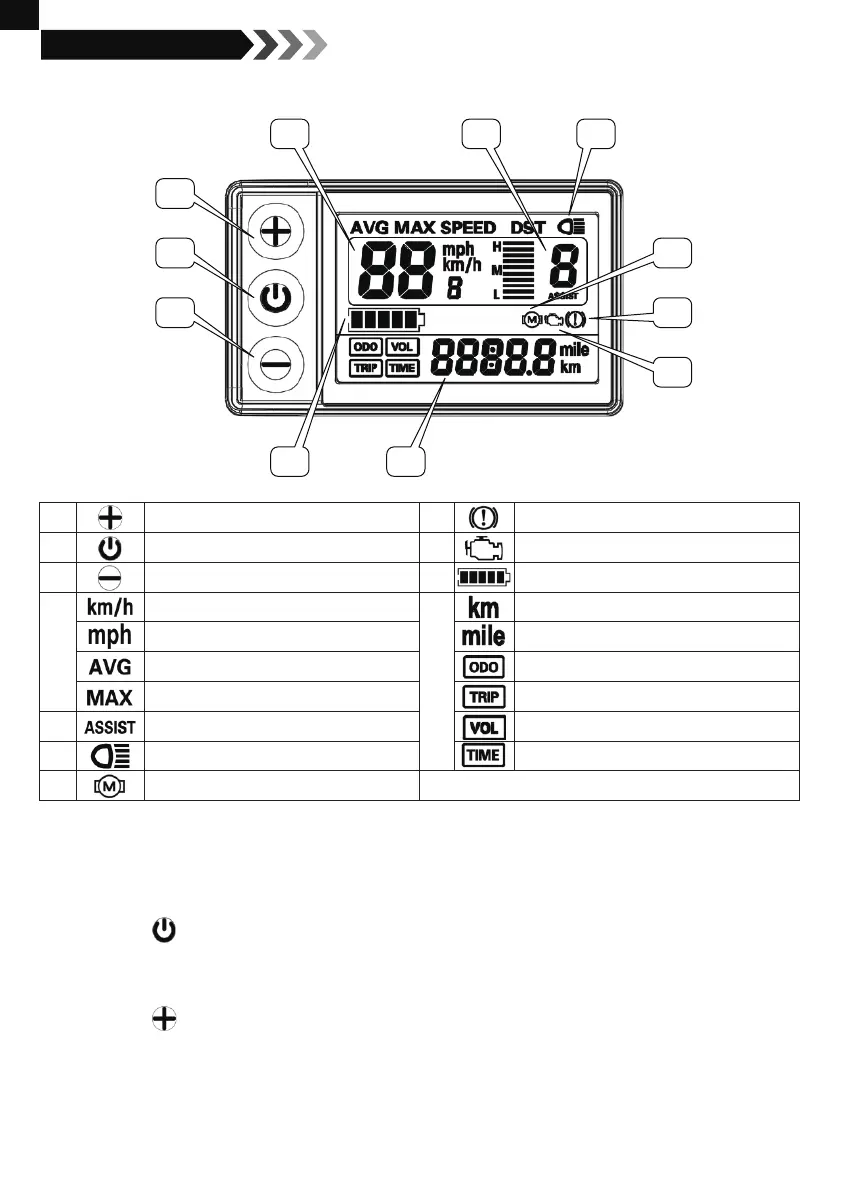
Contents on The Display
8. LCD Display Guide
1
7
8
9
4 5
10 11
6
2
3
Functions & Operations
Power on/off
Long press the button to turn the machine on/off. When the bicycle isn’t moving and the display
hasn’t been used for 10mins, it will turn off all the power automatically.
Light on/off
Long press the button to turn on/off the LCD backlight and the bike light.
1
2
3
4
5
6
7
8
9
10
11
UP
ON/OFF
DOWN
Real-time Speed Unit
Single Average Speed
Single Max. Speed
Speed Mode Shifting
Light-on Mark
Motor Malfunction Mark
Brake Mark
Malfunction Mark
Battery Power Indicator
Mileage Unit
Mileage Unit
Odometer
Trip Distance
Real-time Battery Voltage
Trip Time

Related product manuals