MX 3900 / MX 4900
Operation
19
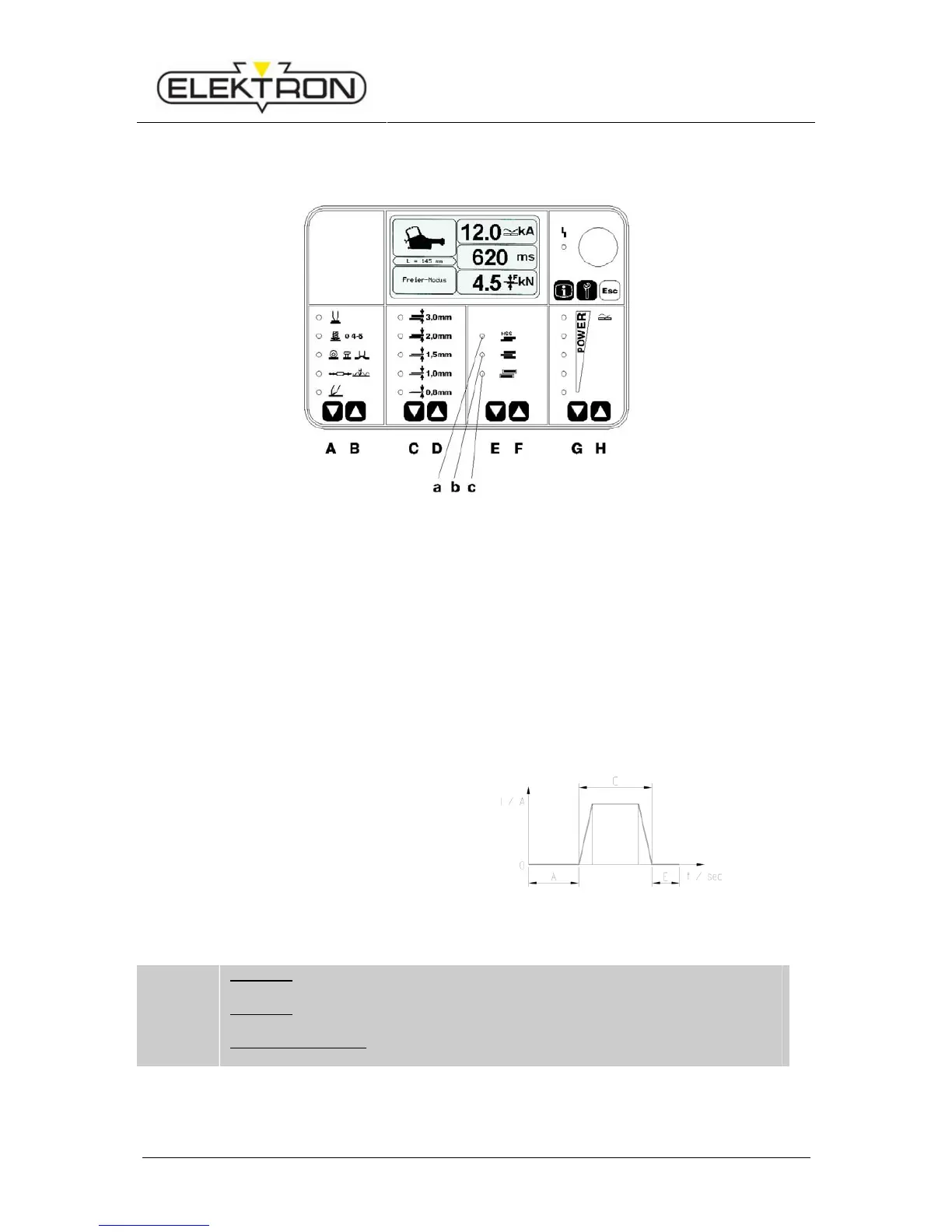
5.4 Welding set up, for example at the MI-100control
i
MX 3900: Welding can be interrupted anytime by release of the contact button
(Fig. 1 ).
MX 4900: Welding can only be interrupted until current is flowing
Aplies for both pliers:
Post pressing time can be extended by keeping the pliers button pressed.
Adjusting sheet thickness:
Select welding task with keys EF, e. g.
a - HSS sheets )
b - three-ply sheets ) (see Fehler! Verweisquelle konnte nicht gefunden werden.)
c - galvanized sheets )
Several options can be selected at the same time.
During welding, hold the pliers button until the welding process is automatically cut-off.
Example of a welding program sequence
(see diagram on the left):
A – Pre-pressing 1 sec.
C – Welding time depending to setting.
E – Post-pressing 1 sec.
(see Fehler! Verweisquelle konnte
nicht gefunden werden.)
Fig. 15: Sequence welding program
Fig. 14: Selecting welding task


 To Next Page