DRYER USE
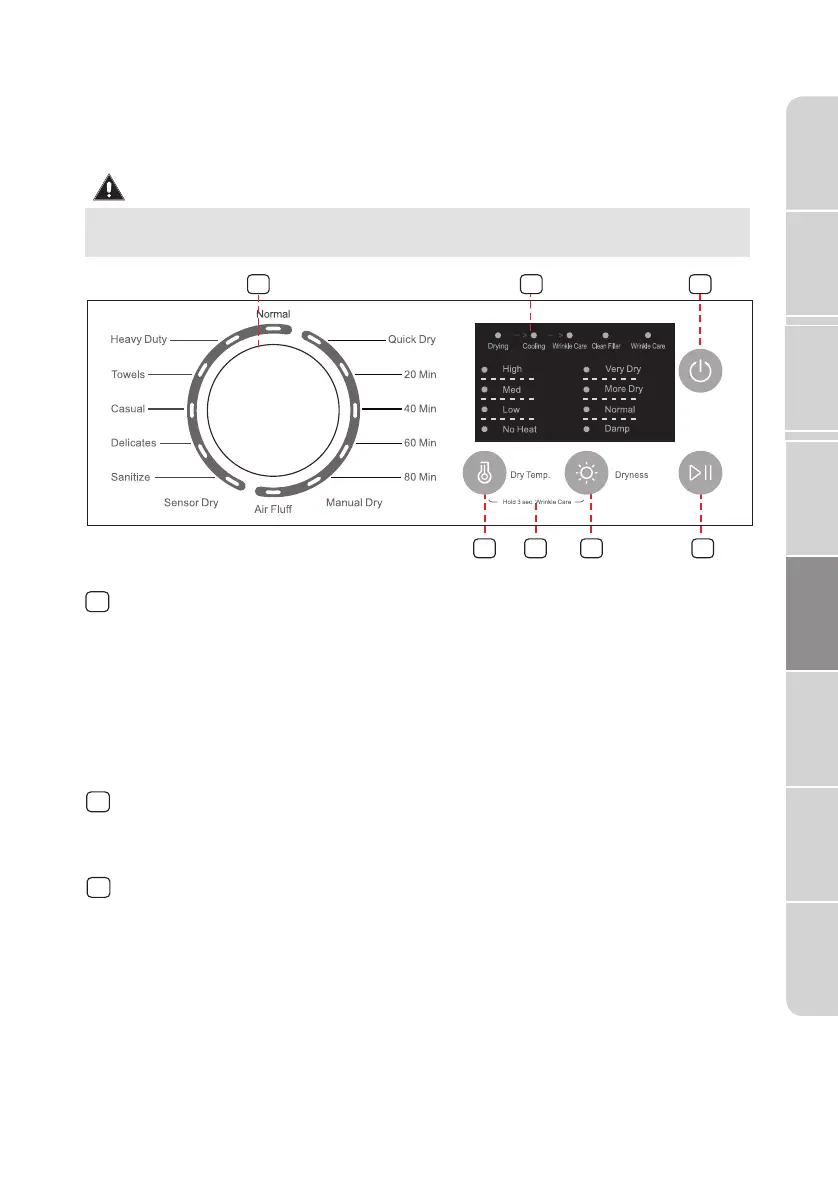
CONTROL PANEL
WARNING
To reduce the risk of fire, electric shock, or injury to persons, read the
IMPORTANT SAFETY INSTRUCTIONS before operating the appliance.
1
Cycle selector
Select your desired cycle for the type of load.
The cycle you select determines the heat control for the cycle.
The Normal, Heavy Duty, Towels, Casual, Delicates and Sanitize cycles
are Sensor Dry cycles.
The Quick Dry, 20Min, 40Min, 60Min, 80Min and Air Fluff are Manual
Dry cycles.
1
7
45
6
2
3
2
Cycle status display
The relative indicator light will be flash when the dryer is in its drying
program, other process indicators to be executed are lit.
3
POWER
Press to turn your dryer on or off. If your dryer is on for more than
10 minutes without any buttons being pressed, it automatically
turns off.
Dryer
Safety
Operation
Requirements
Parts and
Features
Installation
Instructions
Dryer Use
Appendix
Dryer Care
Troubleshooting
33


 To Next Page