and become colorless when a wrong system is selected.
2)For more information of output format, refer to the instruction
of your TV set.
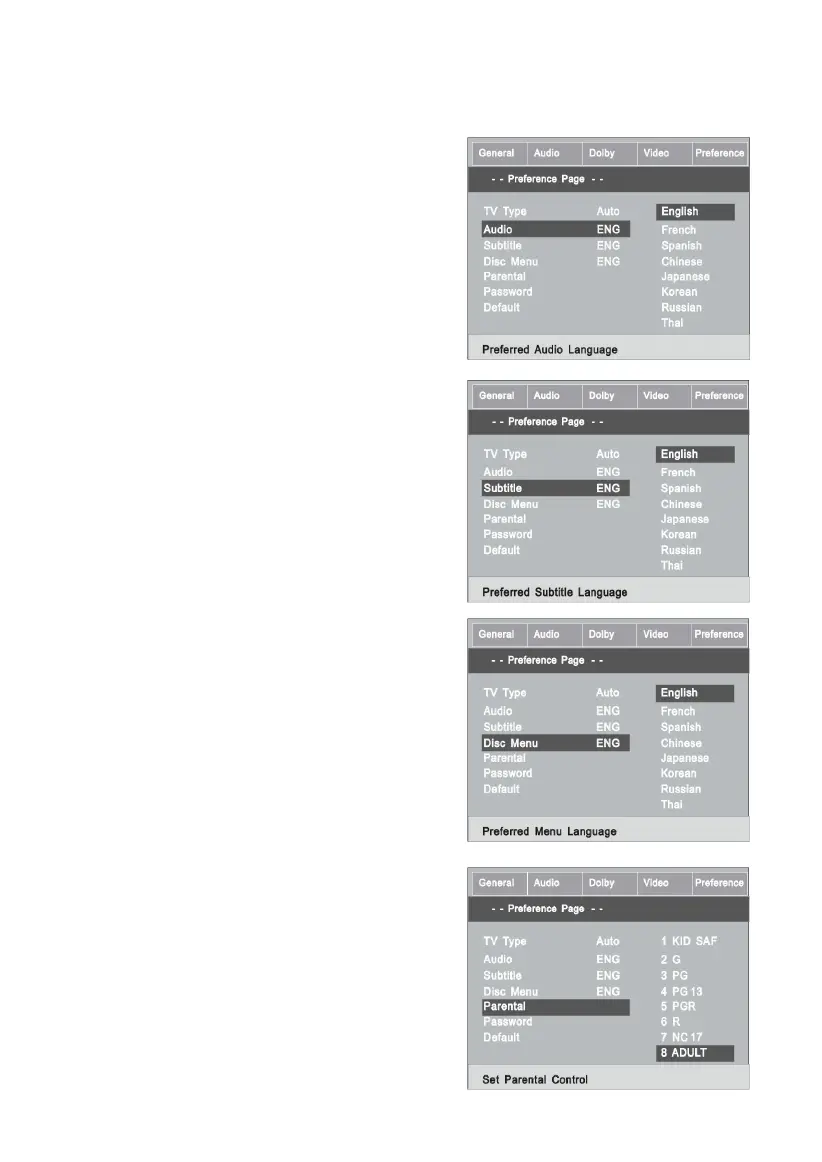
1.5.2 AUDIO
Follow the operating instructions
stated in “DVD MENU SETUP” in
combination with the desired op-
tion in the following figure.
This machine provides English,
French, Spanish, Chinese, Japa-
nese, Korean, Russian and Thaias
the built-in disc dubbing language
options.
1.5.3 SUBTITLE
This machine provides English,
French, Spanish, Chinese, Japa-
nese, Korean, Russian and Tha-
ias the built-in subtitle language.
When a DVD is played, the user
may hide the subtitle or choose
any of them as the preset subtitle
language.
Follow the operating instructions
stated in “DVD MENU SETUP” in
combination with the desired op-
tion in the following figure.
1.5.4 DISC MENU LANGUAGE
This machine provides English,
French, Spanish, Chinese, Japa-
nese, Korean, Russian and Thaias
the film’s menu language options.
Follow the operating instructions
stated in “DVD MENU SETUP” in
combination with the desired op-
tion in the following figure.
1.5.5 PARENTAL
Follow the operating instructions
stated in “DVD MENU SETUP” in
combination with the desired op-
tion in the following figure.
For a film to be restricted for chil-
32



 To Next Page