5
Fuse or Lose
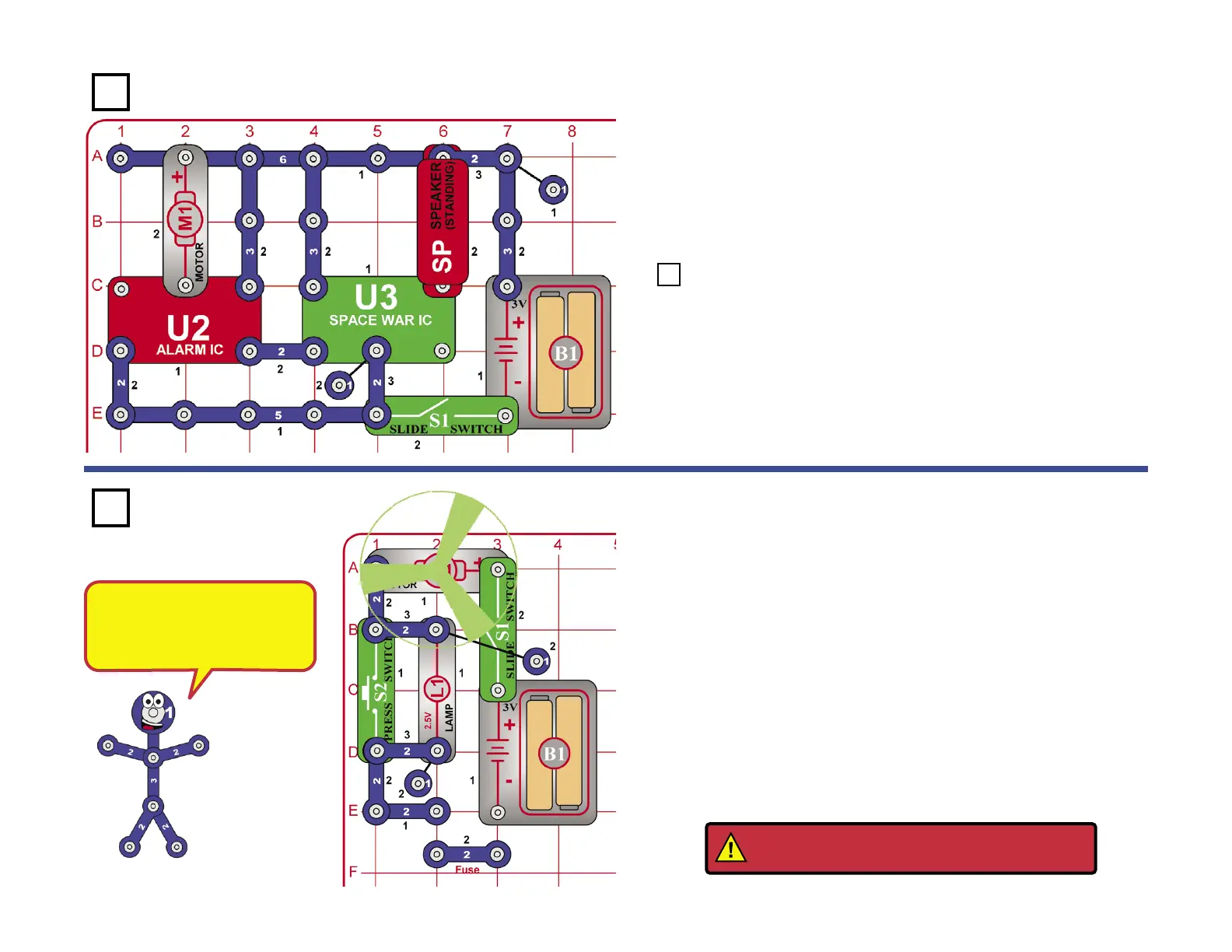
When you close the slide switch (S1), current ows from the batteries
through the slide switch (S1), the lamp (L1), motor (M1), and back to
the battery (B1). Pretend the 2-snap wire marked fuse in the drawing
on the left is a device that will open the circuit if too much current is
taken from the battery. When press switch (S2) is closed, the light is
shorted and motor speed increases due to an increase in current to the
motor. While still holding press switch (S2) down, remove the 2-snap
wire marked fuse and notice how everything stops. Until the fuse is
replaced, the open circuit path protects the electronic parts. If fuses did
not exist, many parts could get hot and even start res. Replace the
2-snap wire and the circuit should return to normal.
Many electronic products in
your home have a fuse that will
open when too much current is
drawn. Can you name some?
Space Battle
Build the circuit shown on the left. Turn on the switch (S1) and you will
hear exciting sounds, as if a space battle is raging!
The motor (M1) is used here as a 3-snap wire, and will not spin.
The preceding circuit is loud and may bother people around you,
so replace the speaker (SP) with the LED (D1). Make sure you
connect the LED with the positive (+) side on A6, not U3. Now you
have a silent space battle.
Project 68 Bizzare Blinker
Project 69
Project 67
WARNING: Moving parts. Do not touch the fan
or motor during operation.










 To Next Page