claros pico user manual V 2.1 page 17 of 34
6.2
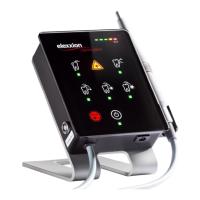
Display and display elements
The ON/OFF button is pressed first of all in order to activate the device.
All indicators light up to confirm that the device is functioning. A code should then be entered. The code
consists of the following key combinations:
1. Periodontology key
2. "Med" surgery key
3. Endodontics key
4. "High" surgery key
The 5 program keys will turn off after a program has been activated.
Application Periodontology


 To Next Page
 Loading...