claros pico user manual V 2.1 page 18 of 34
6.3
Program selection and laser operation
6.3.1 Standby Mode
The device will go into standby mode automatically following 5 minutes of inactivity. The device is switched on by
pressing the ON/OFF button. The activation code should then be entered.
6.3.2 Program selection mode
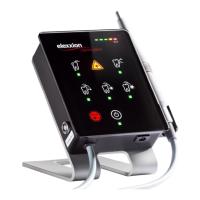
The five program keys will light up. The following options are available:
Endontics
Periodontology
surgery low
surgery med
surgery high
Soft laser therapy + (at the same time)
perio green® program + (at the same time)
Appropriate applications together with the appropriate parameters in line with the programs are given in the
application table page 26.
Laser stop button. Stops radiation emission immediately in any operating status.
6.3.3 Laser warning mode
After confirming the specific program, the device displays a flashing laser warning symbol. This mode lasts 2 seconds.
From this point in time, everyone in the laser protection area must wear suitable safety glasses.
6.3.4 Laser ready mode
Following the laser warning mode, the laser is ready for use. The selected program symbol is displayed.
Laser emission is activated by pressing the foot switch. The laser warning symbol on the device flashes while the foot
switch is activated. A periodic warning sound beeps and laser radiation is emitted.
The device switches off automatically after 10 minutes without activity
Attention! From this point in time, activating the foot switch will result in emission of laser radiation.


 To Next Page
 Loading...