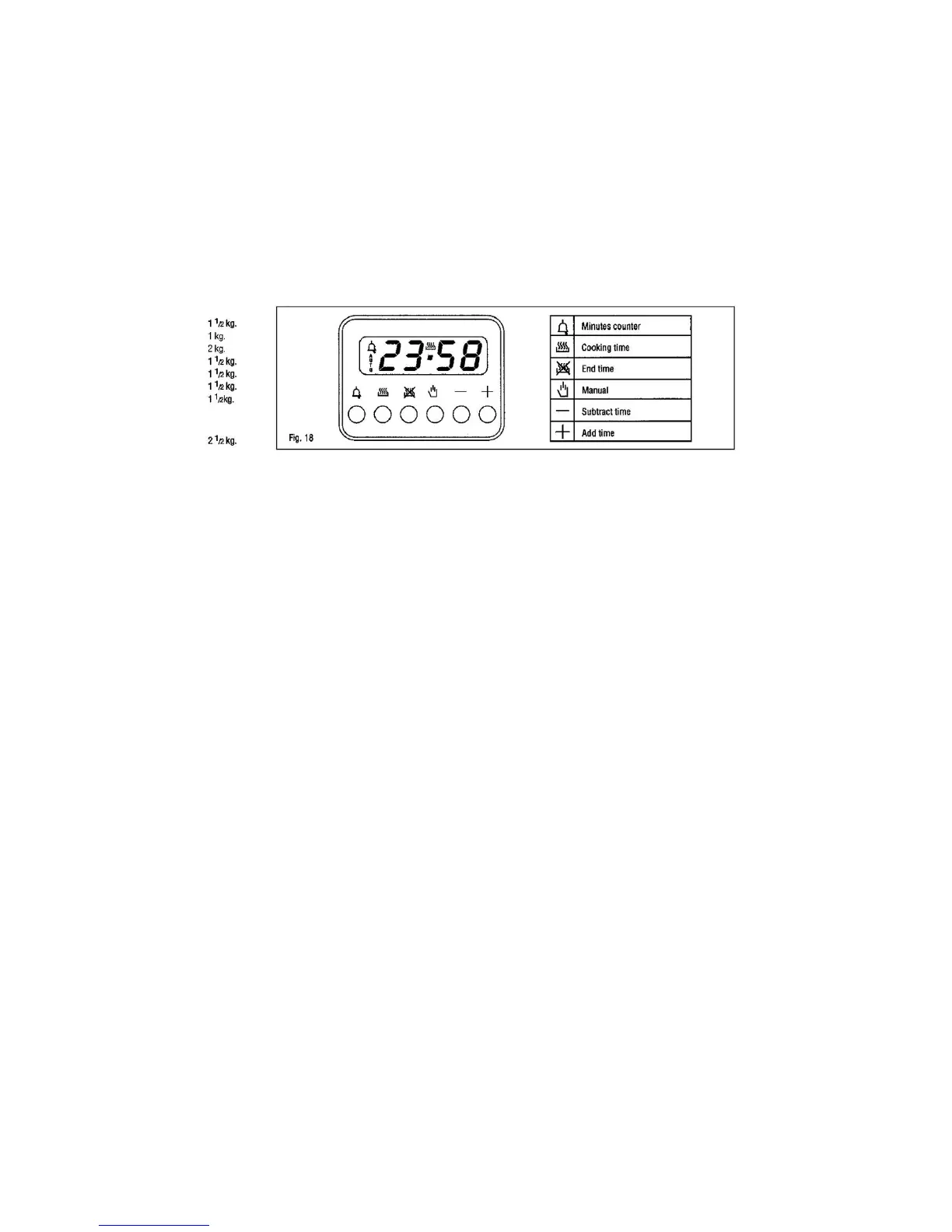
Cooking time and manual function =saucepan symbol
Automatic function =AUTO
Minutes counter =bell symbol
The symbols light up when the corresponding function are selected
Setting
To set ,press and release the desired function ,and within 5 seconds set the time with +and
–buttons .
TASTO +e
-
+and buttons .
the +and –buttons increase or decrease the time at a speed depending on how long button is
pressed
Setting the time
press any two buttons (cooking time ,end time ,minutes counter) at the same time ,and +or –button
to set the desired time .this deletes any previously set programme.
The contacts are switched off and the AUTO symbol flashes.
Manual use
By pressing the manual button the relay contacts switch on, the AUTO symbol switches off and
saucepan symbol lights up.
Manual operation can only be enabled after the automatic programme is over or it has been
cancelled.
Automatic use
Press the cooking time or end time button to automatically form the manual to the automatic
function.
Semi-automatic use with cooking time setting
Press the cooking time button and set the desired time with +or -, the AUTO and cooking time
symbols light up continuously. The relay switches on immediately. When the cooking end time
corresponds to the time of day, the relay and the cooking time symbol switch off. the sound singal
rings and the AUTO symbol flashes.
Semi-automatic use with end time setting
Press the end time button. The time of day appears on the display. Set the cooking end time with
+button. The AUTO and cooking time symbols light up continuously. The relay contacts switch on.



 To Next Page