35
2. BLUETOOTH WIRELESS DIGITAL CONNECTION (DEPENDING ON THE MODEL)
Some Elipson’s turntable are equipped with an aptX Bluetooth transmitter for your wireless
receivers. The Bluetooth signal will be sent to your wireless hi- system. Your receiver must be
equipped with a volume control, that you will need to adjust to a low volume before use.
For your rst connection between the turntable and your Bluetooth receiver, you need to pair
both devices. You have to do this once for each Bluetooth receiver.
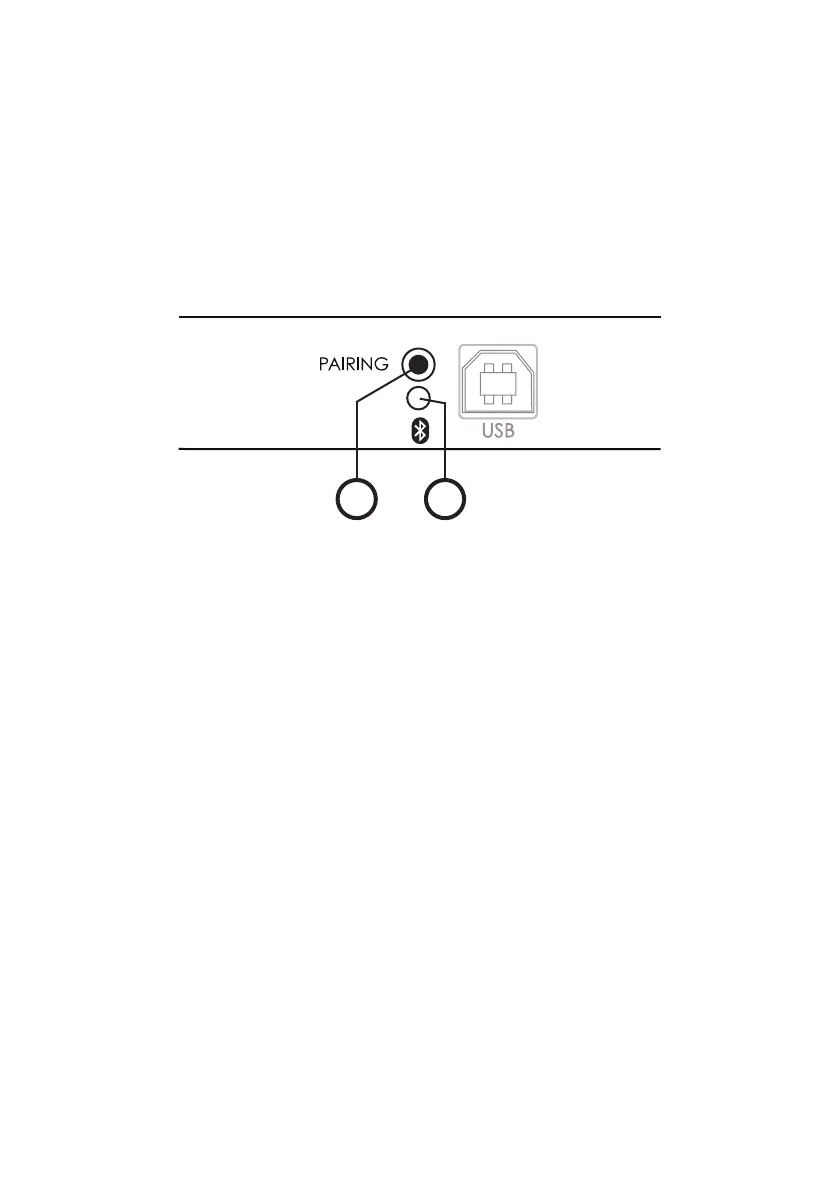
1 : Bluetooth pairing button
2 : Bluetooth activity indicator with a blue LED
1 2
First use :
• Plug in the turntable and turn on the receiver (amplier or speaker).
The turntable’s blue LED ashes slowly (after a delay of 25 seconds).
• Shortly press the pairing button on the turntable.
The turntable’s LED ashes blue and red.
• Press the pairing button of the receiver.
• Wait for pairing between both devices.
The turntable’s blue LED remains on.
Your Bluetooth receiver is now connected to the turntable.
Daily use :
(or if the turntable has been turned off / unplugged (due to a power failure for instance)) :
• Check that the receiver is on.
• Plug in the turntable.
The turntable’s blue LED ashes slowly (after a delay of 25 seconds).
• The pairing between both devices is automatic.
The turntable’s blue LED remains on.
Your Bluetooth receiver is now connected to the turntable.


 To Next Page