38
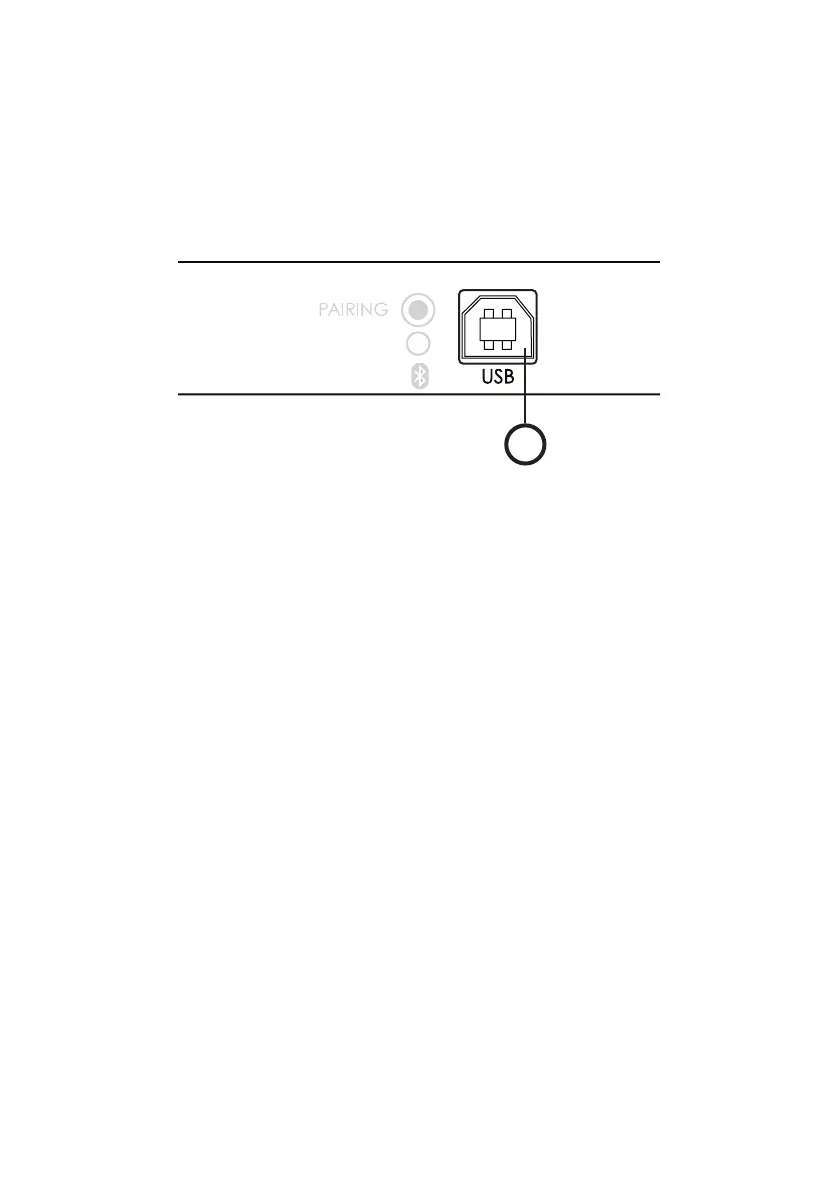
You can connect the turntable to a computer using the USB port.
The turntable is recognized as a USB audio source and allow you to record** your discs.
Compatible with Windows and Mac OS.
VIII. USB RECORDING (DEPENDING ON THE MODEL*)
1
1 : USB port allowing connection to a computer using a type B USB cable
* models with USB port : Bluetooth models only
** requires a specialized software (not provided). You can nd many free downloadable softwares.
• Connect one end of a type B USB cable (not provided) to the USB port of the turntable.
• Connect the other end to the USB port of your computer.
On Windows :
• Open the Control Panel (Start menu)
• Select “Hardware and Sound”
• Click on “Sound” then “Recording”
• Select “Elipson” in the list of available devices then click “by default” to save your choice.
• Check the input volume, increase it if needed.
• Run the software (not provided).
• Start playing the disc and record.
On Mac OS :
• Open System Preferences (Apple menu)
• Go to sound setting and then “Input”
• Select “Elipson ” as sound input.
• Check the input volume, increase it if needed.
• Run the software (not provided).
• Start playing the disc and record.
EN


 To Next Page