SHT-4
cos φ ≥ 0.95
M M
HAL.230V
K
M M
AC12
x
DC14
x
AC1
250V / 16A
AC13
x
AC2
250V / 5A
AC14
250V / 6A
AC3
250V / 3A
AC15
250V / 6A
AC5b
1000W
DC5
24V / 2A
AC6a
x
DC12
24V / 6A
AC7b
250V / 3A
DC13
24V / 2A
02-23/2017 Rev.: 1
1/5
ON / OFF
ON / OFF #
ON / OFF
astro
ManProgAuto + t
6
1
2
3
5
7
8
4
9
10
11
12
13
14
15
16
18
20
21
17
19
15 25
16
A2
A1 18 26 28
astro
A2 26 25 28
A1 16 15 18
Un
Made in Czech Republic
ELKO EP, s.r.o.
Palackého 493
769 01 Holešov, Všetuly
Czech Republic
Tel.: +420 573 514 211
e-mail: elko@elkoep.com
www.elkoep.com
Timer with an astronomical program
Characteristics
Symbol
Type of load
Mat. contacts AgSnO
2
,
contact 16A
Type of load
Mat. contacts AgSnO
2
,
contact 16A
AC5a
uncompensated
230V / 3A (690VA)
DC1
24V / 10A
AC5a
compensated
230V / 3A (690VA)
to max. input C=14uF
DC3
24V / 3A
EN
Connection
Description
Mode precendence
mode with the highest priority
manual control
holiday mode
time program
Prog
Mode precedence Display Output mode
The SHT-4 astronomic timer is used for the automatic real-time controlling of appliances. The timer
operates all year round without the need of continuous maintenance, with minimum operating costs and
maximum savings of electrical energy. (For example for turning on heating, pumps, ventilators, public
lighting etc.). Appliances can be controlled in regular time cycles or based on a pre-set programme.
The astronomic timer does not include any optical sensors or other external equipment. After installation, it
requires no special operation or maintenance. In the case of a power supply interruption, the timer retains all
set values required for its reliable activation after power is restored.
The operation of the astronomic timer is based on the variations in the sunset and sunrise times
throughout the year. Based on the current date (internal real-time clock), it automatically modi es
the times for turning on or o e.g. public lighting. Time updates are resolved automatically for every
day of the year. Using the O set function, it is possible to modify the times for switching on or o by
± 120 minutes. The o set is xed, i.e. the same for both channels each day.
- The 2-channel design (with the option of assigning separate programmes and modes to each channel)
allows controlling two independent circuits.
- Switching modes:
- Auto - automatic switching mode:
- Programme
- switching based on a programme (astro or time).
- Random - switches randomly in a 10 - 120 minute interval.
- Holiday #
- holiday mode - option of setting up a period for which the timer will be blocked, i.e. will not
switch based on the set programmes
.
- Manual - manual mode - option of controlling the individual output relays manually
- Options of the automatic switching programme:
- Astro - switches based on the time of sunset / sunrise calculated from input date and geographical
location. This time can be corrected ± 2 hours.
- Time programme - switching based on a pre-set time programme
- Memory capacity for 100 time programmes (common for both channels).
- Programming can be performed both when power is on or in backup mode.
- Output relays only operate with a supply voltage of AC 230 V.
- Menu display selection - CZ / SK / EN / ES / PL / HU / RU (default factory setting EN).
- Selection of automatic switching between summer / winter timebased on location.
- Setting the geographic location (selection from prede ned options).
- Exact calculation of sunrise and sunset by entering the date, time, latitude and longitude and time
zone.
- Backlit LCD display.
- Simple and easy setup using 4 control buttons.
- Sealable transparent cover on the front panel.
- The timer has a backup battery that preserves data in case of a power supply failure (reserve backup
time up to 3 years).
- Supply voltage: AC 230 V.
- 2-module, mounted onto a DIN rail, clamping terminals.
- After plugging the timer in for the rst time, the current time, date and geographic location must be
set for correct operation of the astronomical clock.
1. Supply voltage terminal (A1)
2. Display with back-light
3. Place for seal
4. Plug-in module
5. Supply voltage terminal (A2)
6. Output - channel 1 (16-15-18)
7. Control buttons
8. Output - channel 2 (26-25-28)
9. Indicates the day in the week
10. Indication (1st channel)
11. Indication (2nd channel)
12. Indication of date / setting menu
13. Time display
14. Control button PRG / +
15. Reset
16. Control button MAN1 / -
17. Operating modes indication
18. 12/24 hours format / sunset - sunrise
19. Indication of the switch program
20. Control button MAN2 / ESC
21. Control button OK
CONTROL OF A DISPLAY WITH BACKLIGHT
Power on: Display is illuminated with a backlight for 10 seconds from the last button press.
The display continuously shows the settings - date, time, day of the week, contact state and
programme. Permanent on / o is activated by simultaneous presses of the MAN, ESC, OK
buttons. After activating the permanent on/o , the display will ash brie y.
Backup mode: After 2 minutes, the display switches to the sleep mode, i.e. shows no information.
The display can be activated by pressing any button.
astro and Time Program can work at the same time on a single channel.

 Need help?
 General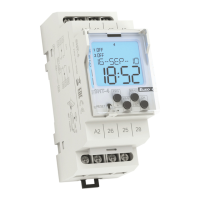

 To Next Page