EasyManua.ls Logo

Elkron EL20RT/10 - User Manual

Elkron EL20RT/10
24 pages
Go to English
Print Icon
To Next Page IconTo Next Page
Loading...
1
EL20
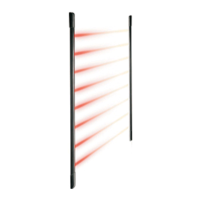
EL20 - Barriera ad infrarossi per esterno
Caratteristiche generali
4 modelli di barriere: EL20RT/05 (0,5m - 2 fasci), EL20RT/10 (1m - 4
fasci), EL20RT/15 (1,5m - 6 fasci), EL20RT/20 (2m - 8 fasci).
Dimensioni estremamente ridotte per consentire anche l’installazione tra la
finestra e la persiana o l’avvolgibile.
Elevata resistenza agli urti e alle intemperie grazie al contenitore in
policarbonato e al sistema di guarnizioni sui coperchi di chiusura.
Resistenza ai raggi UV
Compensazioni delle dilatazioni causate dalle escursioni termiche grazie
al particolare sistema di costruzione
Massima stabilità delle colonne installate a muro ottenuta con fissaggi in-
termedi.
Protezione antiapertura e antiasportazione
Semplice allineamento ottico (senza strumenti di taratura)
Tecnologia SMD con gestione a microprocessore
3 modalità di funzionamento selezionabili: fasci punto-punto, fasci adiacen-
ti, fasci incrociati
Portata selezionabile in funzione della tipologia di installazione (vedi par.
Programmazioni Tx). Le distanze riportate sono indicative e possono subi-
re variazioni dovute all’ambiente in cui si effettua l’installazione.
Codice di identificazione tra TX e corrispondente RX
Sincronismo ottico delle barriere (senza connessione filare)
Memoria di allarme
Terrazze
Protezioni
Esterne
Avvertenze per l’installazione
Evitare per quanto possibile la presenza di oggetti che possano ostacolare il
fascio. E’ consigliabile utilizzare cavo schermato e preferibilmente un cavo
per ogni barriera.
Se vengono installate delle barriere consecutive o parallele utilizzare la
configurazione descritta in figura 1.
Posizionare le barriere in modo da evitare che i raggi del sole possano incidere
direttamente sui ricevitori (vedi figura2)
Nel caso di installazione in presenza di estese superfici riflettenti, che
potrebbero indurre accoppiamenti ottici indesiderati, prima della posa definitiva
è opportuno verificare la piena funzionalità della barriera.
Per il fissaggio delle colonne utilizzare esclusivamente le viti fornite in
dotazione.
La barriera può essere installata indifferentemente con
il cavo in alto o in basso, con la sola avvertenza che il
trasmettitore ed il ricevitore siano posizionati nello stesso
verso (figura 3).
Onde evitare di pregiudicare il funzionamento della
barriera (con decadimento della garanzia) si raccomanda
di evitare ogni tentativo di sfilare i supporti della barriera.
• Le due colonne vengono fornite abbinate in coppie di Tx
ed Rx.; pertanto in caso di sostituzione per manutenzione
è necessario sostituire la coppia.
RX
TX
RX
TX
BARRIERE
PARALLELE
TX
RX
RX
TX
NO
SI
RX
TX
TX
RX
RX
TX
RX
TX
BARRIERE
CONSECUTIVE
SI
NO
Figura 1
Protezioni
Interne
I
TX
RX
RX
Figura 2
NO
SI
IS1077-AE
10.2003
Figura 3
SI
SI
NO
Finestre

Questions and Answers

  • H
    hoffmancarolineJul 25, 2025
    Why is the LED on my Elkron Security System lit with a fixed light, and the relay contact is open?
    • B
      Brian CastroJul 25, 2025
      This issue may occur due to several reasons. It could be due to an incomplete acquisition of the random code; in this case, ensure there are no obstructions between the barriers. Another cause could be a missing power supply to the TX column; make sure to supply power to the TX column. Also, verify that the barrier is not excessively off-center and reposition the barriers if needed. Finally, check that the range selection jumper is correctly set according to the distance between the barriers.
  • L
    Lori JohnsonJul 30, 2025
    What to do if the LED on my Elkron Security System is lit with a fixed light, but the relay contact is closed?
    • H
      huffstephanieJul 31, 2025
      This could be because the alarm memory is enabled. To resolve this, arm the system and then disarm it, referring to the TC input if necessary.
  • A
    Allison CookAug 6, 2025
    What to do if the LED is flashing and the relay contact is open on my Elkron Security System?
    • A
      alexisacostaAug 6, 2025
      A flashing LED with an open relay contact usually indicates a fault in the RX column. Inspect the RX column and replace it if necessary.
  • J
    Jeffrey AndersonAug 12, 2025
    Why is the LED always OFF and the relay contact open on my Elkron Security System?
    • D
      Donald AtkinsonAug 12, 2025
      If the LED is always off and the relay contact is open, it's likely due to a missing power supply to the RX column. Ensure that the RX column is properly supplied with power.
  • C
    Christian HernandezAug 18, 2025
    What does it mean if the LED is always OFF and the relay contact is closed on my Elkron Security System?
    • M
      Megan GreenAug 18, 2025
      If the LED is always off and the relay contact is closed, it indicates the presence of TC. Arm the system and check the connections to resolve this.

Summary

General Characteristics

Model Range

Details the four available barrier models with varying beam counts.

Durability

High resistance to shocks, weather, and UV rays due to polycarbonate case and seals.

Installation Hints

Obstruction Avoidance

Avoid objects obstructing the beam; use shielded cable.

Consecutive;Parallel Installation

Use specific configuration for consecutive or parallel barrier setups.

Sunlight Avoidance

Position barriers to prevent direct sun rays on receivers.

Installation Procedures

Column Placement and Marking

Arrange columns opposite each other at same height, mark fixing holes.

Wall Fixing

Fix column to wall using appropriate screws and slotted holes.

Connection and Programming

RX Programming Modes

Programming RX modes using integral jumpers for beam interruption.

TX Programming Options

Programming TX optical power using integral or cut jumper.

Programming Summary

Summary table of RX programming based on jumper conditions.

First Power-Up and Troubleshooting

Receiver LED Indicators

Receiver LED indicates malfunctions: OFF (closed relay), flashing (troubleshooting).

Troubleshooting Guide

Table listing common troubles, causes, and corrective measures.

Technical Specifications

Details power supply, absorptions, range, temperature, and dimensions.

Elkron EL20RT/10 Specifications

General IconGeneral
BrandElkron
ModelEL20RT/10
CategorySecurity System
LanguageEnglish

Related product manuals