EasyManua.ls Logo

Elmo 16-CL - Page 59

Elmo 16-CL
76 pages
Print Icon
To Next Page IconTo Next Page
To Previous Page IconTo Previous Page
Loading...
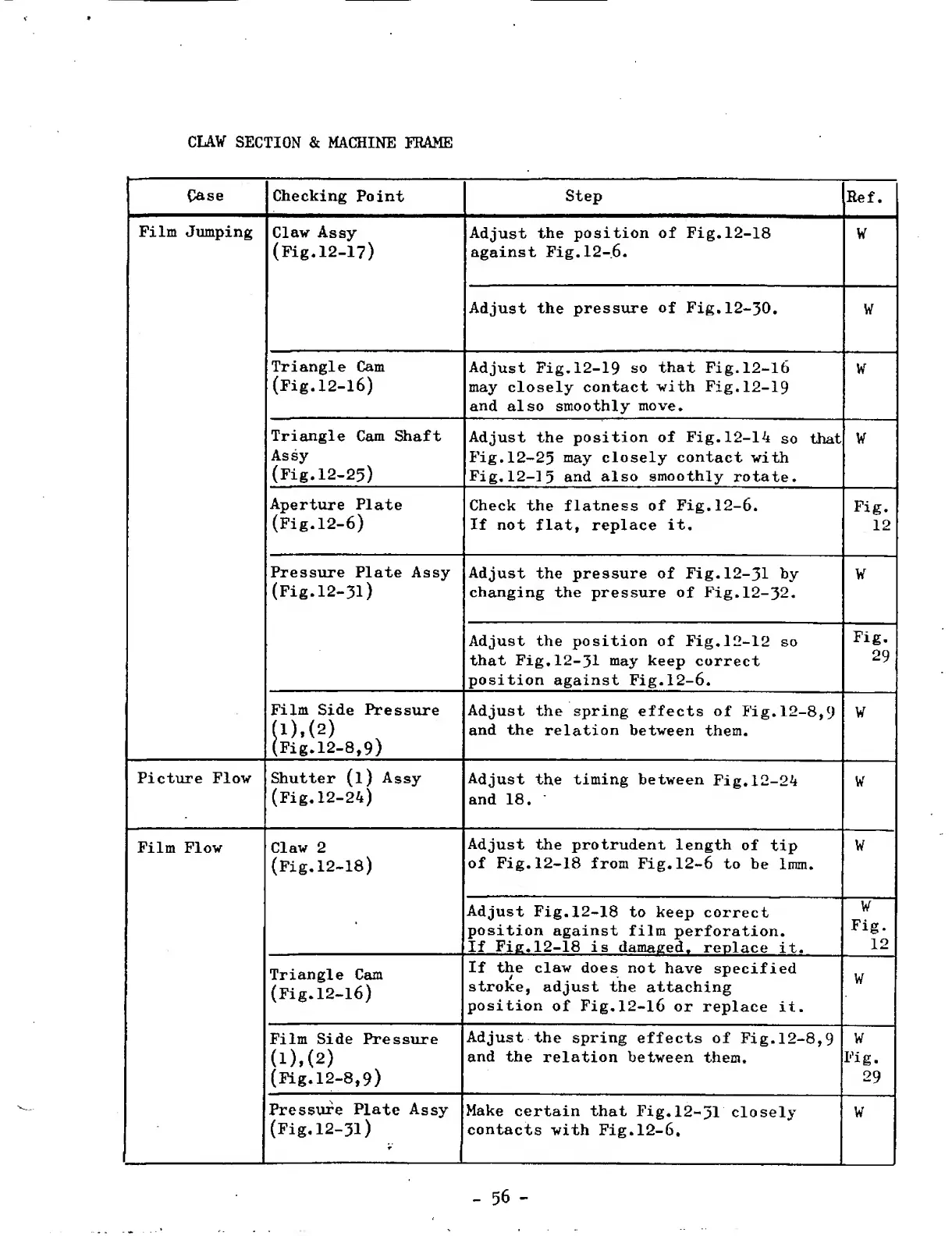
CLAW
SECTION
&
MACHINE
FRAME
Case
Checking
Point
Step
Ref.
Film
Jumping
Claw
Assy
(Fig.12-17)
Adjust
the
position
of
Fig.12-18
against
Fig.12-6.
W
Adjust
the
pressure
of
Fig.12-30.
W
Triangle
Cam
(Fig.12-16)
Adjust
Fig.12-19
so
that
Fig.12-16
may
closely
contact
with
Fig.12-19
and
also
smoothly
move.
W
Triangle
Cam
Shaft
Assy
(Fig.12-25)
Adjust
the
position
of
Fig.12-14
so
that
Fig.12-25
m
ay
closely
contact
with
Fig.12-15
and
also
smoothly
rotate.
W
Aperture
Plate
(Fig.12-6)
Check
the
flatness
of
Fig.12-6.
If
not
flat,
replace
it.
Fig.
12
Pressure
Plate
Assy
(Fig.12-31)
Adjust
the
pressure
of
Fig.12-31
hy
changing
the
pressure
of
Fig.12-32.
W
Adjust
the
position
of
Fig.12-12
so
that
Fig.12-31
may
keep
correct
position
against
Fig.12-6.
Fig.
29
Film
Side
Pressure
(l).(2)
(Fig.12-8,9)
Adjust
the
spring
effects
of
Fig.12-8,9
and
the
relation
between
them.
W
Picture
Flow
Shutter
(l)
Assy
(Fig.12-24)
Adjust
the
timing
between
Fig.12-24
and
18.
W
Film
Flow
Claw
2
(Fig.12-18)
Adjust
the
protrudent
length
of
tip
of
Fig.12-18
from
Fig.12-6
to
be
1mm.
W
Adjust
Fig.12-18
to
keep
correct
position
against
film
perforation.
If
Fig.12-18
is
damaged,
replace
it.
W
Fig.
12
Triangle
Cam
(Fig.12-16)
If
the
claw
does
not
have
specified
stroke,
adjust
the
attaching
position
of
Fig,
1
2
-
1
6
or
replace
it.
W
Film
Side
Pressure
(l),(2)
(Fig.12-8,9)
Adjust
the
spring
effects
of
Fig.12-8,9
and
the
relation
between
them.
W
Fig.
29
Pressure
Plate
Assy
(Fig.12-31)
r
Make
certain
that
Fig.12-31
closely
contacts
with
Fig.12-6.
W
-
56
-

Related product manuals