EasyManua.ls Logo

Elmo 16-CL - Page 61

Elmo 16-CL
76 pages
Print Icon
To Next Page IconTo Next Page
To Previous Page IconTo Previous Page
Loading...
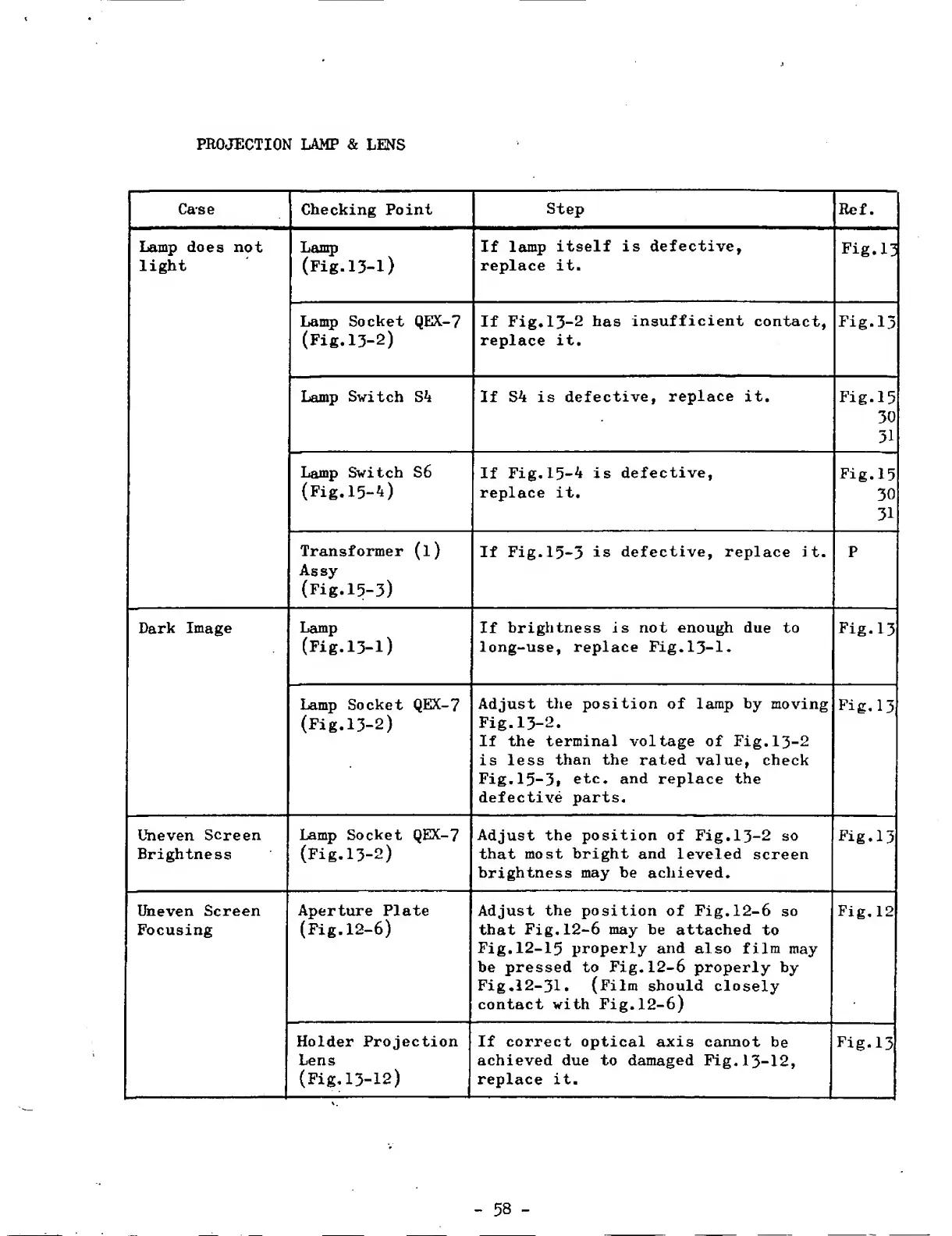
PROJECTION
LAMP
&
LENS
Case
Checking
Point
Step
Ref.
Lamp
does
not
light
Lamp
(Fig.
1
3
-
1
)
If
lamp
itself
is
defective,
replace
it.
Lamp
Socket
QEX-7
(Fig.13-2)
If
Fig,13-2
has
insufficient
contact,
replace
it.
Fig.13
Lamp
Switch
S4
If
S4
is
defective,
replace
it.
Fig.15
30
31
Lamp
Switch
S6
(Fig,15-4)
If
Fig.15-4
is
defective,
replace
it.
Fig.15
30
31
Transformer
(l)
Assy
(Fig.15-3)
If
Fig.15-3
is
defective,
replace
it.
P
Dark
Image
Lamp
(Fig.13-1)
If
brightness
is
not
enough
due
to
long-use,
replace
Fig.13-1.
Fig.13
Lamp
Socket
QEX-7
(Fig.13-2)
Adjust
the
position
of
lamp
by
moving
Fig.13-2.
If
the
terminal
\oltage
of
Fig.13-2
is
less
than
the
rated
value,
check
Fig.15-3,
etc.
and
replace
the
defective
parts.
Fig.13
Uneven
Screen
Brightness
Lamp
Socket
QEX-7
(Fig.13-2)
Adjust
the
position
of
Fig.13-2
so
that
most
bright
and
leveled
screen
brightness
may
be
achieved.
Fig.13
Uneven
Screen
Focusing
Aperture
Plate
(Fig.12-6)
Adjust
the
position
of
Fig.12-6
so
that
Fig.12-6
may
be
attached
to
Fig.12-15
properly
and
also
film
may
be
pressed
to
Fig.12-6
properly
by
Fig.12-31.
(Film
should
closely
contact
with
Fig.12-6)
Fig.12
Holder
Projection
Lens
(Fig.
13-12)
If
correct
optical
axis
cannot
be
achieved
due
to
damaged
Fig.13-12,
replace
it.
Fig.13
-
58
-

Related product manuals