EasyManua.ls Logo

Elmo 16-CL - Page 64

Elmo 16-CL
76 pages
Print Icon
To Next Page IconTo Next Page
To Previous Page IconTo Previous Page
Loading...
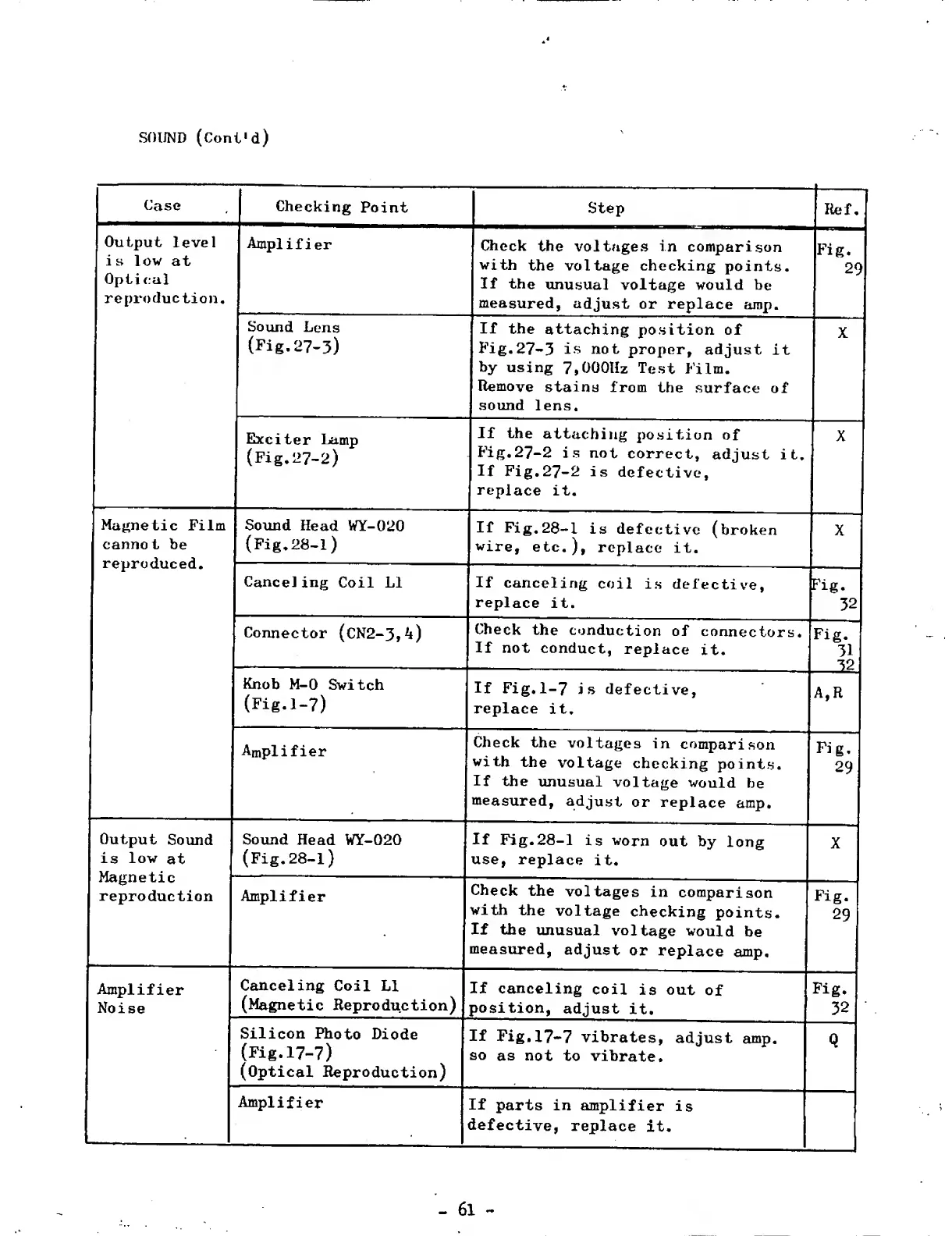
SOUND
(Cont»d)
Case
Checking
Point
Step
lief.
Output
level
is
low
at
Optical
reproduction.
Amplifier
Check
the
voltages
in
comparison
with
the
voltage
checking
points.
If
the
unusual
voltage
would
be
measured,
adjust
or
replace
amp.
Fig.
29
Sound
Lens
(Fig.27-3)
If
the
attaching
position
of
Fig.27-3
is
not
proper,
adjust
it
by
using
7,000Hz
Test
Film.
Remove
stains
from
the
surface
of
sound
lens.
Exciter
Lamp
(Fig.27-2)
If
the
attaching
position
of
Fig.27-2
is
not
correct,
adjust
it.
If
Fig.27-2
is
defective,
replace
it.
X
Magnetic
Film
cannot
be
reproduced.
Sound
Head
WY-020
(Fig.28-1)
If
Fig.28-1
is
defective
(broken
wire,
etc.),
replace
it.
X
Canceling
Coil
Li
If
canceling
coil
is
defective,
replace
it.
M
Connector
(CN2-3,4)
Check
the
conduction
of
connectors.
If
not
conduct,
replace
it.
H
Knob
M-0
Switch
(Fig.1-7)
If
Fig.1-7
is
defective,
replace
it.
Amplifier
Check
the
voltages
in
comparison
with
the
voltage
checking
points.
If
the
unusual
voltage
would
be
measured,
adjust
or
replace
amp.
Fig.
29
Output
Sound
is
low
at
Sound
Head
WY-020
(Fig.28-l)
If
Fig.28-1
is
worn
out
by
long
use,
replace
it.
X
reproduction
Amplifier
Check
the
voltages
in
comparison
with
the
voltage
checking
points.
If
the
unusual
voltage
would
be
measured,
adjust
or
replace
amp.
Fig.
29
Amplifier
Noise
Canceling
Coil
LI
(Magnetic
Reproduction)
If
canceling
coil
is
out
of
position,
adjust
it.
Fig.
32
Silicon
Photo
Diode
(Fig.17-7)
(Optical
Reproduction)
If
Fig.17-7
vibrates,
adjust
amp.
so
as
not
to
vibrate.
Q
....
Amplifier
If
parts
in
amplifier
is
defective,
replace
it.

Related product manuals