EasyManua.ls Logo

ELRO ARD51 - User Manual

ELRO ARD51
18 pages
Print Icon
To Next Page IconTo Next Page
Loading...
ARD51 Manual version: 3
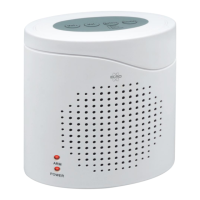
ELECTRONIC GUARD DOG
RADAR TECHNOLOGY
Home is not a place, it’s a feeling
ARD51
Question and Answer IconNeed help?

Do you have a question about the ELRO ARD51 and is the answer not in the manual?

Summary

Introduction and Features

Product Contents Overview

Lists the items included with the electronic guard dog, such as the alarm unit, adapter, manual, and sticker.

Key Product Properties

Highlights the guard dog's capabilities like radar detection, multiple alarm sounds, adjustable volume, and 3D sound effects.

Power Supply and Operation

Power Options

The alarm unit can be powered using the supplied adapter or batteries.

Setting Detection Range

Adjust the radar sensor range (HI, MID, LOW) via a switch inside the battery compartment.

Alarm Activation and Control

Use the On/Off button to activate/deactivate. Select alarm sound and adjust volume.

Detection Delay and Alarm Behavior

Features a 15-second delay for sensor activation and specifies alarm stop times.

Important Information and Specifications

Important Usage Precautions

Provides warnings regarding indoor use, placement, modification, and potential false alarms.

Technical Specifications

Details alarm volume, detection range, consumption, voltage, power, dimensions, weight, and environmental conditions.

Compliance and Support

Disposal and Conformity

Information on WEEE disposal and the EU declaration of conformity for the device.

Service and Contact Information

Guidance on obtaining support, FAQs, installation videos, and contact details for inquiries.

Summary

Introduction and Features

Product Contents Overview

Lists the items included with the electronic guard dog, such as the alarm unit, adapter, manual, and sticker.

Key Product Properties

Highlights the guard dog's capabilities like radar detection, multiple alarm sounds, adjustable volume, and 3D sound effects.

Power Supply and Operation

Power Options

The alarm unit can be powered using the supplied adapter or batteries.

Setting Detection Range

Adjust the radar sensor range (HI, MID, LOW) via a switch inside the battery compartment.

Alarm Activation and Control

Use the On/Off button to activate/deactivate. Select alarm sound and adjust volume.

Detection Delay and Alarm Behavior

Features a 15-second delay for sensor activation and specifies alarm stop times.

Important Information and Specifications

Important Usage Precautions

Provides warnings regarding indoor use, placement, modification, and potential false alarms.

Technical Specifications

Details alarm volume, detection range, consumption, voltage, power, dimensions, weight, and environmental conditions.

Compliance and Support

Disposal and Conformity

Information on WEEE disposal and the EU declaration of conformity for the device.

Service and Contact Information

Guidance on obtaining support, FAQs, installation videos, and contact details for inquiries.

ELRO ARD51 Specifications

General IconGeneral
Power sourceBattery
Test buttonYes
Low battery warningYes
Alarm volume85 dB
Battery BackupNo

Related product manuals