17www.elsema.com
InAUTOmodetheOpenandClosebuttononthefrontofthecasearedisabled.
OFF:WhenthekeyisintheOFFposition,thecontroller(motor)doesnotwork.Thepushbuttonsand
thewirelessremotesaredisabled.
MANUAL:WhenthekeyisintheMANUALpositionthecontroller(motor)willonlyoperatewiththe
pushbuttonsthatareonthefrontpanel.Wirelessremotecontrolsaredisabled.
Test Buttons and status LED’s
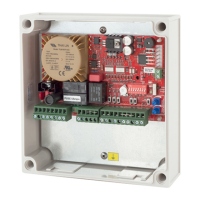
Eachinputhasabuilt-intestbuttonandastatusLED.Thetestbuttonsarelocatedbehindtheterminal
blocksofeachinput.ThestatusLEDisnexttotheinputtestbuttons.
Fuse
Thestandardfuseincludedwiththeboardisaslowblow5Amps(5x20mm).Replacefusewithaslow
blow10Ampsifusingamotorlargerthan1.0kW(1.3HP).
Resetting to Factory Default
Thiswillresetthecontrollercardbacktoitsfactorydefaultsettings.
1. Setdipswitch6,7,8“ON”
2. Setdipswitch1to5“OFF”
3. Setmodeswitchtoprogrammode2,therunLEDwillturnorange
4. PressEnterbuttonfor5secondsthebuzzerwillbeeptoconrmtheresettingwassuccessful
5. SetmodeswitchtoRunmode.
This feature is only available on the 240S2EK
AUTO:WhenthekeyisintheAUTOpositionthecontroller(motor)can
beoperatedby:
• Wirelessremotecontrolifthereceiverisinstalled
• Pushbuttoninputonthecircuitboardwhichcanbeusedtoconnect
externalpushbuttons,swipecard,loopdetectorsorkeypads
Pushbuttoninputisopen,stop,close.Ifdevicessuchasswipecard
orloopdetectorsareusedwhichonlyopensthegate/door,thePB
inputshouldbeconguredasOPENONLY.
• Pedestrianaccessinputonthecircuitboardwhichcanbeusedto
connectexternalpushbuttons,swipecard,loopdetectorsorkeypads
• Stopbuttononthefrontofthecase
Key switch


 To Next Page
 Loading...