12
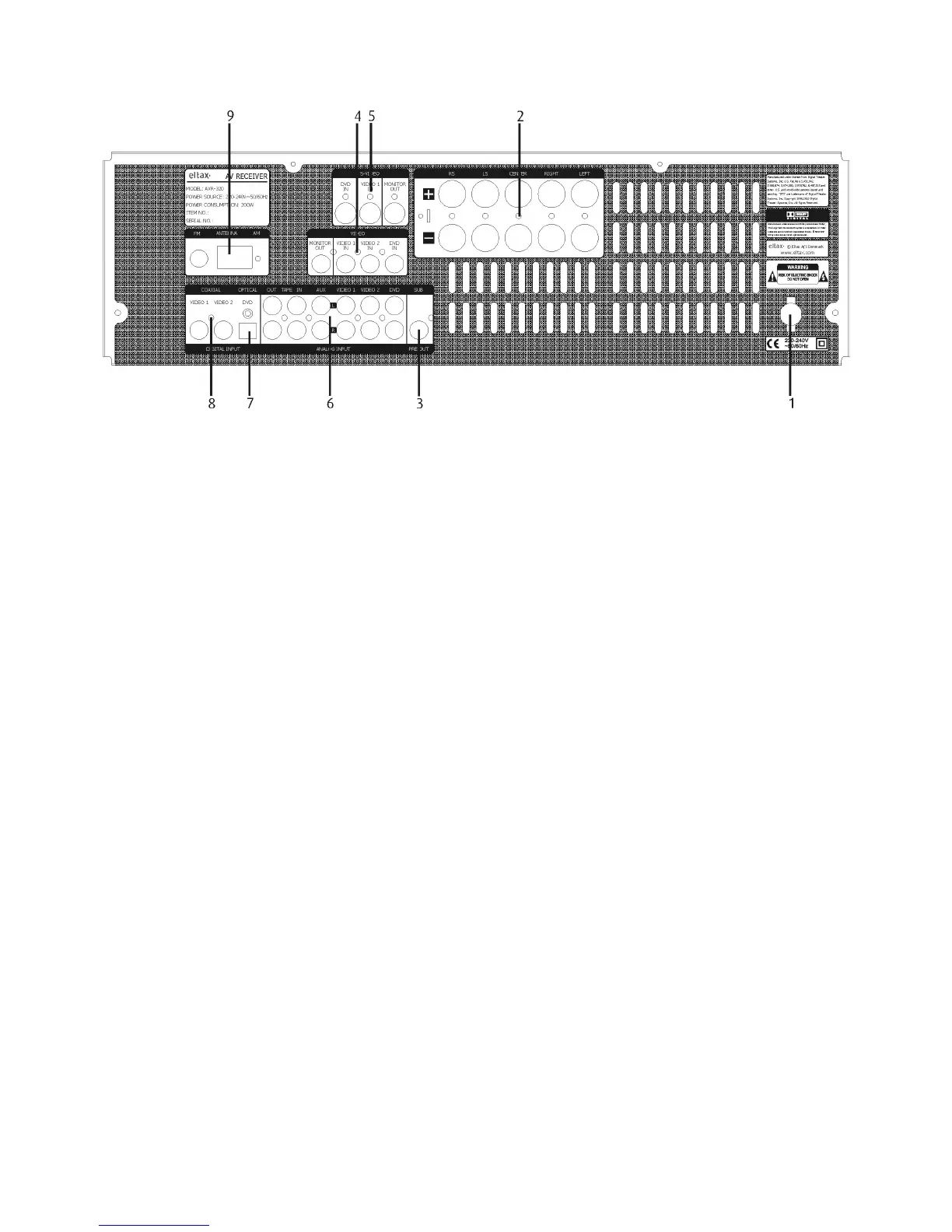
REAR PANEL INFORMATION
1. AC CORD: Connect to the AC mains socket.
2. SPEAKERS: External speakers power output. (Refer to Speaker Connection section)
3. SUB LINE OUT: Pre-out for an active subwoofer.
4. S-VIDEO IN/OUT terminals:
- DVD S-VIDEO IN: Connect an S-VIDEO cable to the S-VIDEO output terminal of a DVD player.
- VIDEO-S IN: For connection of S-VIDEO cable to the output terminal of an external player.
- VIDEO-S OUT: For connection of S-VIDEO cable to the input terminal of an external player.
5. VIDEO IN/OUT terminals:
- VIDEO OUT: Use an RCA composite cable to connect to the TV set.
- V1/V2 IN: Connect RCA composite cables to the line outputs of external players.
- DVD IN: Using an RCA composite cable to the line output of a DVD.
6. ANALOGUE AUDIO IN/OUT terminals
7. DIGITAL INPUT: Optical audio input for connection to the optical output of another DVD/Decoder/Games Console.
8. COAX. IN: Digital audio input for connection to the digital output of another DVD/Decoder/Games Console.
9. ANTENNA terminal: Connect to the AM indoor loop antenna/Lead-type FM antenna.

 To Next Page
 Loading...