15
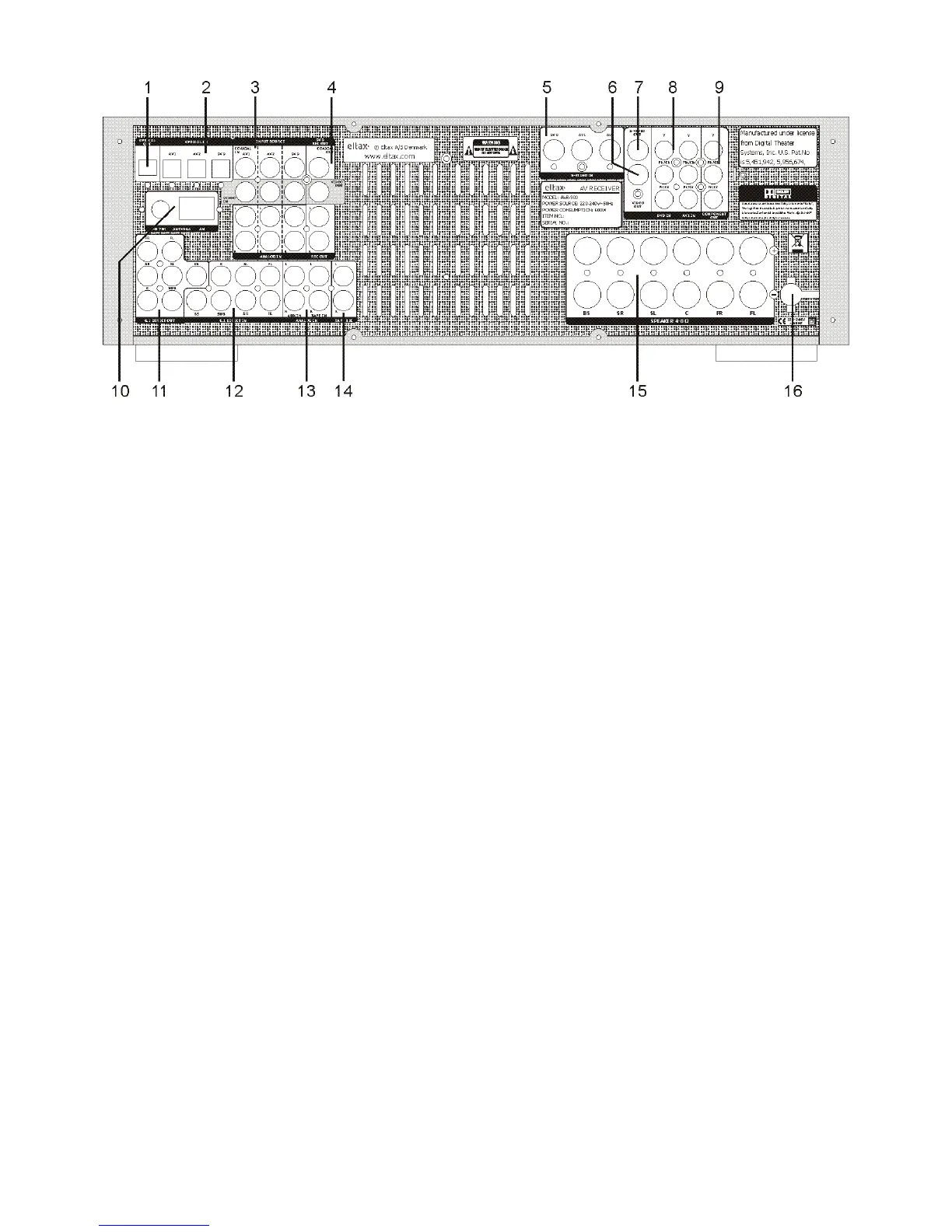
REAR PANEL INFORMATION
1. Optical Out
Optical audio output to the optical input of a DVD player or a VCD player.
2. Optical In
- AV1/AV2: Digital audio input to the digital output of a VCD
- DVD: Optical audio input to the optical output of a DVD.
3. Input Source
1). COAXIAL IN
- AV1/AV2: Digital audio input to the digital output of a VCD.
- DVD: Digital audio input to the digital output of a DVD.
2). VIDEO IN
- AV1/AV2: Connect the output terminal of a VCR to the VIDEO 1 & VIDEO 2 IN.
- DVD: Connect to the line output terminals of a DVD.
3). ANALOG IN
- AV1/AV2: Connect to the analog output of external VCD player.
- DVD: Connect to the analog output of external DVD player.
4. DVD Rec Out
- COAXIAL OUT: Digital audio output to the digital coaxial input of a DVD decoder.
- VIDEO OUT: Video output to the video input of a DVD decoder.
* - REC OUT: Audio output to the audio input of a DVD recorder.
5. S-Video In
- DVD: Connect to the line output terminals of a DVD.
- AV1/AV2: Connect the output terminal of a VCR to the S-AV 1/2.
6. Video Out: Connect TV set to the VIDEO OUT.
7. S-Video Out: Connect TV set to the S-VIDEO OUT.
8. Component In
- DVD IN: Connect to the YUV output of a DVD.
- AV1 IN: Connect to the YUV output of external players.
9. Component Out: Connect to the YUV terminal on the TV set.
10. AM/FM Antenna
11. 6.1 Direct Out: Connect to the 7 channels input terminals of another amplifier.
12. 6.1 Direct In: Connect to the 7 channels output terminals of another player.
13. - AUX In: Connect to the line output of an external player.
-TAPE In: Connect to the line output terminals on the TAPE DECK.
* 14. Tape Rec: Connect to the line input terminals on the TAPE DECK.
15. Speakers 4~8 Ω: Connect to the external speakers.
16. Power Cord: Connect to the A/C socket.
Note:
* = Digital audio inputs are transferred to analog DVD_Rec. out and TAPE-Rec. out

 To Next Page
 Loading...