Operate your Liquid Propulsion Package
1.
Plug in the power cord to the power outlet.
2.
Turn on the laptop.
3.
Press the power button on the LPP, and the LED indicator will start glowing.
4.
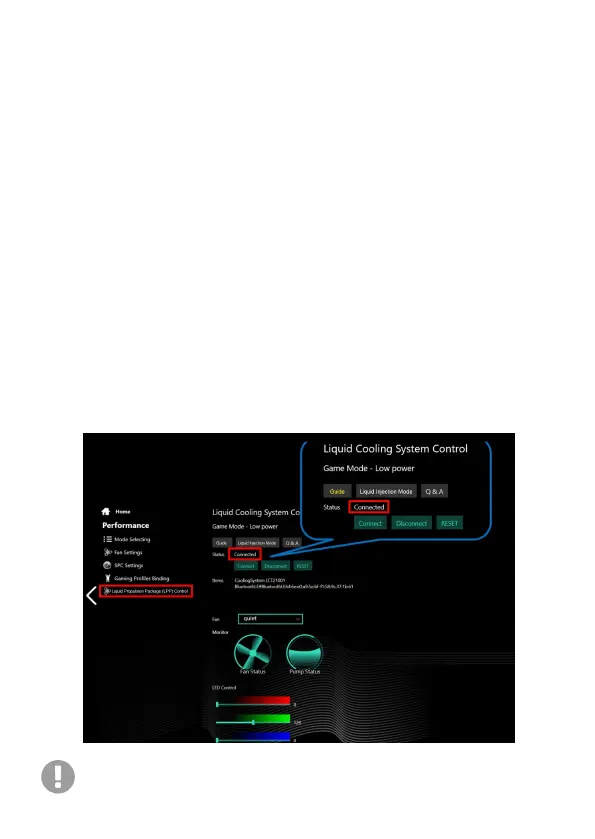
Open the application “Eluktronics Control Center," click
“Performance” then “Liquid Propulsion Package (LPP) Control” module. Click
"Guide" for illustrated instructions.
5.
Click the “Connect” button then the LPP and the laptop will pair via
Bluetooth (the fan and water pump are then activated).
6.
Check all ports for leakage after the first few minutes of use. If there is, turn
off the power, and validate all steps above have been performed properly.
7.
The water level drops in standard operation. Please add distilled water, and
make sure the water level is above the marker indicator. Adding more liquid
after initial operation may be necessary due to liquid now traveling through
your laptop and piping of the LPP.
The LPP should pair automatically via Bluetooth after your initial connection so long as:
1. The laptop has the Eluktronics Control Center installed
2. The Bluetooth connection is not already occupied by another
Bluetooth device


 To Next Page