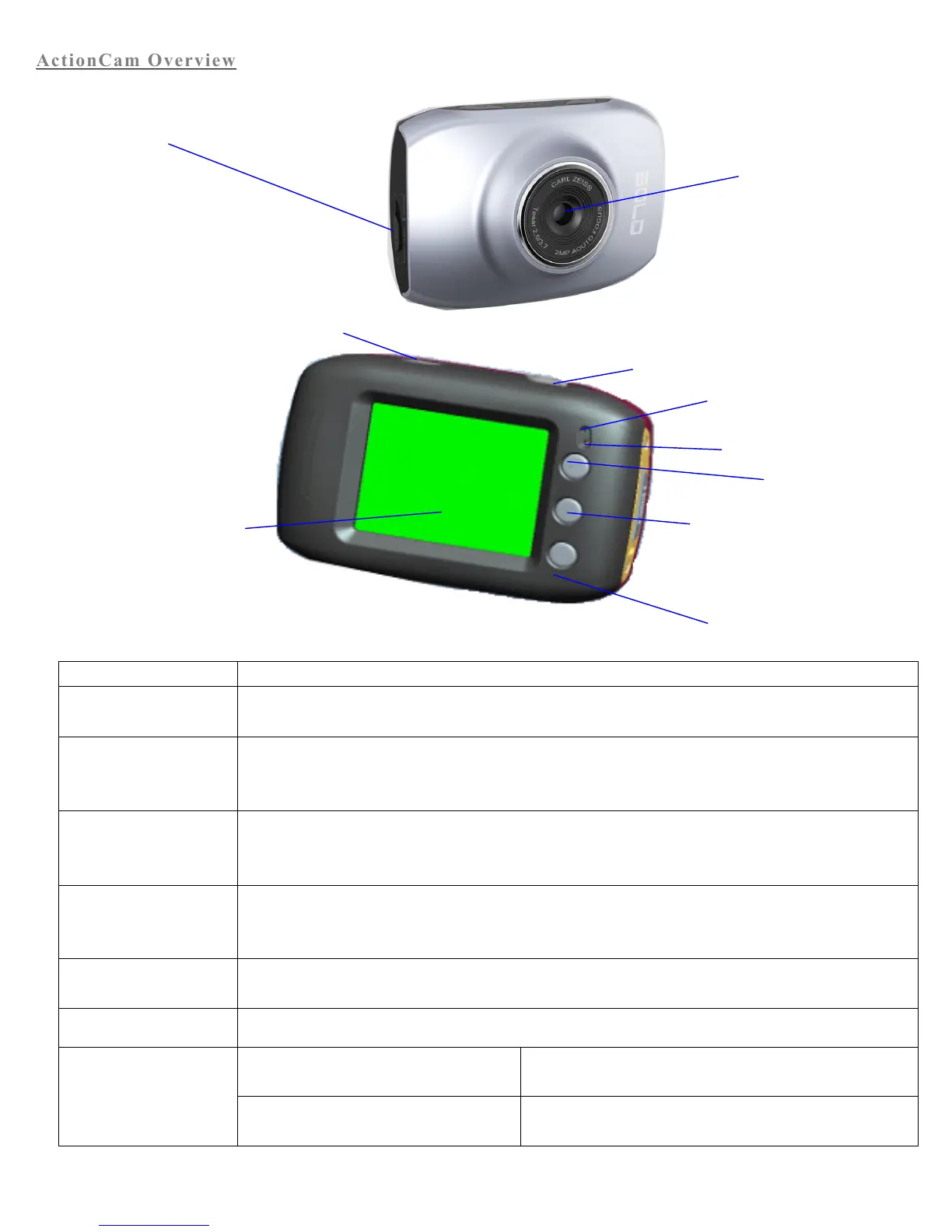
ActionCam
ActionCam
Overview
Overview
Power the ActionCam on or off. In menu mode, switch between normal (effect parameters and replay of
image, video) and setup menu.
In video mode, press to start/stop recording video. In capture mode, press to take a picture. In replay
mode, press to replay a video. In menu mode, press to confirm your selection.
Capture/Video Mode: Zoom In
Menu Mode: Scroll up in Menu Selection
Replay Mode: Pause/Play Video
Open or Exit Menu.
Replay Mode: Stop playing video
Capture/Video Mode: Zoom Out
Menu Mode: Scroll Down in Menu Selection
Switch between Capture Mode, Video Mode, and Replay Mode.
The top light is a charging indicator.
In power-off state, the indicator will be lit when the
ActionCam is charging.
The bottom light is an
operation indicator.
Operation indicator will flash once when taking a picture. In
charging mode, the operation indicator will be lit.
Mode switch:
-Photograph
-Video
-Replay


 To Next Page