DD670, DD860, and DD890 Hardware Overview 7
Front Control Panel
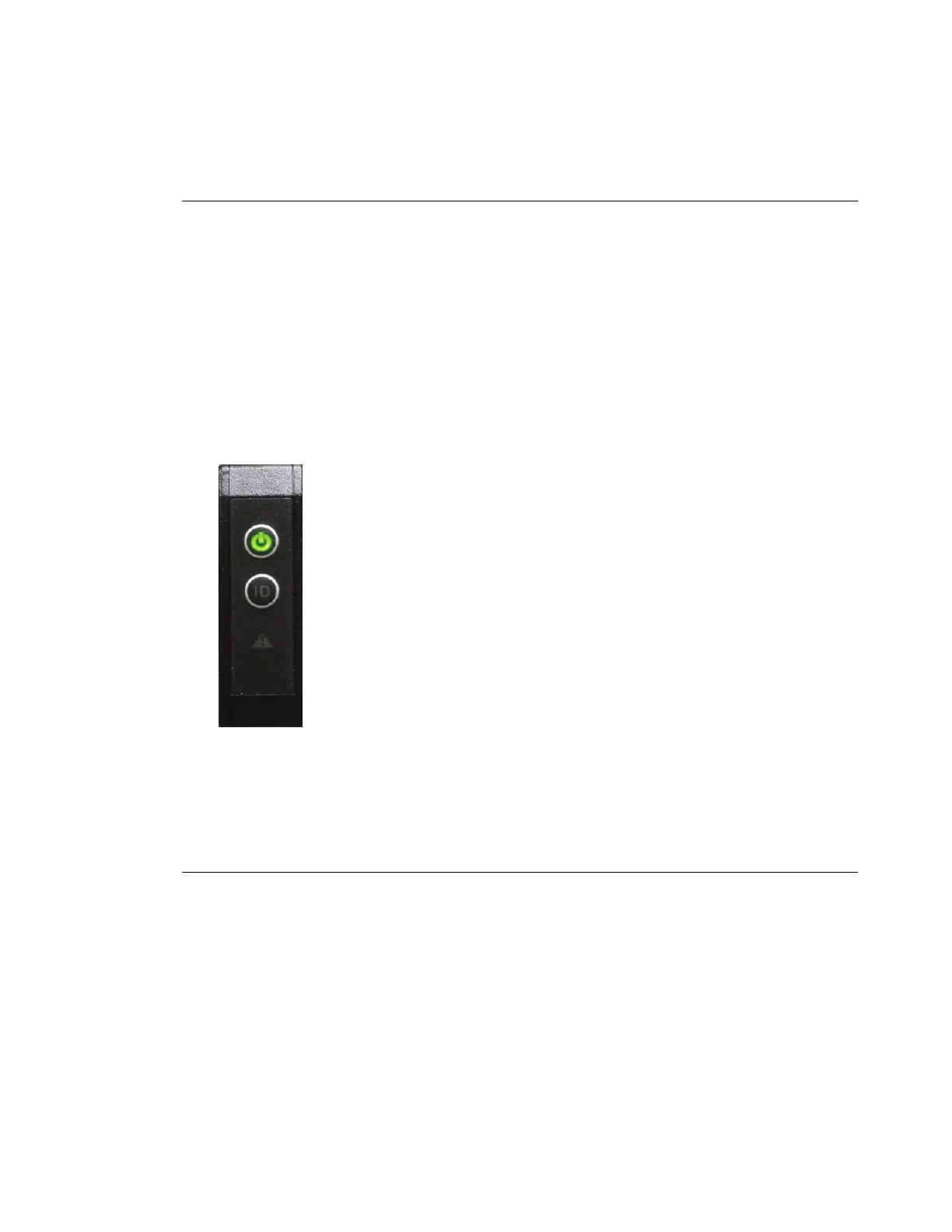
The control panel is at the right edge of the front panel. The control panel contains the
following switches and LED, from top to bottom:
Power Button Press to start boot (if not running). Use the system poweroff command
to shut down the system. Never shut down the system by pressing the
power button. The button glows steady green in the normal operating
state, and blinks to indicate that the system is in a power-saving state.
ID Enclosure Button Press the ID switch to light the blue ID LEDs on the front and back panels.
When working with a large number of rack mounted units, all of similar
appearance, use the ID LEDs to keep track of which unit you are working
on. The button glows steady blue after being pressed or after activation by
a system command. A system command can also cause the button to blink
while the system is under service.
System Fault LED This LED illuminates in green or amber to report a system fault.
Display Meaning Possible Causes
Steady
Green
On Normal operation
Blinking
Green
Startup The system is booting, initializing, or downloading
a firmware update.
Steady
Amber
Critical
Fault
The system needs to be shut down and serviced.
Causes include hardware errors and critical
overheating.
Blinking
Amber
Non-fatal
Fault
The system is reporting a non-fatal problem that
requires service. Possible causes include:
• Overheating warning
• Overvoltage warning
• Single fan failure
• Power Supply or AC failure
• PCIe link degraded
• SAS interface degraded
• Disk drive failure
• Other system-identified problems


 To Next Page