12. Select the checkbox (with an X) by pressing the spacebar.
13. Tab to IP address.
14. Type the IP address assigned to the primary backup network port.
15. Tab to Subnet Mask.
16. Type the subnet mask address assigned to the primary backup network port.
17. Tab to Hostname.
18. Delete the default hostname.
19. Type the hostname assigned to the single-node server.
The hostname must resolve to the IPv4 address used by backup clients and the
address to be assigned to the primary backup network port in the followup Avamar
server software installation.
20. Tab to Next at the bottom of the screen and press Enter.
The Network Settings screen appears.
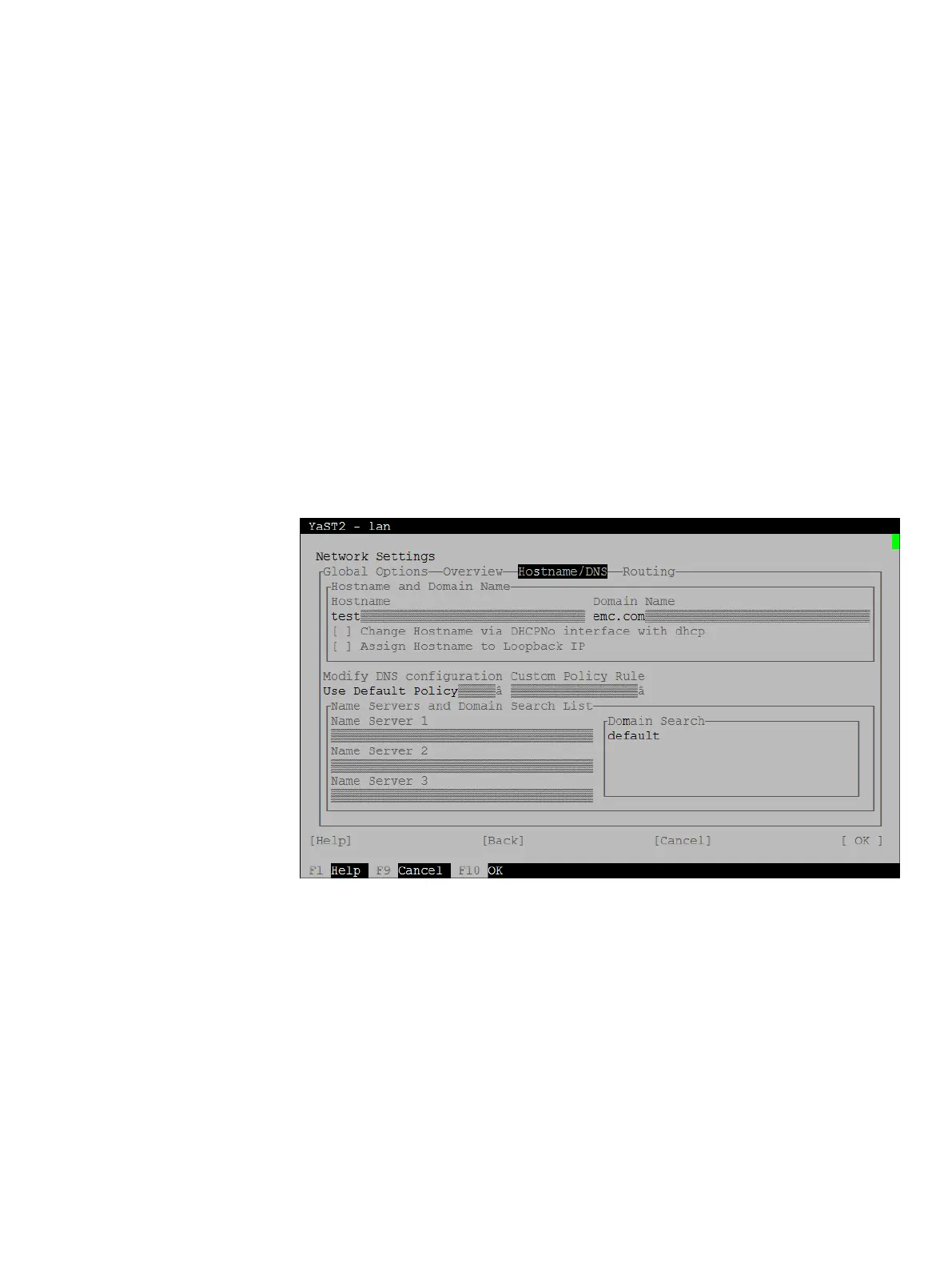
21. Tab to the top menu and use the arrow keys to select Hostname/DNS.
Figure 23 YaST Network Settings - Hostname/DNS
22. Tab to Hostname.
23. Delete the default hostname.
24. Type the correct hostname.
This parameter must be the short name of the hostname that you typed on the
previous screen.
25. Tab to Domain Name.
26. Delete the default domain name.
27. Type the correct domain name.
28. Tab to the DNS configuration section and specify these parameters.
Type up to three IPv4 addresses of DNS recurring name resolving servers.
System Preparation
Preparing the server for software installation 47


 To Next Page